> For the complete documentation index, see [llms.txt](https://docs.concurrence.com/llms.txt). Markdown versions of documentation pages are available by appending `.md` to page URLs; this page is available as [Markdown](https://docs.concurrence.com/channels/surfaces.md).
# Surfaces
Agent-generated data collection interfaces delivered by email or web, with templates, progress tracking, and pending appointment requests.
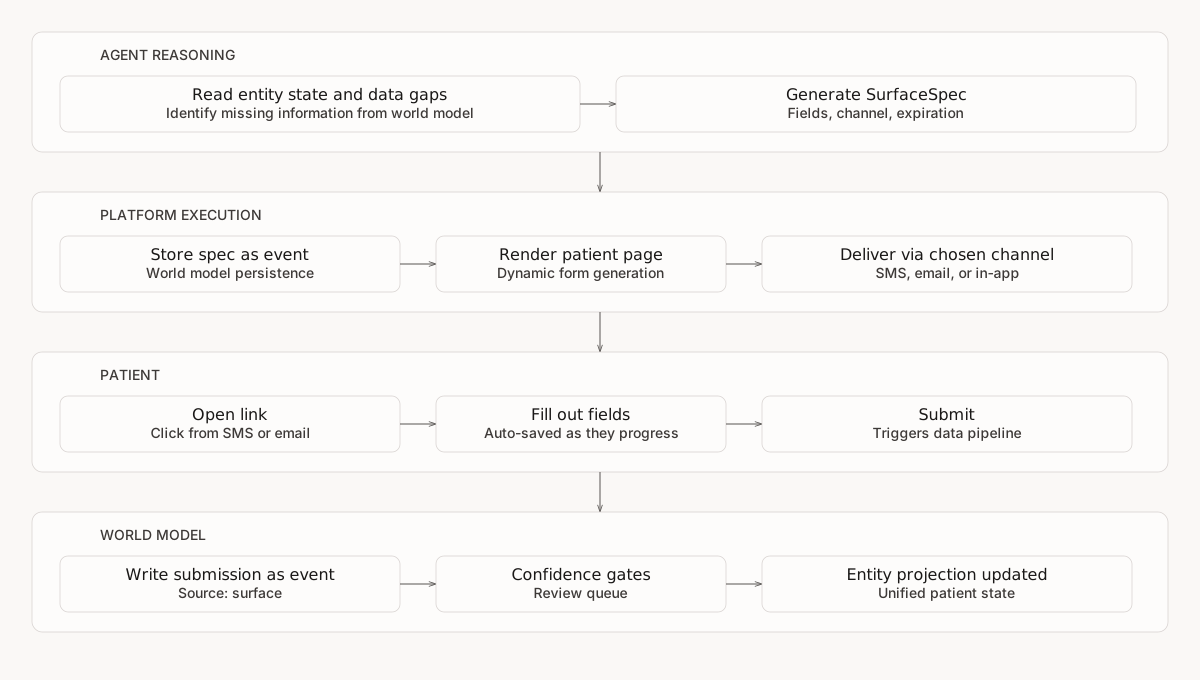
A patient calls to schedule an appointment. During the call, the agent realizes it needs insurance information and a photo of the insurance card. It cannot collect a photo over the phone. Instead of asking the patient to call back or visit a portal, the agent generates a surface - a short data collection form - and shares a secure link. The patient fills it out on their phone. The submission is stored against the surface, and the platform attempts to publish a provenance-bearing world-model event for later projection. Where the private-preview connector review flow is enabled, a configured downstream mutation can become a separate write proposal.
Surfaces close the gap between "we need this data" and "we have a way to collect it." They can be generated dynamically or from workspace templates, delivered by email or handed off as a web link, and contribute patient-reported data to the world model asynchronously.
## How Surfaces Work
The agent decides what to ask. The platform handles rendering, delivery, and collection. Agents generate surface specs from their understanding of what data is missing, or select from workspace-level form templates that pre-define field layouts and prefill rules for common workflows.
## Mid-Call Surface Tools
Agents can access a family of ten surface tools when those tools are exposed by the service and current Context Graph state. This lets an agent create a form, inspect its progress, and hand off a supported link during an interaction without making surface capabilities universal to every state.
| Capability | What It Does |
| ------------------------ | ------------------------------------------------------------------------------------------ |
| **Create surface** | Creates a dynamic form and returns its patient-facing URL when link signing is configured. |
| **Deliver surface** | Sends an email or records an external web handoff. Phone-shaped destinations are rejected. |
| **Check status** | Reads the current lifecycle state and submitted data when available. |
| **Extract file text** | Extracts text from supported PDF fields on a completed surface. |
| **List entity surfaces** | Lists existing surfaces for an entity, optionally filtered by status. |
| **Get surface insights** | Returns observed completion history, pending count, and channel statistics. |
| **Get form templates** | Lists reusable workspace templates. |
| **Create from template** | Resolves a template, prefills supported fields, and creates a surface. |
| **Get progress** | Reports saved and missing fields for a surface. |
| **Reshape surface** | Creates a shorter surface containing remaining fields. |
A typical mid-call flow: the agent notices the patient's insurance card is missing, creates a two-field surface (front photo + back photo), sends the link to the patient, and checks back moments later to see if the patient has opened it. If completed before the call ends, the agent confirms receipt. If not, the surface stays active and the patient can complete it later.
### Real-Time Surface Observation
Supported active sessions can observe a submission for a surface they are tracking and acknowledge it in the conversation. Event delivery is best-effort, so status reads remain the authoritative fallback when the workflow must confirm completion.
The runtime filters available workspace events to the tracked surface IDs and can inject a matching submission as guidance. A missed observer event does not change the stored submission or its lifecycle status.
Surface tools must be present in the service's eligible tool set and bound where the workflow needs them. Workspace authorization and entity scope still apply.
### Surface Templates and Wait Conditions
Context graph states can also declare surfaces and waiting behavior directly in their definition, without the agent needing to call tools:
* **Surface templates** - A state can include a surface spec template. When the agent enters that state, the platform automatically creates the surface using the template's fields and entity context. This is useful for deterministic workflows where the form is always the same (e.g., "collect insurance card" always needs front and back photo fields).
* **Wait conditions** - A state can declare that the agent should pause and wait for the surface to be submitted before continuing. While waiting, the agent stays in the current state and makes empathetic small-talk rather than advancing through the conversation. The wait clears automatically when the patient submits the form or when a reviewer approves the submission.
These extensions work across both voice and text channels. For more details, see [Action State Extensions](/agent/context-graphs.md).
### Form Templates
Workspace administrators can define form templates that standardize common data collection workflows. A template pre-defines the field layout, section structure, and prefill rules - mapping entity state fields to form fields so patients see their known information pre-populated. Templates also support patient-type routing, delivering different field sets based on the entity's characteristics.
Agents access templates through two tools: one to list available templates for the workspace, and one to create a surface from a template with a specific entity. The template system handles field prefill from the entity's world model state, reducing the number of fields the patient needs to fill manually.
Templates are useful when the same form is used repeatedly (intake forms, insurance collection, consent workflows). For one-off or dynamic data collection, agents still generate surface specs directly.
### Calendar Booking
Surfaces can include an appointment-request step where patients select from projected free slots. Submission validates that the slot still appears free, stores the request on the surface, and emits a `booking.requested` event. The response is `pending`; it is not confirmation that an external scheduling system created an appointment.
This is particularly useful for post-call follow-up surfaces where the agent identified that the patient needs to schedule a visit. The surface can collect missing data and capture an appointment request in one flow, while confirmation remains a separate scheduling outcome.
## Intake Upload Links
The separate shareable intake upload-link system has been retired. It is not a current alternative to a Surface. Use Surfaces for supported patient-facing forms and [dataset intake](/data/customer-data-intake.md) for authenticated file ingestion. Surface collection and dataset processing have separate lifecycles; submitting a form does not automatically register or publish a dataset file.
## Automated Gap Detection
Beyond mid-call surfaces, the platform can proactively identify missing data and create surfaces automatically. A background scanner periodically examines entity state across the workspace, compares it against configurable requirements, and creates surfaces for any gaps it finds.
For example: a workspace can define that every patient with an upcoming appointment must have insurance information, a pharmacy on file, and an emergency contact. The scanner checks eligible entities and can create a surface for missing data. Creation does not itself prove that an email or web handoff was delivered.
| Setting | What It Controls |
| ---------------- | ---------------------------------------------------------------------------------------------------------------------------------------------- |
| **Requirements** | Named rules defining which fields must be present for an entity type (e.g., "insurance card required for patients with upcoming appointments") |
| **Trigger** | When to check - before upcoming appointments or after recent interactions |
| **Channel** | The surface's supported email or web delivery mode |
| **Cooldown** | How long to wait before re-scanning the same entity, to prevent notification fatigue |
| **Priority** | Low, normal, or high - controls processing order |
The scanner is rule-based with no LLM involvement. It is disabled by default and configured per workspace.
### Auto-Delivery via Outbound Call
The scanner does not directly auto-deliver a surface through SMS, iMessage, or WhatsApp. The implemented auto-outreach action is an outbound voice task, where the eligible path and an outbound service are configured. Email delivery and web handoff remain separate surface-delivery operations.
## Surfaces Optimization
Surface analytics feed back into surface creation to prevent fatigue and improve completion rates.
**Agent-side intelligence** - Before creating a new surface during an interaction, the agent can query observed surface history: pending count, completion rate, and channel statistics. That evidence can inform whether to collect data verbally or use an eligible delivery channel, but it does not force a deterministic model decision.
**Gap scanner fatigue gating** - The automated gap scanner respects per-workspace limits:
| Setting | Default | What It Controls |
| ------------------------ | ------- | ---------------------------------------------------------------------------------------------------------------------------------- |
| **Max pending surfaces** | 3 | Skip entities that already have this many unfinished surfaces |
| **Min completion rate** | 0% | Skip entities whose historical completion rate is below this threshold |
| **Channel optimization** | Off | Supplies the observed preferred channel as an override candidate; current delivery support still limits the result to email or web |
These settings help limit repeated outreach to people with pending forms or low observed completion.
## Delivery Channels
Surfaces are delivered through two channels - email and web link. SMS, WhatsApp, and iMessage are not supported as surface delivery channels.
| Channel | How It Works | Best For |
| --------- | ----------------------------------------------------------------------- | ----------------------------------------- |
| **Email** | Email with a branded link via the workspace's configured email provider | Longer forms, document collection |
| **Web** | Shareable link for embedding in portals or handing off directly | Integration with existing patient portals |
The workflow or agent selects between email and a web handoff according to its configured policy and the available address. During a live voice call, simple data can be collected verbally, while a photo or document requires a browser surface.
## What Surfaces Can Collect
Fourteen field types cover data collection and display:
| Type | Example Use |
| ----------------- | ------------------------------------------------- |
| **Text** | Name, address, pharmacy name |
| **Textarea** | Symptom description, special instructions |
| **Date** | Date of birth, preferred appointment date |
| **Phone** | Contact number, emergency contact |
| **Email** | Patient email for follow-up |
| **Number** | Age, weight, dosage amount |
| **Single select** | Preferred provider, insurance type |
| **Multi select** | Symptoms from a checklist, available days |
| **Checkbox** | Consent confirmation, HIPAA acknowledgment |
| **Photo** | Insurance card front/back, wound photo, ID |
| **Signature** | Digital consent signature, authorization |
| **File** | Referral letter, prior records, lab results |
| **Heading** | Display-only section title or instruction divider |
| **Info** | Display-only explanatory or warning text |
Fields support prefilling from known data (so patients do not re-enter information the system already has), conditional display (show a field only when another field has a specific value), and PHI flagging for sensitive data handling.
## Form Intelligence
Surfaces include six layers of intelligence that reduce patient effort and improve data quality:
| Capability | What It Does |
| ------------------------ | --------------------------------------------------------------------------------------------------------------------------------------------------------------------------------------------------------------------------------------------------------------------------------- |
| **Smart formatting** | Auto-formats SSNs, ZIP codes, and phone numbers as the patient types. Corrects common email domain typos (gmailcom to gmail.com). |
| **Contextual warnings** | Cross-references fields against each other and the patient's record. If a patient enters a medication that conflicts with an allergy listed elsewhere on the form, a warning appears immediately. Age detection from date of birth triggers minor consent flagging when relevant. |
| **Input correction** | A model can review eligible values on blur. High-confidence corrections may apply automatically and can show an informational toast; lower-confidence suggestions require the patient to accept or dismiss them. Sensitive fields receive formatting-only handling. |
| **Healthcare lookups** | Medication and allergy fields search a standardized drug database in real time. Pharmacy fields search the national provider registry. Insurance carrier fields search a curated list. Results appear as the patient types, reducing free-text entry errors. |
| **OCR prefill** | For insurance card collection, patients can take a photo with their camera. The platform extracts structured fields (member ID, group number, plan name, dates) from the image and pre-fills the form. The patient reviews and confirms before submission. |
| **Abandonment recovery** | If a patient starts a form but does not finish, the agent can check which fields remain unfilled and generate a shortened follow-up surface containing only the missing fields. The patient picks up where they left off without re-entering completed data. |
## Lifecycle
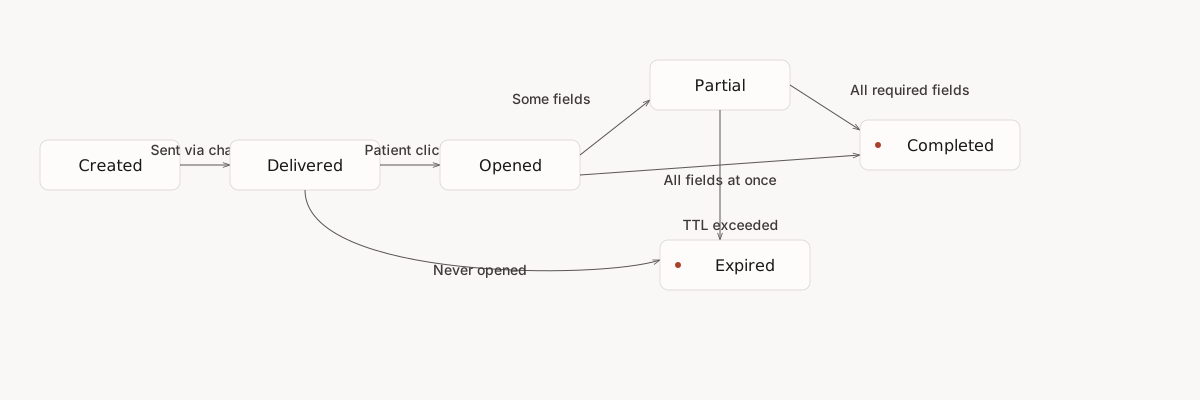
Each surface progresses through a tracked lifecycle:
| Status | What It Means |
| ------------------ | --------------------------------------------------------------------------------- |
| **Created** | Surface row and specification stored; lifecycle event publication is asynchronous |
| **Pending Review** | Awaiting review before delivery (when review workflows are configured) |
| **Delivered** | Email accepted for sending or an external web handoff recorded |
| **Opened** | Patient opened the link |
| **Partial** | Some fields submitted (auto-saved as patient progresses) |
| **Completed** | All required fields submitted |
| **Expired** | TTL exceeded without completion (default 7 days, configurable 1 hour to 1 year) |
| **Archived** | Removed from active use by an authorized operator |
## Data Flow
Surface submissions can enter the world model as provenance-bearing events:
* **Source**: `surface` - distinguishable from EHR, voice, or manual imports in analytics and audit trails
* **Confidence**: Initial confidence appropriate for patient-reported data - not automatically trusted at the same level as authoritative EHR data
* **Entity association**: Creation and submission events carry the target entity when publication succeeds. Event type and projection rules determine whether and how derived entity state changes.
When a patient submits a surface, the platform stores the submission and starts a fire-and-forget `surface.submitted` event write. Entity projection is asynchronous, so successful submission does not guarantee that event publication succeeded or that a derived demographic or clinical view has refreshed. Workflows that need a submitted value immediately should use the submission record or another response documented for that path.
This means surface data participates in the same [confidence and entity-resolution rules](/data/connectors-and-ehr.md) as other sources. A submission keeps its surface provenance. Where the private-preview connector review flow is enabled, a configured downstream mutation can become a separate [external write proposal](/data/review-queue.md).
## Healthcare Examples
| Scenario | What the Agent Generates |
| -------------------------- | ----------------------------------------------------------------------------------------------------------------- |
| **Pre-visit intake** | After scheduling, send a surface with insurance card photo, pharmacy name, medication list, and consent signature |
| **Post-call follow-up** | After a triage call, send a surface with symptom tracker fields and a photo upload for the affected area |
| **Insurance verification** | During a call where insurance details are unclear, send a surface for front/back photos of the card |
| **Consent collection** | Before a referral, email a surface with a consent form, digital signature, and HIPAA acknowledgment |
| **Appointment prep** | Day before appointment, send a surface with transportation needs, interpreter request, and current medications |
## Delivery
When a surface is ready, the delivery endpoint can send it through a configured email use case or record an external web handoff. A phone-shaped destination is rejected. Lifecycle event publication and observer notifications are asynchronous and should not replace the delivery response or provider status.
### Sharing the Link
The web link is portable: the agent can read the URL aloud during a voice call for immediate access, or hand it off within an active conversation thread. The surface itself is still delivered via email or web link - SMS, WhatsApp, and iMessage are not delivery channels.
Observer events such as `surface.delivered`, `surface.opened`, and `surface.submitted` can update dashboards and active agents when publication and subscription succeed. Consumers must tolerate missing or delayed events and reconcile against stored surface state.
### Developer Console
Open **Operate > Outreach** to manage this capability. The current page groups **Surfaces**, **Pending Review**, and **Analytics** in separate tabs.
## Branding
Patient-facing surfaces adopt the workspace's visual identity automatically. Workspace administrators configure default branding - logo, primary color, background color, and font - through the workspace settings. When a surface renders, the platform applies these defaults so every form is consistent with the organization's brand.
Surface-level branding can override workspace defaults for specific use cases. For example, a workspace might use the standard brand for intake forms but apply partner-specific branding for co-branded outreach. The merge is field-level: surface-level values take precedence, and any unset fields fall back to the workspace default.
Branding changes are audit-logged and take effect on the next surface render - already-opened surfaces are not retroactively updated.
## Multi-Page Forms
Longer data collection needs can be split into sections, creating a step-by-step form experience. Each section groups related fields under its own title and description, so patients work through one page at a time rather than scrolling through a single long form.
The form renders sections as stepped pages with Next and Back navigation buttons. A progress bar at the top shows the current step and overall completion. Each step validates its fields before allowing the patient to advance - required fields, format checks, and conditional logic are enforced per step, so patients catch errors immediately rather than at the end.
Sections are useful for complex intake workflows - for example, separating demographics, insurance information, and consent into distinct steps. Auto-save works across steps, so patients can complete part of the form, leave, and return to where they left off. Forms with a single section or no sections render as a single page, maintaining backward compatibility.
## Patient Experience
Patients access surfaces through a secure link - no login, no app download, no account creation. The link contains a cryptographically signed token that grants access to that specific surface only.
The surface renders as a mobile-first browser page. All fourteen field types have patient-facing renderers; photo, signature, and date controls use supported browser capabilities. Eligible input fields auto-save as the patient progresses, allowing a later visit to resume the last successfully saved values.
File and document uploads use a dedicated upload page with drag-and-drop support, per-file progress indicators, and streaming upload for large files. The upload page validates files client-side before uploading (file type, size limits) and server-side after upload (content validation, duplicate detection).
### Inline Validation and Accessibility
Forms validate fields inline as the patient fills them out - errors appear immediately when a field loses focus, not after the patient submits the entire form. When submission or step advancement fails validation, the page scrolls to and focuses the first error field automatically.
Long text fields display a live character count that changes color as the limit approaches. The browser prompts before closing a tab with unsaved form progress. All validation messages are linked to their fields via `aria-describedby` for screen reader compatibility.
Rate limiting protects patient-facing endpoints against abuse. Clients should handle a rate-limit response and retry only after the documented interval.
## Security
* **Token-based access** - Patients access surfaces via HMAC-signed URL tokens. No login required. Each token grants access to one specific surface only.
* **Scoped access** - Dedicated `surfaces:read` and `surfaces:write` permissions control who can generate and view surfaces
* **Sensitive fields** - Fields flagged as sensitive receive additional PHI handling throughout the pipeline
* **File content validation** - File and photo uploads are validated by inspecting the file's actual content type (magic bytes), not just the declared MIME type. Files whose content does not match the allowed types are rejected before storage. This prevents disguised file uploads regardless of what the client declares.
* **Duplicate detection** - After a file uploads successfully, the platform checks for existing files with the same content hash in the workspace. Duplicates are flagged in the response but never blocked - healthcare workflows legitimately re-upload the same document, so the platform informs rather than prevents.
* **Expiration** - Surfaces automatically expire after their configured TTL, limiting the exposure window
* **Entity-scoped** - Each surface is associated with a specific entity, maintaining workspace-level data isolation
* **Rate limiting** - Patient-facing endpoints are rate-limited per IP to prevent abuse
* **Audit trail** - Authorized API actions and successfully published lifecycle events provide separate audit evidence; a surface response does not guarantee every asynchronous event is already present in the [audit trail](/operations-and-safety/compliance.md#audit)
{% hint style="info" %}
**Developer Guide** - For model schemas, field definitions, and API details, see [Surfaces](https://docs.concurrence.com/developer-guide/platform-api/conversations/surfaces) in the developer guide.
{% endhint %}
---
# Agent Instructions
This documentation is published with GitBook. GitBook is the documentation platform designed so that both humans and AI agents can read, navigate, and reason over technical content effectively. Learn more at gitbook.com.
## Querying This Documentation
If you need additional information that is not directly available in this page, you can query the documentation dynamically by asking a question.
Perform an HTTP GET request on the current page URL with the `ask` query parameter, and the optional `goal` query parameter:
```
GET https://docs.concurrence.com/channels/surfaces.md?ask=&goal=
```
`ask` is the immediate question: it should be specific, self-contained, and written in natural language.
`goal` is optional and describes the broader end goal you are ultimately trying to accomplish on behalf of the user. GitBook uses it to tailor the answer towards what is most useful for that goal.
The response will contain a direct answer to the question and relevant excerpts and sources from the documentation.
Use this mechanism when the answer is not explicitly present in the current page, you need clarification or additional context, or you want to retrieve related documentation sections.