> For the complete documentation index, see [llms.txt](https://docs.concurrence.com/llms.txt). Markdown versions of documentation pages are available by appending `.md` to page URLs; this page is available as [Markdown](https://docs.concurrence.com/developer-guide/getting-started.md).
# Getting Started
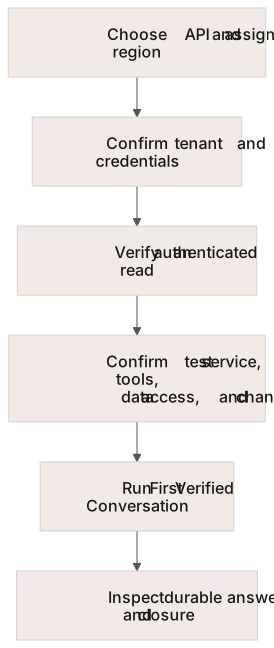
Establish your API, tenant boundary, credentials, and regional endpoint, then validate a first read before building a Concurrence workflow.
For a new Platform project, follow the workspace setup and verified conversation path below. If you maintain an existing Classic integration or use Scribe, choose its separate credential flow in [Choose Credentials](/developer-guide/getting-started/credentials.md). Channel provisioning, data connections, and a configured service are additional prerequisites for a working agent interaction.
A first project has separate access, configuration, and verification steps.
## Build Your First Project
Choose the path that matches your access:
| You have | Start here |
| ------------------------------------------------------ | ----------------------------------------------------------------------------------------------------------------------------------------------------------------------------- |
| Node.js and npm, with no workspace access yet | [First Verified Conversation](/developer-guide/guides/first-verified-conversation.md), **Local walkthrough**. Run the SDK against fixtures and inspect the result file. |
| Console access and a configured test service | [First Console Conversation](/developer-guide/guides/first-console-conversation.md). Send a text question, inspect the answer, and end the session in your browser. |
| A configured test service and Platform API credentials | [First Verified Conversation](/developer-guide/guides/first-verified-conversation.md), **Provisioned test service**. Verify an answer in durable history and confirm closure. |
The prerequisites below apply when connecting to a deployment. The local walkthrough needs no Concurrence account, service, or key.
## Prerequisites
| Confirm with your implementation team | Platform API | Classic API |
| ------------------------------------- | ---------------------------------------------------------------------------- | ---------------------------------------------------------------- |
| Tenant boundary | Workspace ID for workspace resources | Organization ID and the user represented by the credential |
| Endpoint | Assigned Platform regional hostname | Assigned Classic regional hostname |
| Credential | Workspace key or the scoped token required by the chosen route | API key, key ID, and user ID for the token exchange |
| Workflow configuration | Service, selected versions, eligible tools, and the required channel binding | Service, selected version set, and the relevant user permissions |
Keep long-lived credentials in your backend or secret manager. Browser and external-user workflows need their documented access boundary; publishing a workspace key in a client bundle does not create one.
## Essential Reading
1. [Core Concepts](/developer-guide/getting-started/core-concepts.md) maps the resource names and boundaries.
2. [Regions & Endpoints](/developer-guide/getting-started/regions-and-endpoints.md) explains hostname selection.
3. [Choose Credentials](/developer-guide/getting-started/credentials.md) identifies the caller, tenant, and accepted authentication flow.
4. [Govern a Deployment](/developer-guide/guides/govern-a-deployment.md) records channel, feature, and regional prerequisites.
## Build Your First Application
{% tabs %}
{% tab title="Platform" %}
1. [Install the Platform SDK](/developer-guide/platform-api/platform-sdk/installation.md).
2. [Configure the client](/developer-guide/platform-api/platform-sdk/configuration.md) with the assigned workspace and regional hostname.
3. Run the read-only listing example in the [Quickstart](/developer-guide/platform-api/platform-sdk/quickstart.md).
4. Choose an explicitly configured test service before starting a conversation or simulation. Review its data access and integration actions as well as its agent instructions.
5. Use [Conversations](/developer-guide/platform-api/conversations.md) to choose the channel and lifecycle required by your application.
{% endtab %}
{% tab title="Classic" %}
1. [Install a Classic SDK](/developer-guide/classic-api/sdks/sdk-installation.md).
2. [Configure the client](/developer-guide/classic-api/sdks/sdk-configuration.md) for the correct organization and user.
3. Follow [Hello World](/developer-guide/classic-api/sdks/sdk-hello-world.md) to create a conversation and consume its event stream.
4. Handle stream errors and completion explicitly, then apply the [conversation lifecycle](/developer-guide/classic-api/core-api/conversations/conversations-lifecycle.md) appropriate to your application.
{% endtab %}
{% endtabs %}
## Key Resources
A successful authenticated read confirms access to that operation. It does not establish that a channel is provisioned, source data is ready, or a workflow can complete an external action.
Continue with [Guides](/developer-guide/guides.md) for implementation paths. Use [Evaluating Concurrence](https://docs.concurrence.com/platform-overview/evaluating-amigo) to define the evidence for a broader technical evaluation, and the [API Reference](https://docs.concurrence.com/api-reference) to inspect operation schemas.
---
# Agent Instructions
This documentation is published with GitBook. GitBook is the documentation platform designed so that both humans and AI agents can read, navigate, and reason over technical content effectively. Learn more at gitbook.com.
## Querying This Documentation
If you need additional information that is not directly available in this page, you can query the documentation dynamically by asking a question.
Perform an HTTP GET request on the current page URL with the `ask` query parameter, and the optional `goal` query parameter:
```
GET https://docs.concurrence.com/developer-guide/getting-started.md?ask=&goal=
```
`ask` is the immediate question: it should be specific, self-contained, and written in natural language.
`goal` is optional and describes the broader end goal you are ultimately trying to accomplish on behalf of the user. GitBook uses it to tailor the answer towards what is most useful for that goal.
The response will contain a direct answer to the question and relevant excerpts and sources from the documentation.
Use this mechanism when the answer is not explicitly present in the current page, you need clarification or additional context, or you want to retrieve related documentation sections.