> For the complete documentation index, see [llms.txt](https://docs.concurrence.com/llms.txt). Markdown versions of documentation pages are available by appending `.md` to page URLs; this page is available as [Markdown](https://docs.concurrence.com/developer-guide/guides/build-and-prove.md).
# Build and Prove
Configure a Platform service, test its behavior, and release selected versions with clear acceptance criteria and a recovery plan.
Follow this path to configure a service, test the workflow, and release selected versions. You need a test workspace, permitted synthetic data, and an implementation owner who can confirm which tools and channels are enabled.
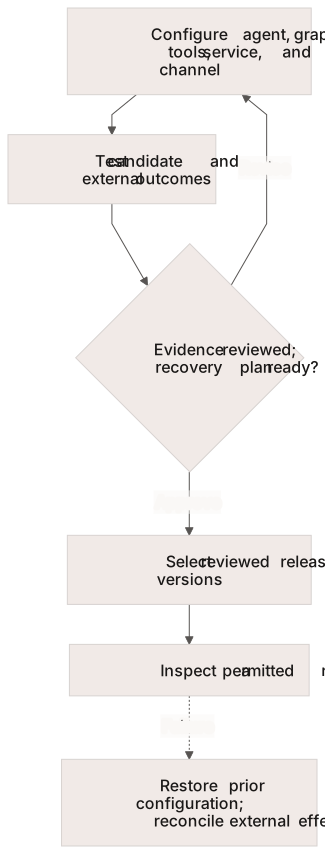
Promotion is an explicit decision based on reviewed evidence; recovery also checks external effects.
## Build
Agree on the workflow before configuring the agent. Write a [patient arc](https://docs.concurrence.com/agent/pattern-discovery-and-reuse#turn-feedback-into-a-patient-arc) with the user's request, source data, decision branches, permitted actions, completion criteria, and handoff owner. Have the customer workflow owner review the expected behavior and exceptions. Use synthetic examples to turn those decisions into test cases.
Console groups authoring under **Build**: Personas, Context Graphs, Tools, Agents, and Channels. The Console's Personas are API agents, and its Agents are API services. Visibility and permissions depend on the workspace. Use the corresponding contracts when automating the same task.
1. Confirm [credentials and workspace access](/developer-guide/getting-started/credentials.md).
2. Configure the [agent](/developer-guide/platform-api/workspaces/agents.md) and [Context Graph](https://docs.concurrence.com/agent/context-graphs). Publish graph changes through the supported API or [Agent Forge](https://docs.concurrence.com/reference/agent-forge); Console graph pages show a selected version as plain text, JSON, or a graph, and download it as JSON. Identify which tools can read data or change an external system, and use test targets for the first run.
3. Bind the agent and graph in a [service](/developer-guide/platform-api/workspaces/services.md). Read back the selected versions and field-specific configuration. A service version set does not isolate all data or external effects.
4. Choose the supported [conversation path](/developer-guide/platform-api/conversations.md). Managed channels require a [provisioned binding](/developer-guide/platform-api/workspaces/use-cases.md). Console Channels forms begin the managed setup process; submitting a form does not provision the channel.
If a tool needs an application value supplied when the conversation starts, follow [Pass Context to Tool Parameters](/developer-guide/guides/conversation-context.md) to declare the service schema and bind the parameter in the graph. Keep that input separate from identity bindings and choose the tool's result-retention policy deliberately.
## Evaluate
Console's **Evaluate** area includes Playground, Runs, Simulations, Metrics, Case Library, and Suites. Choose your first check:
* [First Console Conversation](/developer-guide/guides/first-console-conversation.md) walks through a browser text session with your configured service, including readiness errors and inspection controls.
* [First Verified Conversation](/developer-guide/guides/first-verified-conversation.md) provides a runnable SDK project, durable-answer verification, a rejected-request exercise, and cleanup. Start locally without credentials, then use its provisioned mode to test your service.
For a graph or channel change, use [Playground](https://docs.concurrence.com/testing/testing/playground) and the applicable [simulation workflow](https://docs.concurrence.com/testing/testing/simulations). Cover these cases from the approved arc:
* The normal path reaches the expected result.
* Missing or stale data triggers the agreed recovery or handoff.
* An existing request is handled without duplicating it.
* An unauthorized or rejected action follows the agreed failure path.
* A human handoff reaches the right owner with the required context.
Record the configuration, input, expected outcome, observed result, and failures for each case. Verify external changes separately with [Verify an Integration Action](/developer-guide/guides/verify-an-integration-action.md). Simulation success does not establish production delivery or deterministic future output.
## Promote and Recover
Use [Version Sets & Promotion](/developer-guide/operations/devops/version-sets-best-practices.md) to compare the candidate with the current release and retain the previous selection for rollback. Prefer explicit component versions for a reproducible release; an unpinned version can resolve newer configuration later.
Before promotion, record who reviewed the evidence, which channel and integration checks ran, and how to recover if the new behavior fails. After promotion, inspect a permitted test run through [Runs](/developer-guide/platform-api/conversations/runs.md). Rolling back configuration does not undo external mutations that already completed; reconcile those through the owning integration.
---
# Agent Instructions
This documentation is published with GitBook. GitBook is the documentation platform designed so that both humans and AI agents can read, navigate, and reason over technical content effectively. Learn more at gitbook.com.
## Querying This Documentation
If you need additional information that is not directly available in this page, you can query the documentation by asking a question.
Perform an HTTP GET request on the following URL with the `ask` and `goal` query parameters:
```
GET https://docs.concurrence.com/developer-guide/guides/build-and-prove.md?ask=&goal=
```
`ask` is the immediate question: it should be specific, self-contained, and written in natural language.
`goal` is what the user is ultimately trying to achieve, the reason they need the answer. Sharing it helps GitBook give you a better, more relevant answer. A goal is most helpful when it describes the outcome the user wants rather than restating the question. For example, with `ask=how do I create an API token`, a goal like `automate deployments from our CI pipeline` lets GitBook tailor the answer to that use case.
The response will contain a direct answer to the question and relevant excerpts and sources from the documentation.
Use this mechanism when the answer is not explicitly present in the current page, you need clarification or additional context, or you want to retrieve related documentation sections.