> For the complete documentation index, see [llms.txt](https://docs.concurrence.com/llms.txt). Markdown versions of documentation pages are available by appending `.md` to page URLs; this page is available as [Markdown](https://docs.concurrence.com/developer-guide/guides/conversation-context.md).
# Pass Context to Tool Parameters
Declare accepted conversation context on a service, supply values at creation, and bind them to tool parameters in the active Context Graph state.
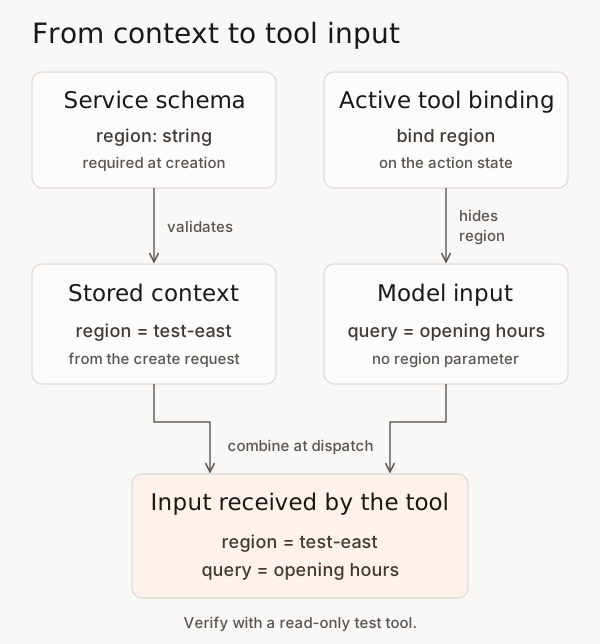
Use start-time conversation context to pass application values to a tool without asking the model to supply those parameters. There are three configuration points: the **service** declares accepted keys, the **conversation create request** supplies values, and the **Context Graph's state-to-tool binding** selects which parameters receive them.
This Platform API task extends [Build and Prove](/developer-guide/guides/build-and-prove.md) for an already configured service and tool. The map supplies inputs for one conversation; declaring it does not update world-model facts, create memory, or grant tool access.
## Choose the Right Context Feature
| You need to… | Use… |
| ----------------------------------------------------------------- | ---------------------------------------------------------------------------------------------------------------------------------------------------------------------------------- |
| Supply a typed application value to a tool for one conversation | The start-time `context` map and state binding in this guide |
| Supply a verified value to a tool after a voice call has started | [Set Context on a Live Voice Call](/developer-guide/guides/live-call-context.md), from a trusted backend |
| Add free-text guidance to a turn or an opening WebSocket exchange | The separate text fields in [Conversations](/developer-guide/platform-api/conversations.md) or [Sessions](/developer-guide/platform-api/platform-api/sessions.md) |
| Read or retain facts about a person across conversations | The [World Model](https://docs.concurrence.com/data/world-model) and [Functional Memory](https://docs.concurrence.com/agent/memory), under their own write and retrieval contracts |
| Supply verified identity for an integration's authentication | [External User Subject-Key Binding](/developer-guide/platform-api/integrations/external-user-subject-key-binding.md), rather than caller-supplied application context |
| Add stored user information through the Classic API | Classic [User Models and additional context](/developer-guide/classic-api/core-api/users/user-models.md) |
| Inspect a service's neutral configuration and tool descriptors | [Harness Context](/developer-guide/platform-api/functions/harness-context.md), a read-only discovery operation |
## Before You Start
Use a test workspace with permission to update its service, publish a Context Graph version, and create and inspect conversations. You need a configured read-only test tool whose input and result you can inspect. The example assumes that tool accepts two string parameters, `region` and `query`, and can report which region it actually received.
Use the regional API base and credentials assigned to that workspace; see [Choose Credentials](/developer-guide/getting-started/credentials.md). Save the current service schema and selected graph version before changing them. This guide does not provision a service, integration, or channel.
Platform SDK 0.109.1 and later type `accepted_context` on services and the `context` map on conversation create and outbound call requests. The tool-call spec types include `context_bindings` but not `context_binding_aliases` as of 0.110.0; use the HTTP contracts embedded below when you need aliases.
The synthetic test below uses a blocking tool with `result_persistence: "accumulate"` so its result can be inspected in history. If your workflow requires ephemeral results, keep that policy and verify the received input at the test tool instead; see [Tool Result Persistence](https://docs.concurrence.com/agent/context-graphs#tool-result-persistence).
{% hint style="warning" %}
**Runtime and identity scope.** Bindings apply to direct tools and companion skill inputs on the current runtime. Mapped bindings require their source value before execution. Automatic `channel-id` requires an available channel address and the service declaration; it does not verify a person’s identity. On voice calls, a binding to a declared key that the call did not start with refuses to run until the key is set, and a companion skill input bound to such a key is refused. Read [Supported Tool Paths](#supported-tool-paths) and [Reserved Channel Identity](#reserved-channel-identity).
{% endhint %}
## How the Values Reach the Tool
The service validates the values; the active state selects the binding. Verify the input received by the tool.
## 1. Declare the Schema on the Service
Set `accepted_context` in the top-level request body when creating or updating the service:
| Task | Operation |
| ------------------------------------ | ---------------------------------------------- |
| Create a service with its schema | `POST /v1/{workspace_id}/services` |
| Read the current schema | `GET /v1/{workspace_id}/services/{service_id}` |
| Replace an existing service's schema | `PUT /v1/{workspace_id}/services/{service_id}` |
Service updates use **PUT**, not PATCH. For the complete contracts, see [Services](/developer-guide/platform-api/workspaces/services.md).
For a dedicated test service, this is a complete update body:
```json
{
"accepted_context": [
{
"key": "region",
"type": "string",
"description": "Synthetic routing region for the test lookup",
"required": true
},
{
"key": "attempt",
"type": "number",
"description": "Optional test attempt number",
"required": false
}
]
}
```
The service's page (**Agents** in the Console) displays declared context keys, types, required status, and descriptions read-only. Use the service API to change `accepted_context`. The text Playground presents these keys as input fields when you start a test session.
Read the service back and confirm the schema before starting a conversation. A supplied list replaces the entire previous `accepted_context` list. Preserve any existing keys you still need; omission or `null` leaves the list unchanged, while `[]` accepts no caller-supplied context keys.
Each entry requires `key`, `type`, `description`, and `required`. Keys must be unique, 2-63 characters, and contain only lowercase letters, digits, and internal hyphens. Underscores and leading or trailing hyphens are invalid. Types are `string` or `number`; the service accepts at most 100 key declarations.
Adding a required key affects subsequent create requests validated against this service. Update callers together with the service schema.
`accepted_context` is service-level configuration. Selecting a previous graph version does not restore a previous context schema; save and restore that schema separately when rolling back.
## 2. Bind a Parameter in the Context Graph
The binding belongs to the **tool call specification on the state**, not the tool's create/update body. The underlying tool must already declare the parameter.
Read the service's selected Context Graph version. In the action state that calls your test tool, add `context_bindings` to its existing `action_tool_call_specs` entry, or to `exit_condition_tool_call_specs` when that is where the tool is used:
```json
{
"tool_id": "lookup_test_hours",
"execution": "blocking",
"result_persistence": "accumulate",
"context_bindings": ["region"]
}
```
This is a **ToolCallSpec fragment**, not a complete graph or tool creation request. Replace `lookup_test_hours` with the exact model-callable tool name, including a prefix such as `fn_` or `wsq_` for [Platform Functions](https://docs.concurrence.com/agent/platform-functions#using-functions-in-context-graphs). The execution and persistence values select the test behavior described above. Retain the entry's other settings and the graph's other states and bindings.
Each `context_bindings` list item uses the same name for the accepted context key and tool parameter. Use `context_binding_aliases` when the names differ:
```json
{
"tool_id": "lookup_test_patient",
"context_binding_aliases": {
"patient_id": "patient-id"
}
}
```
This is another ToolCallSpec fragment: the left side is the tool parameter, and the right side is the service’s accepted context key. The target parameter is hidden from the model and filled at dispatch. An alias takes precedence over a same-name binding for the same target. A missing alias source rejects the tool call before execution, even if the model supplies a value or the input schema has a default. Several parameters can map to one source key.
Declare the binding in each state where it is needed, using that state's tool-spec list. Keep a tool's bindings consistent across states, especially for voice runtimes that advertise one tool schema for the whole call.
Publish the complete revised graph using:
{% openapi src="" path="/v1/{workspace\_id}/context-graphs/{context\_graph\_id}/versions" method="post" %}
{% endopenapi %}
Select that graph version in the test service's [version set](/developer-guide/platform-api/workspaces/services.md#version-sets). Preserve its agent and model selections. A new graph version does not change a version set pinned to an older one.
**Check:** The selected graph version contains the binding in the action state that will execute the tool. The tool's original input schema still declares `region`; the runtime removes it from the model-visible schema for the bound call.
## 3. Supply Values When Creating the Conversation
Send the map in `context` on `POST /v1/{workspace_id}/conversations`. Replace the synthetic service UUID with your test service ID:
```json
{
"service_id": "11111111-1111-4111-8111-111111111111",
"channel": "web",
"context": {
"region": "test-east",
"attempt": 1
}
}
```
The create request accepts at most 50 context keys. String values are limited to 8,192 characters. Service validation returns `422` for unknown keys, missing required keys, and values that do not match the declared type after request parsing. Send a JSON number for `number`, not a numeric string or a boolean. Arrays, objects, and null values are not context values.
**Validation edge case:** The public contract excludes booleans, but the current conversation-create parser can coerce `true` and `false` to `1` and `0` before service validation. Validate your application's values before sending them; do not rely on a boolean producing `422`.
An empty `context` map works only when the service has no required keys. If an optional key in the legacy same-name `context_bindings` list is absent from a text conversation, the runtime leaves that parameter unchanged; the tool can apply its own default or reject missing input. In contrast, a missing `context_binding_aliases` source rejects the call. Do not bind a required tool parameter to an optional key unless that absence is handled.
On voice calls, a binding to a declared key that the call did not start with refuses to run until the key is set on the live call; see [Set Context on a Live Voice Call](/developer-guide/guides/live-call-context.md#how-the-agent-uses-the-value).
Save the returned conversation ID before sending a turn. Context is stored for the conversation and restored on subsequent text turns. The turn request's text `context` field is a different feature; it does not update this map. See [Conversation operations](/developer-guide/platform-api/conversations.md).
### Outbound Requests
Outbound SMS and iMessage use the same create operation with the channel's required `recipient` and `use_case_id`. The service's `accepted_context` validates the map before dispatch. Existing channel permissions, provisioning, and delivery requirements still apply.
Outbound voice uses `POST /v1/{workspace_id}/calls/outbound` and its `context` map. Those values reach the live call's bound tools, and each key is then set for the call, so a later [live-call update](/developer-guide/guides/live-call-context.md#set-once-semantics) to a different value is rejected. Validation and routing use the service bound to the supplied `use_case_id`; this request does not select a service through `service_id`. Follow [Calls](/developer-guide/platform-api/conversations/calls.md) for the required phone, patient, and routing inputs. Its `goal` and `system_prompt` supply startup instructions; `metadata` supplies correlation data. None replaces the typed `context` map. The 50-key and 8,192-character limits above describe the conversation-create body, not a universal limit for every context-bearing route.
## 4. Verify the Bound Input
Send a message that triggers the read-only lookup, such as “Use the test lookup to show opening hours.” The model supplies `query`; the runtime supplies `region` from the conversation context when the bound action-state tool executes.
Use the test tool's observed request or a result that explicitly echoes its received parameters to verify:
```json
{
"region": "test-east",
"query": "opening hours"
}
```
The exact query wording may vary. Confirm that the tool received `region: "test-east"`, that its result reached durable conversation history under this test's accumulate policy, and that the selected service and graph versions match your test record. Ephemeral bindings retain execution metadata instead of raw arguments and results. Tool telemetry is useful when available; model narration alone does not prove which parameters reached the tool.
Repeat in a fresh conversation with a different synthetic region to check that the value is conversation-specific. Also try omitting `region`, adding an undeclared key, and sending `attempt: "one"`; each create should return `422` before a conversation is created. Resolve ambiguous network outcomes by inspecting retained state before retrying.
Close successful test conversations and verify closure through the [close and detail operations](/developer-guide/platform-api/conversations.md). Restore the saved service schema and version selection if the test configuration is temporary. Closing a conversation does not erase its retained context or undo an external operation.
## Supported Tool Paths
The runtime resolves the tool's binding from the state where the call starts and carries that binding into execution. This includes action, decision, and data-collection states. The example above uses an action state.
| Tool or state | Current behavior |
| ---------------------------------------------------- | ----------------------------------------------------------------------------------------------------------------------------------------------------------------------------------------------------------------------------------------------------------------------------------------------------------------------------------------------------------------------------------------------------------------------------------------------------------------- |
| Direct integration endpoint | Context parameters are injected before the integration call when the launching state's spec binds that exact tool name. Integration authentication and grants still apply. |
| Direct world tool | Uses the same injection path. Its existing parameter schema, validation, and execution policy still apply. |
| SQL-backed platform function or workspace data query | Uses the direct-tool path when exposed to the conversation. Parameter names must also satisfy the SQL tool's own naming rules. Use `context_binding_aliases` to map a hyphenated context key to an underscore-containing SQL parameter. |
| Companion skill input | Receives the bound context before the companion starts, including on background execution. A mapped source must exist. Passing that skill input to an integration sub-tool requires its own `skill_input_bindings`; see [Skills](/developer-guide/platform-api/workspaces/skills.md#bind-skill-inputs-to-integration-tools). On voice calls, a skill input bound to a declared key the call did not start with is refused; bind that key on the sub-tool instead. |
| Decision or data-collection state | The binding resolves from that state's `tool_call_specs` list. Action states use `action_tool_call_specs` and `exit_condition_tool_call_specs`. Annotation states do not bind tools. |
| Realtime voice runtime | The call stays in its initial state, so bindings resolve across the whole graph. When states bind the same parameter differently, the initial state wins, then the first state in graph order. Keep a tool's bindings consistent across states. |
| Standalone tool test or direct function invocation | Has no conversation context binding merely because the tool is used in a graph. Supply the endpoint's required inputs through that operation's contract. |
Context bindings are distinct from identity bindings and authorization-bound SQL parameters. Keep their parameter names separate; do not context-bind credential or access-control parameters. Caller-supplied context is application input, not proof of identity or permission. Removing a parameter from the model's tool schema does not make its value a secret: tool results, retained context, or telemetry can expose it. Do not put credentials in this map.
Tool result persistence governs the tool journal and later prompts; it does not clear the separately stored start-time context map. Apply your retention requirements to both.
## Reserved Channel Identity
The reserved key is **`channel-id`**, with a hyphen. It is not `channel_id`, a use-case ID, a conversation UUID, or the business's sending address.
The initialization rule fills a declared string `channel-id` from a non-empty caller/channel address, overriding the value in the initialization map. Voice uses the caller or destination phone number; messaging adapters carry their channel-specific sender identifier. The text path preserves this initialized map for tool execution and re-derives the channel address when a session is restored. The separately persisted start-time context remains the originally supplied map, so it can differ from the effective tool input.
On the inbound voice path, valid caller numbers are normalized to E.164. Withheld, anonymous, invalid, and non-phone caller identifiers are treated as unidentified, so they supply no phone address for automatic filling. An absent address does not erase a caller-supplied context value; do not use a supplied `channel-id` as a fallback identity. Even a valid phone address is not proof of the caller's identity or authority.
{% hint style="info" %}
**Verify the channel address.** Automatic filling depends on the address supplied by the selected channel adapter; a web conversation need not have a phone address. Test the effective tool input on your deployed channel before relying on automatic filling.
{% endhint %}
When preparing a supported deployment for automatic filling, declare `channel-id` as `type: "string"` and `required: false`. API validation occurs before initialization, so `required: true` can reject a create request that omits it before any auto-fill occurs. An absent caller address also means there is nothing to auto-fill. Do not send a placeholder value to bypass that validation.
Use an explicitly supplied, non-reserved key for ordinary application context. It remains caller-supplied data and must not replace the tool's authorization checks.
## Troubleshooting
| Symptom | Check next |
| ------------------------------------------------- | --------------------------------------------------------------------------------------------------------------------------------------------------------------------------------------------------------------------------- |
| Service update returns `405` | Use `PUT /services/{service_id}`, not PATCH or PUT on the collection. |
| Schema or create request returns `422` | Check key spelling, uniqueness, scalar types, required keys, and request limits. `channel_id` is not a valid accepted-context key. |
| Bound parameter is missing | Check the selected graph version, launching state, deployed state coverage, exact tool name and parameter name, and whether the optional context key was supplied. |
| A warehouse parameter uses underscores | Add an explicit `context_binding_aliases` mapping from that tool parameter to the accepted context key. There is no implicit translation. |
| Model is still asked for the value | Confirm the binding is on the active state's ToolCallSpec, rather than on the tool definition or an unselected graph version. |
| Voice tool returns a missing-context rejection | The key is declared but the call did not start with it. Set it with [live call context](/developer-guide/guides/live-call-context.md) before the agent needs the tool, or remove the declaration if nothing will supply it. |
| `channel-id` is absent or differs from the sender | Check the service declaration, channel adapter address, and effective tool input; do not infer identity from a supplied value. |
Continue with [Verify an Integration Action](/developer-guide/guides/verify-an-integration-action.md) when the tool performs an external write, and [Build and Prove](/developer-guide/guides/build-and-prove.md) for a reviewed configuration rollout.
---
# Agent Instructions
This documentation is published with GitBook. GitBook is the documentation platform designed so that both humans and AI agents can read, navigate, and reason over technical content effectively. Learn more at gitbook.com.
## Querying This Documentation
If you need additional information that is not directly available in this page, you can query the documentation by asking a question.
Perform an HTTP GET request on the following URL with the `ask` and `goal` query parameters:
```
GET https://docs.concurrence.com/developer-guide/guides/conversation-context.md?ask=&goal=
```
`ask` is the immediate question: it should be specific, self-contained, and written in natural language.
`goal` is what the user is ultimately trying to achieve, the reason they need the answer. Sharing it helps GitBook give you a better, more relevant answer. A goal is most helpful when it describes the outcome the user wants rather than restating the question. For example, with `ask=how do I create an API token`, a goal like `automate deployments from our CI pipeline` lets GitBook tailor the answer to that use case.
The response will contain a direct answer to the question and relevant excerpts and sources from the documentation.
Use this mechanism when the answer is not explicitly present in the current page, you need clarification or additional context, or you want to retrieve related documentation sections.