> For the complete documentation index, see [llms.txt](https://docs.concurrence.com/llms.txt). Markdown versions of documentation pages are available by appending `.md` to page URLs; this page is available as [Markdown](https://docs.concurrence.com/developer-guide/guides/data-to-verified-action.md).
# Data to a Verified Action
Follow a synthetic record from a supported source through queryable data and agent access to an independently verified external integration outcome.
For hospital workflows, first qualify the [HL7v2 integration boundary](https://docs.concurrence.com/data/healthcare-interoperability): inbound HL7v2 ADT/SIU notifications and outbound scheduling changes require separate evidence. The steps below assume a supported, provisioned source and target.
Use a synthetic record and an approved test destination to verify the whole data path. Obtain a configured source, supported mapping, permitted read access, and an integration whose test behavior and mutation permissions are understood. If any prerequisite is missing, complete provisioning before running the corresponding step.
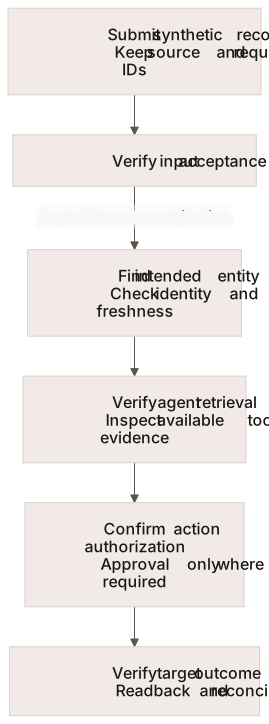
Each arrow requires new evidence. Acceptance does not establish queryability, retrieval, or external completion.
## Connect the Source
In Console, **Data → Sources** is the entry point for connected sources and their health. Configure the supported [intake source](/developer-guide/platform-api/data-world-model/intake-sources.md) or [connector](/developer-guide/platform-api/data-world-model/connector-runner.md). Record the source identifier and the submitted record's external identifier so that you can locate the same record later.
[Authenticated dataset intake](/developer-guide/platform-api/data-world-model/intake.md) and [browser Surfaces](/developer-guide/platform-api/conversations/surfaces.md) have different contracts. A Surface submission does not automatically create a dataset file. Source support and parsing must be confirmed for the chosen format.
## Verify Queryable Data
Use **Data → Records** and the supported [workspace data query](/developer-guide/platform-api/functions/workspace-data-queries.md) path to locate the intended entity and inspect source attribution. Verify its identity and the fields needed by the workflow. World-model read views update asynchronously; acceptance of an input is not evidence that the corresponding projection is already queryable.
If the record is missing or stale, inspect source status, mapping, identity resolution, and freshness before resubmitting. Preserve the original identifiers. Caller recognition may require a separate [external identity binding](/developer-guide/platform-api/integrations/external-user-subject-key-binding.md); a queryable record alone does not prove recognition is ready.
## Verify Agent Access
Configure the test service with the intended graph, query/tool access, and subject context. Run the bounded interaction from [First Verified Conversation](/developer-guide/guides/first-verified-conversation.md) against that configured test service. Check the retained answer and available tool evidence against the synthetic source record. A plausible answer does not establish that the agent retrieved the intended source.
## Verify the External Outcome
Follow [Verify an Integration Action](/developer-guide/guides/verify-an-integration-action.md) for the authorized test mutation, expected failure, target acknowledgement or read-back, and reconciliation. Apply approval requirements only to the integration path that implements them. The separately enabled [connector write-back review](/developer-guide/platform-api/integrations/review-queue.md) workflow has its own availability and lifecycle.
| Milestone | Evidence to keep |
| ------------------------- | ---------------------------------------------------------------------------- |
| Submitted | Source and request identifiers; input acceptance or rejection |
| Queryable | Intended entity, source attribution, required fields, and observed freshness |
| Used by the workflow | Service/version, conversation/run, and available retrieval or tool evidence |
| Authorized | Required permission and approval decision for the specific action |
| Completed externally | Target acknowledgement or independent read-back |
| Reconciled and cleaned up | Resolution of ambiguous attempts and cleanup of the permitted test resources |
Stop at the last verified milestone when later evidence is missing. Use [Troubleshooting](/developer-guide/guides/troubleshooting.md) for the next diagnostic rather than repeating an uncertain mutation.
---
# Agent Instructions
This documentation is published with GitBook. GitBook is the documentation platform designed so that both humans and AI agents can read, navigate, and reason over technical content effectively. Learn more at gitbook.com.
## Querying This Documentation
If you need additional information that is not directly available in this page, you can query the documentation dynamically by asking a question.
Perform an HTTP GET request on the current page URL with the `ask` query parameter, and the optional `goal` query parameter:
```
GET https://docs.concurrence.com/developer-guide/guides/data-to-verified-action.md?ask=&goal=
```
`ask` is the immediate question: it should be specific, self-contained, and written in natural language.
`goal` is optional and describes the broader end goal you are ultimately trying to accomplish on behalf of the user. GitBook uses it to tailor the answer towards what is most useful for that goal.
The response will contain a direct answer to the question and relevant excerpts and sources from the documentation.
Use this mechanism when the answer is not explicitly present in the current page, you need clarification or additional context, or you want to retrieve related documentation sections.