> For the complete documentation index, see [llms.txt](https://docs.concurrence.com/llms.txt). Markdown versions of documentation pages are available by appending `.md` to page URLs; this page is available as [Markdown](https://docs.concurrence.com/developer-guide/guides/first-verified-conversation.md).
# First Verified Conversation
Run a pinned TypeScript starter, verify a durable text response, exercise a failure, and close the conversation with explicit test-service prerequisites.
Build a trusted Node.js client that creates a web conversation, asks a synthetic scheduling question, reads the answer back from durable history, and closes the conversation. The result is an evidence file you can inspect. This first project does not book an appointment or contact a patient.
Choose how to run the same client:
| Start here | What you need | What the result verifies |
| ---------------------------- | ------------------------------------------------------ | ----------------------------------------------------------------------------------------------------------------- |
| **Local walkthrough** | Node.js and npm; no Concurrence account or credentials | The real Platform SDK works with the supplied synthetic HTTP fixtures. No model or Concurrence service is called. |
| **Provisioned test service** | A configured test workspace, service, and credential | Your service returns an answer that the client can read back from history, and the conversation closes. |
Both paths start with the download below. If you want to test a service in your browser, follow [First Console Conversation](/developer-guide/guides/first-console-conversation.md).
## Before You Start
You need Node.js 22 or later, npm, and a tool to extract ZIP files. The starter pins `@amigo-ai/platform-sdk` to `0.108.1` and commits its dependency lockfile. Use `npm ci` to reproduce the checked version.
You can run the **Local walkthrough** immediately. The **Provisioned test service** tab in step 2 lists the additional setup required before contacting Concurrence.
## 1. Get the Starter
Download and extract the starter ZIP. It contains only the example source, pinned dependencies, fixtures, tests, and the documentation snapshots used by its checks. No GitHub organization access is required.
{% file src="/files/cgkESp5ztA2rhX4SRogb" %}
Download the runnable Platform conversation starter.
{% endfile %}
In the extracted directory:
```bash
cd amigo-first-conversation
npm ci
npm test
```
Tests use fixture responses and do not contact Concurrence. `npm run check:docs` also compiles the included SDK quickstart snapshots and checks this tutorial's client block against its executable source.
## 2. Run a Conversation
{% tabs %}
{% tab title="Local walkthrough" %}
```bash
npm run demo
```
No credentials or provisioning are needed. The SDK's injected transport accepts only the example host and never sends a network request. The fixture asks which information a scheduling team needs before considering an appointment change. Its answer explains the prerequisites and says that no appointment changed.
{% endtab %}
{% tab title="Provisioned test service" %}
Before running this path, your workspace administrator or Concurrence implementation contact must supply:
| Prerequisite | Ready when |
| ------------------------------------------- | ------------------------------------------------------------------------------------------------------------------------------------------------------------------- |
| Regional Platform API base and workspace ID | Both identify the same test deployment; see [Regions and Endpoints](/developer-guide/getting-started/regions-and-endpoints.md) |
| Workspace API key | It can create, read, submit turns to, and close conversations in that workspace; see [Authentication](/developer-guide/platform-api/platform-api/authentication.md) |
| Configured test service ID | Its selected agent and Context Graph answer ordinary text questions without requiring a patient entity or production data |
| Reviewed tool and data access | The service has no production write tools, outbound channel actions, or private patient context; a prompt asking for a test is not an authorization boundary |
| Configuration record | The implementation owner records the service and selected configuration used for the test |
This tutorial does not provision the workspace or author the service. Resolve those dependencies before continuing; use the **Local walkthrough** while arranging access.
Keep credentials in a trusted terminal or server process. Supply the key through your normal secret-injection mechanism, then set the non-secret deployment values:
```bash
export AMIGO_BASE_URL='https://api.platform.amigo.ai'
export AMIGO_WORKSPACE_ID='your-test-workspace-id'
export AMIGO_SERVICE_ID='your-configured-test-service-id'
export AMIGO_TEST_SERVICE_CONFIRMED='yes'
# AMIGO_API_KEY must already be supplied by your secret mechanism.
npm start
```
Use the regional base supplied for your deployment; the US base above is an example. Confirm the prerequisites before setting the test-service flag. The program sends one synthetic user message. Agent wording varies with your configuration and runtime.
{% endtab %}
{% endtabs %}
## 3. Inspect the Evidence
Read `artifacts/result.json`. A successful local run includes:
```json
{
"mode": "local-fixture",
"conversation_id": "33333333-3333-4333-8333-333333333333",
"answer": "Confirm the appointment, the requested change, available alternatives, and the authority to make the change. No appointment has been changed.",
"durable_answer_verified": true,
"closed": true,
"external_action_verified": false
}
```
For a provisioned run, `mode` is `provisioned-platform`, and the ID and answer come from your service. The program verifies that every returned agent answer is present in conversation history and that closure is visible on a subsequent read. A completed text answer establishes neither booking success nor the quality of a clinical decision.
The program writes `artifacts/progress.json` as soon as creation succeeds, before submitting a turn. If a later request fails, keep that ID and inspect the conversation before retrying. Only a zero exit status and the result from **this run** establish success; an older result file is not new evidence.
**You have completed the conversation when:**
* The command exits successfully and writes a new `artifacts/result.json`.
* `mode` matches the path you chose.
* `answer` contains the response and `durable_answer_verified` is `true`.
* `closed` is `true`. `external_action_verified` remains `false` because this exercise does not verify an external action.
Keep this result if you want to compare it with the rejection exercise, which writes its own result to the same file.
## 4. Exercise a Rejection
```bash
npm run demo:failure
```
This sends an invalid web-create request with `force_new: true`. The fixture returns a validation rejection, and the program records `expected_rejection: 422`. The current web contract rejects this combination because every web create already starts a new conversation. To exercise the same rejection in your provisioned test environment, use `npm start -- --invalid` with the prerequisites above.
An authentication error or transport failure does not count as the expected rejection. See the canonical [Conversation operations](/developer-guide/platform-api/conversations.md) for the request and response contracts.
## 5. Understand the Client
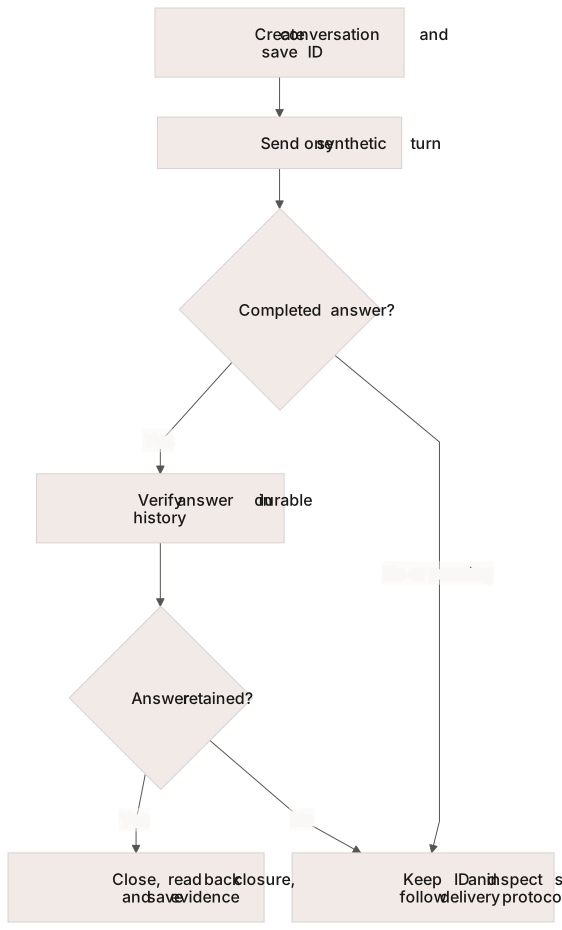
Save the conversation ID before the turn; only verified history and closure complete the starter.
The following block is checked against the executable `src/starter.ts` on every PR. The CLI supplies either the fixture transport or your provisioned client.
```typescript
import { AmigoClient } from '@amigo-ai/platform-sdk'
export const message = 'This is a synthetic documentation exercise. What information would a scheduling team need before considering an appointment change? Do not book or change anything.'
export async function firstConversation(
client: AmigoClient,
serviceId: string,
onCreated: (id: string) => Promise = async () => {},
) {
const conversation = await client.conversations.create({ service_id: serviceId, channel: 'web' })
// Persist the ID before sending a turn, so an ambiguous failure can be investigated.
await onCreated(conversation.id)
const turn = await client.conversations.createTurn(conversation.id, { message })
if (turn.background_pending) {
throw new Error(`Background work remains for ${conversation.id}. Keep this conversation open and follow the web integration delivery guide.`)
}
const answers = turn.output.filter(item => item.role === 'agent' && item.text.trim())
if (!answers.length) throw new Error(`No completed agent answer for ${conversation.id}`)
const durable = await client.conversations.get(conversation.id)
if (!answers.every(answer => durable.turns?.some(item => item.role === 'agent' && item.text === answer.text))) {
throw new Error(`Answer not found in durable history for ${conversation.id}; investigate before retrying`)
}
await client.conversations.close(conversation.id)
const closed = await client.conversations.get(conversation.id)
if (closed.lifecycle !== 'closed') throw new Error(`Close was not confirmed for ${conversation.id}`)
return {
conversation_id: conversation.id,
answer: answers.map(item => item.text).join('\n'),
durable_answer_verified: true,
closed: true,
external_action_verified: false,
}
}
export async function demonstrateRejection(client: AmigoClient, serviceId: string) {
try {
await client.conversations.create({ service_id: serviceId, channel: 'web', force_new: true })
} catch (error) {
if (error && typeof error === 'object' && 'statusCode' in error && error.statusCode === 422) {
return { expected_rejection: 422, reason: 'force_new does not apply to web conversations' }
}
throw error
}
throw new Error('Expected a validation rejection but the request succeeded; stop and investigate the contract')
}
```
If `background_pending` is true, the starter stops without claiming a completed answer or automatically closing the conversation. Implement the receipt-based delivery flow in [Serve an Agent From a Web App](/developer-guide/platform-api/conversations/serve-agent-from-web-app.md) before choosing a service with background tools.
## 6. Clean Up and Continue
A successful conversation run closes its created conversation and verifies closure. Closing ends the conversation lifecycle; it does not erase retained records. After an incomplete run, inspect the saved ID, reconcile pending work, and use the [close operation](/developer-guide/platform-api/conversations.md) when appropriate. Follow your workspace's retention and deletion process for test records.
Local artifacts and fixture state are disposable. Remove `artifacts/` when you no longer need the evidence, and revoke a temporary test key through your normal credential process. The starter does not create a service, entity, sender, or external appointment.
For production, add scoped browser access, request correlation, background delivery and acknowledgement, retry reconciliation, operational monitoring, and workflow-specific authorization. Continue with [Verify an Integration Action](/developer-guide/guides/verify-an-integration-action.md), [Test a Managed SMS Workflow](/developer-guide/guides/test-managed-sms.md), or [Troubleshoot an Integration](/developer-guide/guides/troubleshooting.md). Use the [SDK Quickstart](/developer-guide/platform-api/platform-sdk/quickstart.md) for additional operations.
## Troubleshooting
| What you see | What to do next |
| ------------------------------------------------------------------------------------ | ------------------------------------------------------------------------------------------------------------------------------------------------------------------------------------------------------------------------------------------ |
| `npm ci` or compilation fails | Check `node --version` is 22 or later and that you are in the extracted starter directory. Keep the supplied lockfile and capture the first installation or compiler error. |
| A `Set AMIGO_...` message during a local attempt | Run `npm run demo`. `npm start` selects the provisioned path and requires its environment variables. |
| Authentication or service lookup fails | Check the API family, assigned regional base, workspace, key permissions, and configured service. Start with [Choose Credentials](/developer-guide/getting-started/credentials.md). |
| Background work remains, the answer is missing from history, or the connection fails | Inspect the conversation identified by this attempt's `artifacts/progress.json` before resending. Follow [web delivery](/developer-guide/platform-api/conversations/serve-agent-from-web-app.md) for a service that uses background tools. |
| The result file contains an older success or only `expected_rejection` | Check the most recent command's exit status. The failure exercise replaces the result file; a previous success does not establish a new successful conversation. |
| Closure was not confirmed | Inspect the saved conversation's lifecycle and pending work, then follow the documented [close operation](/developer-guide/platform-api/conversations.md). |
---
# Agent Instructions
This documentation is published with GitBook. GitBook is the documentation platform designed so that both humans and AI agents can read, navigate, and reason over technical content effectively. Learn more at gitbook.com.
## Querying This Documentation
If you need additional information that is not directly available in this page, you can query the documentation dynamically by asking a question.
Perform an HTTP GET request on the current page URL with the `ask` query parameter, and the optional `goal` query parameter:
```
GET https://docs.concurrence.com/developer-guide/guides/first-verified-conversation.md?ask=&goal=
```
`ask` is the immediate question: it should be specific, self-contained, and written in natural language.
`goal` is optional and describes the broader end goal you are ultimately trying to accomplish on behalf of the user. GitBook uses it to tailor the answer towards what is most useful for that goal.
The response will contain a direct answer to the question and relevant excerpts and sources from the documentation.
Use this mechanism when the answer is not explicitly present in the current page, you need clarification or additional context, or you want to retrieve related documentation sections.