> For the complete documentation index, see [llms.txt](https://docs.concurrence.com/llms.txt). Markdown versions of documentation pages are available by appending `.md` to page URLs; this page is available as [Markdown](https://docs.concurrence.com/developer-guide/guides/integrate-channel-manager.md).

# Integrate Channel Manager Through the API

Connect your application to Channel Manager. Set up access, send messages, handle replies, connect voice, and test the workflow before launch.

Use Channel Manager with your own agent or backend. Your team configures and runs the agent; your application decides whom to contact, what to say, when to follow up, and where to record the result. Channel Manager handles the provisioned channel and its delivery records. You do not need a Concurrence workspace, agent, service, or Developer Console.

This guide covers shared setup, examples for SMS/MMS, email, iMessage, and WhatsApp, and the steps to connect a voice runtime. Start with one approved channel and a recipient your team controls. The [Channel Manager reference](/developer-guide/platform-api/conversations/channel-manager.md) contains the API contracts and channel requirements.

## Example: Follow Up With a Member

Suppose your application needs to contact a member about an approved benefit or service. The same division of work applies to appointment follow-up, support, and other approved programs.

| Step     | Your application                                                                | Channel Manager                                                                  |
| -------- | ------------------------------------------------------------------------------- | -------------------------------------------------------------------------------- |
| Prepare  | Select the member, check permission and timing, and create a workflow ID        | Supply the provisioned sender and channel use case                               |
| Contact  | Compose approved content and call the channel API                               | Submit the message or connect the call                                           |
| Continue | Match a reply to the workflow and run your agent                                | Forward an inbound message, or connect voice audio through the agreed media path |
| Hand off | Route a request to a specialist and keep the case open until someone accepts it | Connect a specialist to a call when your application requests it                 |
| Complete | Record the service outcome in your own system                                   | Retain channel delivery and call records                                         |

Save your workflow ID alongside each returned message or call ID. A delivered message is not a completed member request. If the member asks for a specialist, your application owns that handoff and its eventual outcome.

Keep this mapping when changing channels. A follow-up call and an email reply do not automatically become one conversation; your application must link them to the same workflow. Check permission for the new channel before switching.

## Before You Start

Request a channel through your Concurrence implementation contact before starting the API steps. Confirm the required sender registrations and provider approvals, then wait for your contact to confirm that the sender and use case are ready. A submitted request is not an approval.

Get these details from your implementation contact:

| Item               | What you need                                                                    |
| ------------------ | -------------------------------------------------------------------------------- |
| Deployment         | Assigned API host, processing region, retention, and allowed network paths       |
| Channel            | Setup ID, use-case ID, approved sender, and the intended message or call flow    |
| Access             | Client ID and secret restricted to your setup, with the scopes below             |
| Messaging receiver | Your HTTPS callback URL and its per-use-case signing secret                      |
| Test               | A controlled recipient, synthetic content, and permission to run the test        |
| Support            | Integration and channel-operations contacts who can investigate a failed attempt |

Provisioning happens separately from API access. A credential does not create a sender or approve an outreach program. Confirm where content and delivery records will be processed; calling from your own cloud account does not mean the channel service runs there.

For email, test inbound body retrieval before relying on replies. For MMS and other media, test attachment access too. Voice also needs an event receiver and a compatible audio endpoint, described [below](#connect-voice).

## 1. Verify Scoped Access

Use the host assigned to your deployment. The current public host is `https://channels.api-us.concurrence.com`. Keep it in configuration; a change to your website or email domain does not change the API host.

Request only the scopes for the channel you are testing, plus `use-case:read`:

| Channel  | Scopes for these examples                   |
| -------- | ------------------------------------------- |
| SMS/MMS  | `use-case:read sms:read sms:send`           |
| Email    | `use-case:read email:read email:send`       |
| iMessage | `use-case:read imessage:read imessage:send` |
| WhatsApp | `use-case:read whatsapp:send`               |
| Voice    | `use-case:read voice:read voice:call`       |

SMS recipient controls need additional grants: `sms:consent:read` to inspect opt-outs and `sms:consent:write` to send the registered opt-in message or clear a setup-wide opt-out. Request these only for the client that manages recipient consent, then include the needed scopes when obtaining its token. See [SMS recipient opt-in and opt-out](/developer-guide/platform-api/conversations/channel-manager.md#sms-recipient-opt-in-and-opt-out).

Load `CHANNEL_CLIENT_ID`, `CHANNEL_CLIENT_SECRET`, `CHANNEL_SETUP_ID`, and `CHANNEL_USE_CASE_ID` from your approved configuration and secret store. The examples use Bash, cURL, and `jq`. Keep shell tracing off and tokens out of shared logs.

Set `CHANNEL_SCOPES` to the row you need. This token example uses SMS:

```bash
set -euo pipefail
export CHANNEL_API_BASE=https://channels.api-us.concurrence.com
CHANNEL_SCOPES='use-case:read sms:read sms:send'

TOKEN_RESPONSE=$(curl --fail-with-body --silent --show-error \
  --request POST "$CHANNEL_API_BASE/v1/oauth/token" \
  --user "$CHANNEL_CLIENT_ID:$CHANNEL_CLIENT_SECRET" \
  --data-urlencode 'grant_type=client_credentials' \
  --data-urlencode "scope=$CHANNEL_SCOPES")

# Stop if the client was not granted every requested scope.
printf '%s' "$TOKEN_RESPONSE" | jq -e --arg requested "$CHANNEL_SCOPES" \
  '(.scope | split(" ")) as $granted |
   ($requested | split(" ")) - $granted | length == 0' >/dev/null || exit 1

CHANNEL_ACCESS_TOKEN=$(printf '%s' "$TOKEN_RESPONSE" | jq -er '.access_token')
unset TOKEN_RESPONSE
```

If a scope is missing, ask the credential owner to correct the grant. Tokens last one hour; obtain another before expiry. Rotating the client secret does not immediately invalidate issued tokens.

## 2. Confirm the Assigned Route

List your use cases, then read the one you will use:

```bash
curl --fail-with-body --silent --show-error --get \
  "$CHANNEL_API_BASE/v1/use-case" \
  --header "Authorization: Bearer $CHANNEL_ACCESS_TOKEN" \
  --data-urlencode "setup_id=$CHANNEL_SETUP_ID"

curl --fail-with-body --silent --show-error \
  "$CHANNEL_API_BASE/v1/use-case/$CHANNEL_USE_CASE_ID" \
  --header "Authorization: Bearer $CHANNEL_ACCESS_TOKEN"
```

Check the channel, setup, sender, and callback URL against the handoff from your implementation contact. For phone-based use cases, inspect `phone_numbers` on the detailed read; the list response can leave it empty. Resolve a wrong sender or receiver before sending.

## 3. Connect Your Inbound Receiver

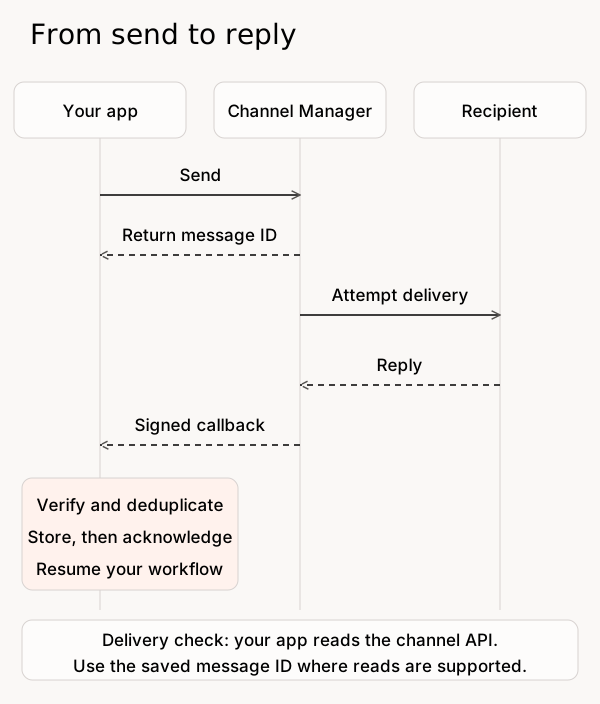
SMS, email, iMessage, and WhatsApp send inbound messages to the messaging use case's configured receiver. Your application verifies the event and decides which workflow to resume. Voice uses a separate call-event contract.

<figure><img src="https://1651797362-files.gitbook.io/~/files/v0/b/gitbook-x-prod.appspot.com/o/spaces%2F2YwM0LHtEGLt9S21OyC3%2Fuploads%2Fgit-blob-ade9d5dc7707ef52a2cf97fe6e79fc2139776e9e%2Fchannel-manager-message-flow.svg?alt=media" alt="Your application sends a message through Channel Manager to a recipient. A reply returns through Channel Manager to your receiver, which verifies and stores it before resuming the application workflow. Delivery checks are separate API reads where the channel supports them."><figcaption><p>Replies and delivery status are separate. A callback resumes your workflow; a delivery read helps investigate the send.</p></figcaption></figure>

Implement these steps in your receiver:

1. Read the raw request bytes. Verify `X-AMIGO-CHANNEL-MANAGER-WEBHOOK-SIGNATURE` as a lowercase hexadecimal HMAC-SHA256, using the provisioned secret as the key. Compare in constant time before processing the JSON.
2. Check the use-case ID against your configuration. Select secrets from that trusted configuration, never from the request. During rotation, handle repeated signature headers, including comma-combined values, and accept a valid signature from an active secret.
3. Deduplicate on `(use_case_id, idempotency_key)`. Store the event durably before returning success, then process it asynchronously. A replay must not trigger a second application action.
4. Match the event to your workflow. Use the channel, use case, sender, and any usable parent reference. If several workflows could match, resolve the ambiguity before sending another message.

The [public schema](https://channels.api-us.concurrence.com/openapi.json) describes the messaging `inbound-turn` envelope. Its `authenticated` flag concerns channel-origin verification; it does not establish the person's identity or consent.

### Match Replies to Your Records

| Channel          | How to correlate the reply                                                                                                                                                                  |
| ---------------- | ------------------------------------------------------------------------------------------------------------------------------------------------------------------------------------------- |
| SMS and iMessage | `parent_outbound_ref` is empty. Look up the workflow using the use case, `caller_ref`, and your own routing rules.                                                                          |
| Email            | Read `/v1/email/{email_id}` using `inbound_message_ref`. Match the returned `in_reply_to_email_id` to the CM email `id` saved from the send. It is `null` for an unthreaded message.        |
| WhatsApp         | `caller_ref` is the recipient's business-scoped address. A recognized reply or reaction target can carry your CM-issued outbound `message_id` as its parent; otherwise the parent is empty. |

Treat an absent parent as a normal case. Do not infer that a reply answers the most recent message if more than one active workflow is possible.

### Read Bodies and Attachments

A content part may contain text or a URL. Email bodies are retrieved separately; media on other channels can also require a read. Verify access from the network where your receiver runs. Use only the agreed content hosts and authentication; never forward a bearer token to an arbitrary callback URL. If you cannot retrieve the content, work with your implementation contact to fix access before enabling that channel.

For delivery status, use the channel's reads described below. The inbound receiver is not a universal delivery-event feed.

## 4. Send One Controlled Message and Read the Result

Choose one tab. Use that channel's provisioned use case and token scopes, and check the recipient, permission, and content immediately before sending. These messaging examples submit once. If a request times out, reconcile it before trying again.

{% tabs %}
{% tab title="SMS / MMS" %}
Set `CHANNEL_TEST_RECIPIENT` to the controlled phone number and `CHANNEL_TEST_MESSAGE` to the approved synthetic text.

Before an ordinary send on a supported US long-code or US/Canada toll-free route, use `POST /v1/sms/opt-in` with `use_case_id` and `to_phone_number` to send the registered confirmation. This requires `sms:consent:write` and prior consent evidence. The confirmation record is per recipient and use case; it does not clear an opt-out. Use [the recipient endpoints](/developer-guide/platform-api/conversations/channel-manager.md#sms-recipient-opt-in-and-opt-out) to inspect suppression and handle re-subscription.

```bash
set -euo pipefail
SEND_RESPONSE=$(curl --fail-with-body --silent --show-error \
  --request POST "$CHANNEL_API_BASE/v1/sms/" \
  --header "Authorization: Bearer $CHANNEL_ACCESS_TOKEN" \
  --form-string "use_case_id=$CHANNEL_USE_CASE_ID" \
  --form-string "to_phone_number=$CHANNEL_TEST_RECIPIENT" \
  --form-string "message=$CHANNEL_TEST_MESSAGE")

CHANNEL_MESSAGE_ID=$(printf '%s' "$SEND_RESPONSE" | jq -er '.id')
printf '%s' "$SEND_RESPONSE" | jq '{id, status}'
unset SEND_RESPONSE

curl --fail-with-body --silent --show-error \
  "$CHANNEL_API_BASE/v1/sms/$CHANNEL_MESSAGE_ID" \
  --header "Authorization: Bearer $CHANNEL_ACCESS_TOKEN"
```

Save the Channel Manager message `id` with your workflow ID. Read again for later delivery or error information, then have the test recipient reply.

For MMS, the same send accepts `media_attachments`; add a file part such as `--form 'media_attachments=@/path/to/test-image.png'` to the request. Test inbound media retrieval separately. See the [SMS/MMS contract](/developer-guide/platform-api/conversations/channel-manager.md#send-and-reconcile-sms).
{% endtab %}

{% tab title="Email" %}
Use a verified sender and a controlled mailbox in `CHANNEL_TEST_EMAIL`. Set `CHANNEL_EMAIL_SUBJECT` and `CHANNEL_EMAIL_HTML` to approved test content. For an unsubscribable use case, the HTML must include both `{{ unsubscribe_link }}` and `{{ unsubscribe_from_all_link }}`; the service inserts their URLs. A non-unsubscribable use case must use HTML without template variables.

```bash
set -euo pipefail
SEND_RESPONSE=$(curl --fail-with-body --silent --show-error \
  --request POST "$CHANNEL_API_BASE/v1/email/" \
  --header "Authorization: Bearer $CHANNEL_ACCESS_TOKEN" \
  --form-string "use_case_id=$CHANNEL_USE_CASE_ID" \
  --form-string "to_address=$CHANNEL_TEST_EMAIL" \
  --form-string 'mode=raw_html' \
  --form-string "subject=$CHANNEL_EMAIL_SUBJECT" \
  --form-string "body_html=$CHANNEL_EMAIL_HTML")

CHANNEL_EMAIL_ID=$(printf '%s' "$SEND_RESPONSE" | jq -er '.id')
printf '%s' "$SEND_RESPONSE" | jq '{id, created_at}'
unset SEND_RESPONSE

curl --fail-with-body --silent --show-error \
  "$CHANNEL_API_BASE/v1/email/$CHANNEL_EMAIL_ID" \
  --header "Authorization: Bearer $CHANNEL_ACCESS_TOKEN"
curl --fail-with-body --silent --show-error --get \
  "$CHANNEL_API_BASE/v1/email/event" \
  --header "Authorization: Bearer $CHANNEL_ACCESS_TOKEN" \
  --data-urlencode "setup_id=$CHANNEL_SETUP_ID" \
  --data-urlencode "email_id=$CHANNEL_EMAIL_ID"
```

Save the Channel Manager email `id` with your workflow ID. Confirm receipt in the mailbox, reply, and verify that your receiver can fetch the inbound body. Read the inbound email using the callback's `inbound_message_ref`; its `in_reply_to_email_id` links back to the CM email you sent. To continue that thread, pass the inbound CM ID as `reply_to_inbound_email_id` on your next send. Test unsubscribe behavior with your channel operator. See the [email contract](/developer-guide/platform-api/conversations/channel-manager.md#send-and-reconcile-email).
{% endtab %}

{% tab title="iMessage" %}
Set `CHANNEL_TEST_RECIPIENT` and `CHANNEL_TEST_MESSAGE`. Confirm that SMS fallback is acceptable for this program before using the route.

```bash
set -euo pipefail
SEND_RESPONSE=$(curl --fail-with-body --silent --show-error \
  --request POST "$CHANNEL_API_BASE/v1/imessage/" \
  --header "Authorization: Bearer $CHANNEL_ACCESS_TOKEN" \
  --form-string "use_case_id=$CHANNEL_USE_CASE_ID" \
  --form-string "to_number=$CHANNEL_TEST_RECIPIENT" \
  --form-string "content=$CHANNEL_TEST_MESSAGE")
CHANNEL_MESSAGE_ID=$(printf '%s' "$SEND_RESPONSE" | jq -er '.id')
unset SEND_RESPONSE

curl --fail-with-body --silent --show-error \
  "$CHANNEL_API_BASE/v1/imessage/$CHANNEL_MESSAGE_ID" \
  --header "Authorization: Bearer $CHANNEL_ACCESS_TOKEN"
```

Save the message ID. Check the later delivery/error fields, `service`, and `was_downgraded`, then verify a reply reaches the right workflow. Test media access before adding attachments. See the [iMessage contract](/developer-guide/platform-api/conversations/channel-manager.md#send-and-reconcile-imessage).
{% endtab %}

{% tab title="WhatsApp" %}
Have the test recipient message the provisioned business number first. Set `CHANNEL_TEST_BSUID` from that event's `caller_ref`, and set `CHANNEL_TEST_MESSAGE` to your test reply. The inbound message must be within the last 23 hours for this use case.

```bash
set -euo pipefail
SEND_RESPONSE=$(curl --fail-with-body --silent --show-error \
  --request POST "$CHANNEL_API_BASE/v1/whatsapp/" \
  --header "Authorization: Bearer $CHANNEL_ACCESS_TOKEN" \
  --data-urlencode "use_case_id=$CHANNEL_USE_CASE_ID" \
  --data-urlencode "to_bsuid=$CHANNEL_TEST_BSUID" \
  --data-urlencode 'message_type=text' \
  --data-urlencode "message=$CHANNEL_TEST_MESSAGE")
CHANNEL_MESSAGE_ID=$(printf '%s' "$SEND_RESPONSE" | jq -er '.message_id')
unset SEND_RESPONSE
```

Save the message ID and confirm receipt with the test recipient. This route does not send templates or initiate cold outreach. There is no WhatsApp message-read API in the current public schema; ask your channel operator how to investigate delivery or an uncertain send. See the [WhatsApp contract](/developer-guide/platform-api/conversations/channel-manager.md#reply-through-whatsapp).
{% endtab %}
{% endtabs %}

## Connect Voice <a href="#connect-voice" id="connect-voice"></a>

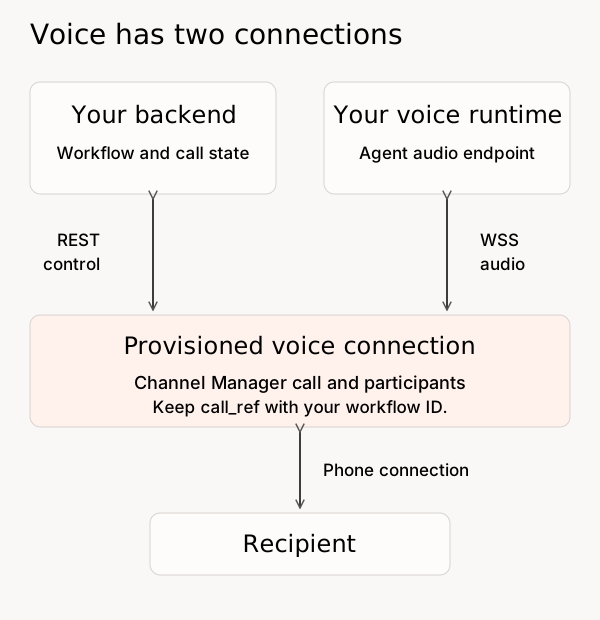
Voice needs a working audio integration before the first call. Have your implementation contact confirm the media protocol, event contract, network access, recording settings, and failure behavior. The REST examples below control the call; they do not implement the audio server.

<figure><img src="https://1651797362-files.gitbook.io/~/files/v0/b/gitbook-x-prod.appspot.com/o/spaces%2F2YwM0LHtEGLt9S21OyC3%2Fuploads%2Fgit-blob-789790773a2fa9a647f9114b8194a355785bdfe4%2Fchannel-manager-voice-flow.svg?alt=media" alt="Your backend uses REST to create and control a Channel Manager call. Your agent runtime uses a separate secure WebSocket media connection for audio. The recipient joins through a phone connection. A call reference links these parts to your workflow."><figcaption><p>Call control and audio are separate connections. Creating the call resource alone does not dial the recipient.</p></figcaption></figure>

For a controlled outbound test, obtain a token with the voice scopes, select an `outbound_voice` use case, and set `CHANNEL_VOICE_STREAM_URL` to your tested `wss://` endpoint. Creating the resource does not yet place a call:

```bash
set -euo pipefail
CALL_RESPONSE=$(jq -n --arg use_case "$CHANNEL_USE_CASE_ID" \
  '{use_case_id: $use_case}' | \
  curl --fail-with-body --silent --show-error \
    --request POST "$CHANNEL_API_BASE/v1/voice-call/" \
    --header "Authorization: Bearer $CHANNEL_ACCESS_TOKEN" \
    --header 'Content-Type: application/json' --data-binary @-)
CHANNEL_CALL_REF=$(printf '%s' "$CALL_RESPONSE" | jq -er '.call_ref')
unset CALL_RESPONSE

jq -n --arg stream "$CHANNEL_VOICE_STREAM_URL" --arg call "$CHANNEL_CALL_REF" \
  '{kind: "media", stream_url: $stream, stream_context: {call_ref: $call}}' | \
  curl --fail-with-body --silent --show-error \
    --request POST "$CHANNEL_API_BASE/v1/voice-call/$CHANNEL_CALL_REF/participant" \
    --header "Authorization: Bearer $CHANNEL_ACCESS_TOKEN" \
    --header 'Content-Type: application/json' --data-binary @-
```

Save the returned `participant_ref` and confirm that your runtime accepts the media connection. Then set `CHANNEL_TEST_RECIPIENT` to the controlled phone number. **The next request dials that number:**

```bash
jq -n --arg recipient "$CHANNEL_TEST_RECIPIENT" \
  '{kind: "dial", role: "callee", to_phone_number: $recipient,
    detect_answering_machine: false}' | \
  curl --fail-with-body --silent --show-error \
    --request POST "$CHANNEL_API_BASE/v1/voice-call/$CHANNEL_CALL_REF/participant" \
    --header "Authorization: Bearer $CHANNEL_ACCESS_TOKEN" \
    --header 'Content-Type: application/json' --data-binary @-

curl --fail-with-body --silent --show-error \
  "$CHANNEL_API_BASE/v1/voice-call/$CHANNEL_CALL_REF" \
  --header "Authorization: Bearer $CHANNEL_ACCESS_TOKEN"
```

Save this participant reference too. A queued participant is not proof that the person answered. Confirm the call state, two-way audio, and the intended agent session. End the test call and read it again to confirm completion:

```bash
curl --fail-with-body --silent --show-error --request DELETE \
  "$CHANNEL_API_BASE/v1/voice-call/$CHANNEL_CALL_REF" \
  --header "Authorization: Bearer $CHANNEL_ACCESS_TOKEN"
curl --fail-with-body --silent --show-error \
  "$CHANNEL_API_BASE/v1/voice-call/$CHANNEL_CALL_REF" \
  --header "Authorization: Bearer $CHANNEL_ACCESS_TOKEN"
```

For an inbound test, call the assigned number and verify that your call-event receiver starts the correct session and attaches the agent's media participant. Test disconnects, no-answer, and any specialist transfer separately. Use call reads to reconcile uncertain participant creation before repeating it. The [voice reference](/developer-guide/platform-api/conversations/channel-manager.md#control-voice-calls) explains the available controls and event-contract handoff.

## 5. Accept the Integration and Hand It Over

Before launch, run these checks on the actual deployment and record the result:

| Check             | Expected result                                                                                                                     |
| ----------------- | ----------------------------------------------------------------------------------------------------------------------------------- |
| Access            | Missing or expired credentials fail. Your client cannot access a designated second test setup.                                      |
| Send and reply    | Correct sender and recipient; saved IDs; reply or call reaches the intended application session.                                    |
| Receiver          | Invalid signatures fail; replay causes one application action; secret rotation preserves reception.                                 |
| Content and audio | Email bodies and attachments are accessible where needed. Voice has working two-way audio and confirmed teardown.                   |
| Opt-out           | The selected channel's suppression rules block subsequent sends. Switching senders or channels does not bypass your consent policy. |
| Uncertain send    | A timeout enters investigation rather than triggering an automatic duplicate send or call.                                          |
| Handoff           | A support owner can find the workflow and channel records, investigate a failure, and reach the right escalation contact.           |

Coordinate suppression tests and cleanup with the channel operator. For supported toll-free SMS, `START`/`UNSTOP` clears line-specific opt-out only. Then, after reviewing renewed consent, a client with `sms:consent:write` can [clear setup-wide suppression](/developer-guide/platform-api/conversations/channel-manager.md#sms-recipient-opt-in-and-opt-out) with a recorded reason. An opt-in-message send record is not proof of consent. See [SMS consent controls](https://docs.concurrence.com/channels/sms).

Remove temporary credentials from the test shell:

```bash
unset CHANNEL_ACCESS_TOKEN CHANNEL_CLIENT_SECRET
```

Keep test and suppression records for the agreed retention period. Use [Troubleshooting](/developer-guide/guides/troubleshooting.md) to raise an issue with the relevant IDs and errors, leaving out credentials and unnecessary message content.


---

# Agent Instructions
This documentation is published with GitBook. GitBook is the documentation platform designed so that both humans and AI agents can read, navigate, and reason over technical content effectively. Learn more at gitbook.com.

## Querying This Documentation
If you need additional information that is not directly available in this page, you can query the documentation dynamically by asking a question.

Perform an HTTP GET request on the current page URL with the `ask` query parameter, and the optional `goal` query parameter:

```
GET https://docs.concurrence.com/developer-guide/guides/integrate-channel-manager.md?ask=<question>&goal=<endgoal>
```

`ask` is the immediate question: it should be specific, self-contained, and written in natural language.
`goal` is optional and describes the broader end goal you are ultimately trying to accomplish on behalf of the user. GitBook uses it to tailor the answer towards what is most useful for that goal.

The response will contain a direct answer to the question and relevant excerpts and sources from the documentation.

Use this mechanism when the answer is not explicitly present in the current page, you need clarification or additional context, or you want to retrieve related documentation sections.