> For the complete documentation index, see [llms.txt](https://docs.concurrence.com/llms.txt). Markdown versions of documentation pages are available by appending `.md` to page URLs; this page is available as [Markdown](https://docs.concurrence.com/developer-guide/guides/operate-and-improve.md).
# Operate and Improve
Investigate a Platform run, use supported operator controls, reconcile incomplete effects, and turn observed failures into repeatable evaluations.
Start with the workspace, run or conversation identifier, approximate time, and the outcome being investigated. Use a credential permitted to inspect that workspace. Operator actions require additional permissions and channel support.
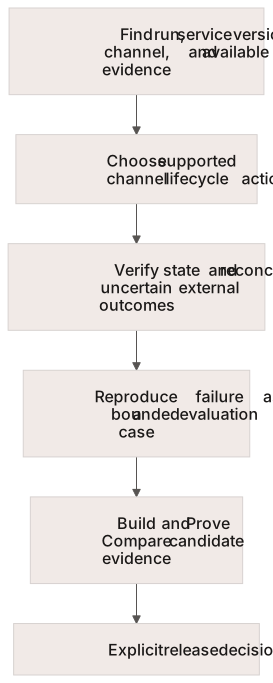
Use the channel’s lifecycle controls, then turn a reproduced failure into a candidate evaluation.
## Find the Execution
In the standard Console workspace, open **Evaluate → Runs**. Operator-only workspaces retain **Operate → Runs**. The unified inventory includes supported conversation and framework run records; the old Conversations listing redirects there. Conversation detail remains the place to inspect the underlying conversation. The [Runs API](/developer-guide/platform-api/conversations/runs.md) documents filtering, detail, and supported controls.
Record the selected service/version, channel, execution state, and available error or correlation identifiers. Read history and traces as evidence with their stated completeness limits. A generated summary or missing recording link is not sufficient to determine whether an action completed.
## Choose the Correct Lifecycle Action
| Observation | Next action and verification |
| ----------------------------------------------------------------- | ----------------------------------------------------------------------------------------------------------------------------------------------------------------------------- |
| An application text conversation has reached its intended outcome | Apply the documented [conversation close](/developer-guide/platform-api/conversations.md) behavior and read back its state; preserve the durable answer before cleanup |
| A persistent text connection drops | Follow the [session protocol](/developer-guide/platform-api/platform-api/sessions.md); verify the conversation state before creating another interaction |
| A managed message thread is complete | Use that [channel's lifecycle](/developer-guide/platform-api/conversations.md); thread identity, terminal closure, and a forced new conversation are separate decisions |
| An eligible voice run needs human intervention | Use your [operator API integration](/developer-guide/platform-api/conversations/operators.md), verify takeover, and verify handback separately; voice operators join by phone |
| An integration action is approved or a request times out | Inspect the target system before retrying; [approval alone does not confirm that the action completed](/developer-guide/guides/verify-an-integration-action.md) |
Do not apply one channel's close or retry behavior to every session type. Where an outcome is ambiguous, preserve identifiers and reconcile before repeating a mutation.
## Recover and Escalate
Follow [Troubleshoot an Integration](/developer-guide/guides/troubleshooting.md) to locate access, configuration, execution, projection, and external-delivery failures. Record the last successful step, the observed error, and the next check. Share only the information needed to investigate through the agreed support channel.
## Improve
Review **Home → Insights** for patterns across runs. Find **Quality** and **Dashboards** through Console search; these pages remain available according to workspace access even though they are not standard sidebar entries. Use [quality metrics](https://docs.concurrence.com/testing/testing/metrics), [production evaluations](/developer-guide/platform-api/safety/production-evals.md), and [trace analysis](/developer-guide/platform-api/safety/call-trace-analysis.md) according to their access and coverage limits.
Turn a reproduced failure into a test case with a stated expected result. Test the proposed configuration against that case using [Build and Prove](/developer-guide/guides/build-and-prove.md). Record cases that could not be evaluated separately from passes, and check model-generated assessments against the underlying run and target-system records.
---
# Agent Instructions
This documentation is published with GitBook. GitBook is the documentation platform designed so that both humans and AI agents can read, navigate, and reason over technical content effectively. Learn more at gitbook.com.
## Querying This Documentation
If you need additional information that is not directly available in this page, you can query the documentation by asking a question.
Perform an HTTP GET request on the following URL with the `ask` and `goal` query parameters:
```
GET https://docs.concurrence.com/developer-guide/guides/operate-and-improve.md?ask=&goal=
```
`ask` is the immediate question: it should be specific, self-contained, and written in natural language.
`goal` is what the user is ultimately trying to achieve, the reason they need the answer. Sharing it helps GitBook give you a better, more relevant answer. A goal is most helpful when it describes the outcome the user wants rather than restating the question. For example, with `ask=how do I create an API token`, a goal like `automate deployments from our CI pipeline` lets GitBook tailor the answer to that use case.
The response will contain a direct answer to the question and relevant excerpts and sources from the documentation.
Use this mechanism when the answer is not explicitly present in the current page, you need clarification or additional context, or you want to retrieve related documentation sections.