> For the complete documentation index, see [llms.txt](https://docs.concurrence.com/llms.txt). Markdown versions of documentation pages are available by appending `.md` to page URLs; this page is available as [Markdown](https://docs.concurrence.com/developer-guide/guides/scribe-capture-to-note.md).
# Scribe: Capture to Finalized Note
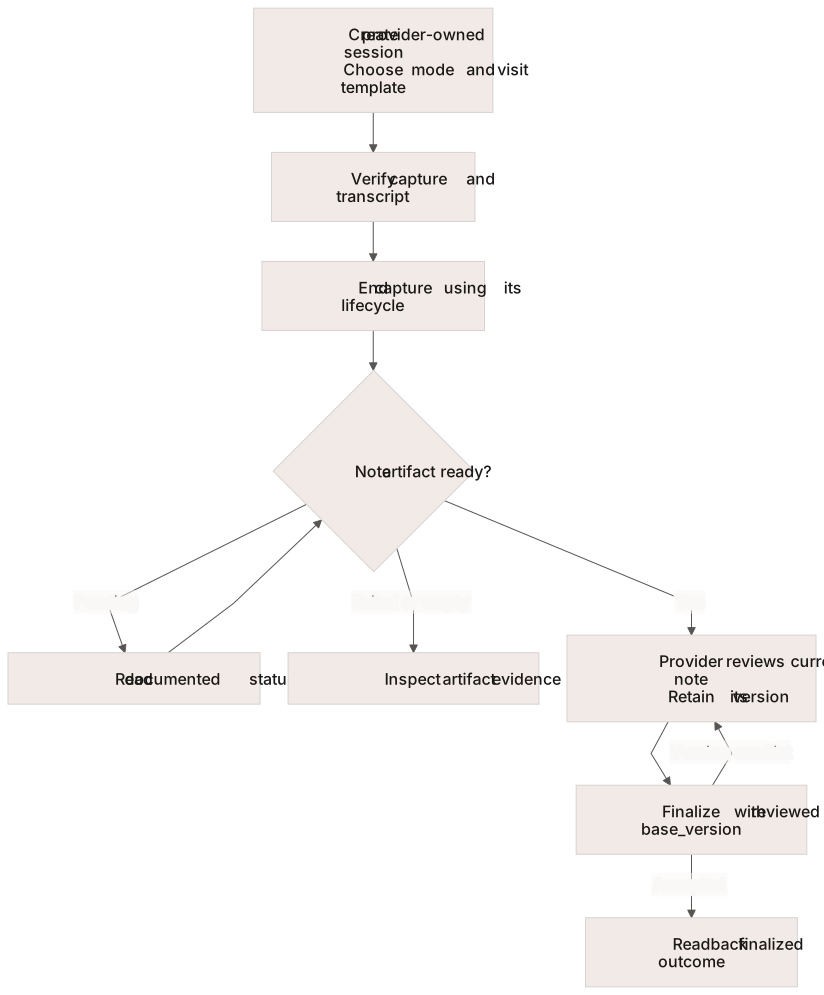
Prepare provider access, create an in-person or Zoom Scribe session, verify transcript and artifact readiness, and finalize the note the provider reviewed.
Use this workflow with a provisioned Scribe deployment and an authorized provider. For integration testing, use an approved synthetic encounter. Confirm the supported visit type and note template, capture method, required permissions, and recording/disclosure process before capture begins.
Capture, artifact readiness, provider review, and version-checked finalization are separate milestones.
## Prepare Access and Capture
Scribe uses its own deployment base and [provider-principal authentication](/developer-guide/platform-api/scribe.md#authentication). The provider's workspace must match the request, and access to a session is scoped to its owner. Read, session-write, and note-write scopes authorize different operations.
Choose in-person microphone capture or Zoom when creating the session. Mode cannot be changed later. Zoom requires the provider's connected account and the supported meeting/disclosure configuration. Use the assigned Scribe schema; Platform text-session endpoints are a different contract.
## Create and Capture
Follow [Create an In-Person Session](/developer-guide/platform-api/scribe/sessions.md#create-an-in-person-session) or [Create a Zoom Session](/developer-guide/platform-api/scribe/sessions.md#create-a-zoom-session). Supply a supported canonical visit type that resolves the note template, including where the generated request model marks the selection optional. Record the returned session identifier.
Use the configured capture client and its supported attachment or Zoom controls. Inspect session state and available transcript evidence. Creating a session does not prove that recording has attached or usable transcript segments have arrived.
## End Capture and Inspect Artifacts
Use the capture mode's [lifecycle operation](/developer-guide/platform-api/scribe/sessions.md#session-lifecycle). An in-person end can be refused while streaming remains attached; a Zoom end acknowledgement can precede transcript finalization. Read the resulting session and [artifact state](/developer-guide/platform-api/scribe/artifacts.md) separately.
When note generation is pending, continue checking its documented read operation. Handle failed and empty results explicitly. A successful generation request or a session in review does not establish that a note is ready. Review the transcript, note, checklist, and coding suggestions according to the provider's workflow; generated content and confidence values do not substitute for that review.
## Finalize the Reviewed Version
Read the current note and retain its version. The provider reviews that version, then the client submits its `base_version` to [Finalize a Note](/developer-guide/platform-api/scribe/artifacts.md#finalize-a-note). If another edit produces a version conflict, reload and have the provider review the new version before submitting again.
Read back the submitted note and session outcome. A finalized artifact is distinct from delivery to another clinical system; verify any separately configured integration at its own boundary.
## Verify Failure and Cleanup
In the approved test deployment, verify the documented stale-version conflict using a mutable test note and an older version. Confirm that the current note remains intact, reload it, and complete the intended review path. Cancel an unfinished test session using the supported lifecycle; finalization and cancellation are not general data-deletion operations. Follow the agreed retention and test-data cleanup process.
Keep the session identifier, capture mode, artifact outcome, reviewed version, finalization result, and correlation identifiers. Use the [Scribe HTTP reference](https://docs.concurrence.com/api-reference/readme/scribe) for exact request and response contracts.
---
# Agent Instructions
This documentation is published with GitBook. GitBook is the documentation platform designed so that both humans and AI agents can read, navigate, and reason over technical content effectively. Learn more at gitbook.com.
## Querying This Documentation
If you need additional information that is not directly available in this page, you can query the documentation dynamically by asking a question.
Perform an HTTP GET request on the current page URL with the `ask` query parameter, and the optional `goal` query parameter:
```
GET https://docs.concurrence.com/developer-guide/guides/scribe-capture-to-note.md?ask=&goal=
```
`ask` is the immediate question: it should be specific, self-contained, and written in natural language.
`goal` is optional and describes the broader end goal you are ultimately trying to accomplish on behalf of the user. GitBook uses it to tailor the answer towards what is most useful for that goal.
The response will contain a direct answer to the question and relevant excerpts and sources from the documentation.
Use this mechanism when the answer is not explicitly present in the current page, you need clarification or additional context, or you want to retrieve related documentation sections.