> For the complete documentation index, see [llms.txt](https://docs.concurrence.com/llms.txt). Markdown versions of documentation pages are available by appending `.md` to page URLs; this page is available as [Markdown](https://docs.concurrence.com/developer-guide/guides/test-managed-sms.md).
# Test a Managed SMS Workflow
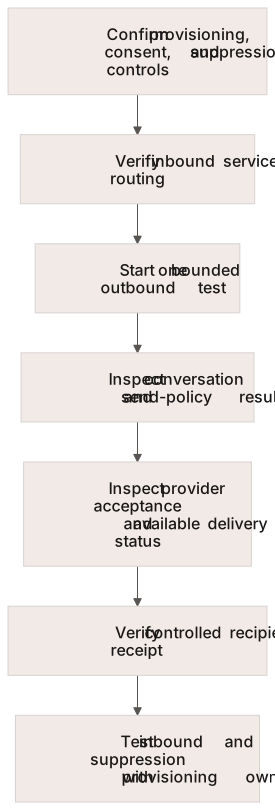
Test a provisioned SMS workflow through routing, consent controls, conversation evidence, recipient delivery, suppression, and operational handoff.
A working text client does not verify SMS delivery. Use a provisioned test use case and a recipient controlled by your test team to exercise the actual channel. This guide follows Concurrence's managed SMS boundaries; use [SMS](/developer-guide/platform-api/conversations/sms.md) for the implementation contract and [SMS concepts](https://docs.concurrence.com/channels/sms) for sender and consent-control behavior.
## Before You Start
Complete managed provisioning with Concurrence: the sender resources and registration, eligible use-case identifier, workspace linkage, and inbound routing must be ready. Your team must hold consent evidence appropriate to the sending brand and intended test messages. Also have a configured test service, a controlled recipient, access to the exposed delivery evidence, and a Concurrence contact for managed-channel issues.
A workspace credential can use the public service-binding and conversation operations. It does not grant the separate sender-provisioning or suppression-management permissions. Record the test sender, recipient, use case, and responsible operator before sending.
Keep these observations separate. Missing delivery evidence remains an unresolved result.
## 1. Verify Routing
Use [Use Cases and Bindings](/developer-guide/platform-api/workspaces/use-cases.md) to inspect the provisioned use case's service binding. Confirm that inbound test content reaches the expected service. A binding establishes routing; it does not establish registration approval or recipient consent.
## 2. Send One Bounded Test
Follow [Starting an Outbound Conversation](/developer-guide/platform-api/conversations.md#starting-an-outbound-conversation) with the SMS channel, configured service, managed use case, and controlled recipient. The managed channel selects the sender from its provisioned resources.
Record separate observations:
1. Whether conversation creation succeeded and which conversation was selected.
2. What the agent produced and whether channel policy accepted the send.
3. Provider acceptance and any later delivery status available for the deployment.
4. What the controlled recipient actually received.
If a final carrier receipt is unavailable, record that absence. A screenshot from the controlled recipient can support this test's observed receipt; it does not establish a universal delivery guarantee.
## 3. Exercise Inbound and Suppression Behavior
Reply from the controlled recipient and verify that ordinary content reaches the intended non-terminal conversation. Phone continuity does not by itself establish patient identity.
On the supported sender path, exercise the recognized opt-out flow with the provisioning owner. Verify that ordinary sends are suppressed across the managed business setup. Do not try another sender or conversation as a way to bypass suppression.
On the supported toll-free path, `START` or `UNSTOP` clears the line-specific opt-out only. Setup-wide suppression requires a separately authorized reversal with a recorded reason. Agree on test cleanup with the channel operator before exercising this case. A client with Channel Manager's `sms:consent:write` permission can use the [recipient API](/developer-guide/platform-api/conversations/channel-manager.md#sms-recipient-opt-in-and-opt-out) for this step; a workspace API key alone cannot authorize it.
## 4. Decide Whether the Channel Is Ready
Pass the test only when routing, expected recipient behavior, policy checks, and exception ownership are supported by the evidence. Mark an unavailable receipt or unresolved send explicitly rather than converting it into delivery success. An opt-in-message send record establishes provider acceptance of that message, not proof of prior consent.
Close test conversations when appropriate. Retain suppression and consent records according to the agreed process; do not clear them merely to get a test to pass. For a production launch, repeat the relevant cases with the actual approved sender configuration, channel-specific limits, monitoring, and staffed escalation path.
Use [Troubleshoot an Integration](/developer-guide/guides/troubleshooting.md) to package missing-delivery evidence for the team that owns the failing boundary.
---
# Agent Instructions
This documentation is published with GitBook. GitBook is the documentation platform designed so that both humans and AI agents can read, navigate, and reason over technical content effectively. Learn more at gitbook.com.
## Querying This Documentation
If you need additional information that is not directly available in this page, you can query the documentation dynamically by asking a question.
Perform an HTTP GET request on the current page URL with the `ask` query parameter, and the optional `goal` query parameter:
```
GET https://docs.concurrence.com/developer-guide/guides/test-managed-sms.md?ask=&goal=
```
`ask` is the immediate question: it should be specific, self-contained, and written in natural language.
`goal` is optional and describes the broader end goal you are ultimately trying to accomplish on behalf of the user. GitBook uses it to tailor the answer towards what is most useful for that goal.
The response will contain a direct answer to the question and relevant excerpts and sources from the documentation.
Use this mechanism when the answer is not explicitly present in the current page, you need clarification or additional context, or you want to retrieve related documentation sections.