> For the complete documentation index, see [llms.txt](https://docs.concurrence.com/llms.txt). Markdown versions of documentation pages are available by appending `.md` to page URLs; this page is available as [Markdown](https://docs.concurrence.com/developer-guide/guides/verify-an-integration-action.md).
# Verify an Integration Action
Verify a configured integration action from authorization through target acknowledgement, including rejection, ambiguous delivery, and test cleanup.
Use this guide after [First Verified Conversation](/developer-guide/guides/first-verified-conversation.md) to verify work outside the conversation. The example is a synthetic appointment change against a scheduling test system. Your integration owner supplies the target contract and fixture; Concurrence does not define one universal appointment-write payload for every scheduling system.
## Prerequisites
Have a configured test service, a test integration and endpoint, credentials limited to synthetic records, and permission to inspect the operation's evidence. Choose one fixture appointment, record its starting value, and document how the target can be read back and restored. The integration owner must verify that the selected endpoint has no production side effects.
Decide whether the test uses direct execution or [approval-gated integration writes](/developer-guide/platform-api/integrations/approval-gated-integration-writes.md).
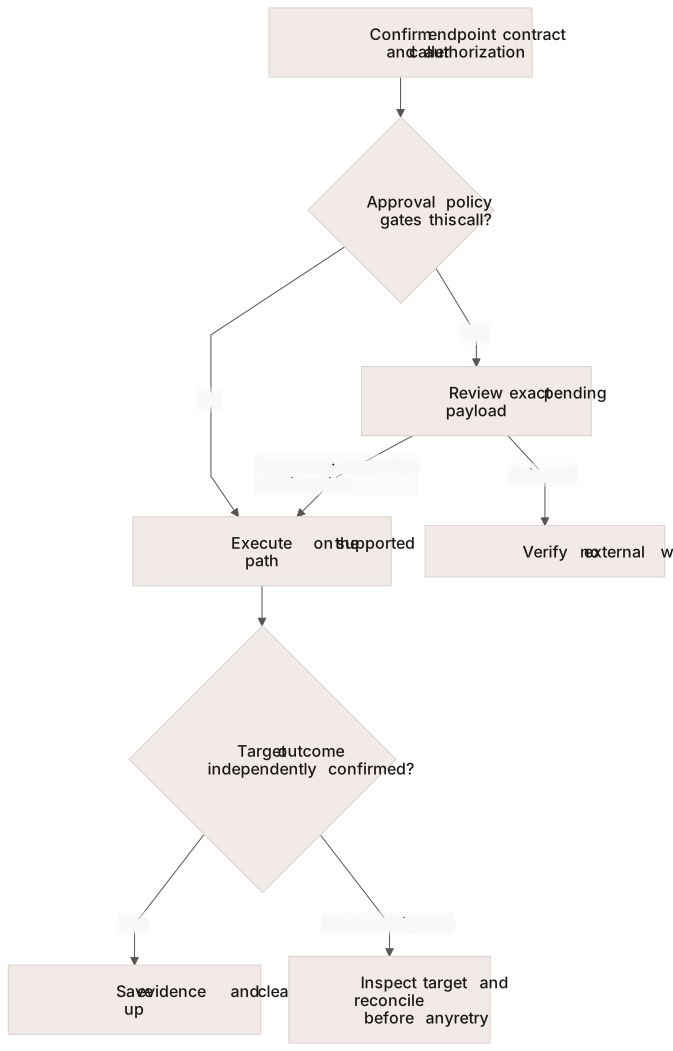
Approval authorizes a supported call. Only destination evidence establishes the external outcome.
## 1. Establish the Contract and Access
Use [Integrations](/developer-guide/platform-api/integrations.md) to inspect the configured endpoint and its input schema. Verify that the test service exposes the intended tool and that its principal has the required access. [Tool Testing](/developer-guide/platform-api/functions/tool-testing.md) explains resolution and the separate integration-endpoint test operation.
Record the service configuration, integration/endpoint identifiers, synthetic target record, proposed old-to-new change, and external read-back method. A test label or a generic dry-run flag is not a universal guarantee that nothing will be written.
## 2. Test the Action in Isolation
Invoke the integration endpoint's dedicated test operation using the fixture payload that matches its schema. Save the returned result and inspect the target record independently. Classify the result as confirmed, rejected, failed, or unresolved.
A returned success from a tool can describe request acceptance rather than a committed target change. If the target processes requests asynchronously, use its documented completion/read-back procedure. Do not invent a retry or idempotency contract where the integration does not provide one. The test follows the same retry rules as a conversation, so a write that times out or gets a `502`, `504`, `520`, or `524` goes out once and stays unresolved until you read the target back. So does a write answered with a 2xx whose body doesn't hold what its `field` or `graphql` success rule reads; see [Writes Answered With a 2xx](/developer-guide/platform-api/integrations.md#writes-answered-with-a-2xx). The test response reports such a write as `"outcome": "unknown"`; classify it as unresolved, not failed. The test waits as long as the endpoint's own timeout allows, so check `over_text_budget` before you rely on the endpoint in a text conversation: when it is `true`, the call took as long as a text turn waits on one and would time out there. See [Endpoint Retries](/developer-guide/platform-api/integrations.md#endpoint-retries).
## 3. Exercise the Conversation Path
Start a new test conversation with the configured service and request the same bounded change. Inspect the selected tool, its input, the result, and the resulting agent statement through [Conversation detail](/developer-guide/platform-api/conversations.md) with tool-call metadata requested where supported.
For an approval-gated call, verify that the target remains unchanged while the write is parked. Review the exact pending payload, record an approval or rejection through the supported decision operation, and exercise the next supported turn. A granted decision alone is not target acknowledgement. Only text conversations offer approval-gated tools, so exercise this path in a text conversation; see [Approval-Gated Integration Writes](/developer-guide/platform-api/integrations/approval-gated-integration-writes.md#key-concepts).
## 4. Prove the Failure Boundary
| Case | Evidence required before passing |
| ---------------------------------------------------------------------------------------------------------- | ----------------------------------------------------------------------------------------------------------------------------------------------------------------------------------------------------------- |
| Missing or unauthorized input | The action is refused and the target remains unchanged |
| Reviewer rejects a parked write | No external write; the agent communicates the rejection accurately |
| Target rejects the request | The actual error is recorded; the agent does not confirm a completed change |
| No answer that settles the write, such as a timeout or a 2xx body its `field` or `graphql` rule can't read | The tool result reports `"outcome": "unknown"`, the platform doesn't send the write again, and the agent is told to say it can't confirm the request went through; target read-back establishes the outcome |
| Successful target change | Read-back confirms the intended record and value; the agent's statement matches that evidence |
An approval consumption can precede an interrupted external call. Verify the destination before any manual retry. Repeating a conversation turn is not proof that a target write will be deduplicated.
### Reconcile Unknown Outcomes
A write that got no answer saying whether it went through, for example after a timeout, has an unknown outcome: the vendor may have made it. In the conversation's tool calls it reports `succeeded: false`, with `"outcome": "unknown"` in its result. The platform doesn't send it again in that conversation, and the reply checks don't count it as done. See [Endpoint Retries](/developer-guide/platform-api/integrations.md#endpoint-retries) for the full rule.
Nothing reconciles these writes automatically. Find them in your tool-call records, read the target to learn what happened, and complete or undo the change through the target's own process.
## 5. Save Evidence and Clean Up
Use the [evaluation packet](https://docs.concurrence.com/platform-overview/evaluation-packet) to record each case, configuration, conversation, operation, target acknowledgement, and reviewer decision. Restore the synthetic appointment using the target's supported process, close test conversations, and reconcile any unresolved writes before deleting test evidence.
You are ready to extend the workflow when both normal and failure cases have target evidence. Move to [managed SMS testing](/developer-guide/guides/test-managed-sms.md) for channel behavior or [troubleshooting](/developer-guide/guides/troubleshooting.md) when the evidence stops at an intermediate stage.
---
# Agent Instructions
This documentation is published with GitBook. GitBook is the documentation platform designed so that both humans and AI agents can read, navigate, and reason over technical content effectively. Learn more at gitbook.com.
## Querying This Documentation
If you need additional information that is not directly available in this page, you can query the documentation by asking a question.
Perform an HTTP GET request on the following URL with the `ask` and `goal` query parameters:
```
GET https://docs.concurrence.com/developer-guide/guides/verify-an-integration-action.md?ask=&goal=
```
`ask` is the immediate question: it should be specific, self-contained, and written in natural language.
`goal` is what the user is ultimately trying to achieve, the reason they need the answer. Sharing it helps GitBook give you a better, more relevant answer. A goal is most helpful when it describes the outcome the user wants rather than restating the question. For example, with `ask=how do I create an API token`, a goal like `automate deployments from our CI pipeline` lets GitBook tailor the answer to that use case.
The response will contain a direct answer to the question and relevant excerpts and sources from the documentation.
Use this mechanism when the answer is not explicitly present in the current page, you need clarification or additional context, or you want to retrieve related documentation sections.