> For the complete documentation index, see [llms.txt](https://docs.concurrence.com/llms.txt). Markdown versions of documentation pages are available by appending `.md` to page URLs; this page is available as [Markdown](https://docs.concurrence.com/developer-guide/platform-api/conversations/channel-manager.md).

# Channel Manager

Use Channel Manager with your own application. Find setup requirements, credentials, messaging and voice APIs, and the differences between channels.

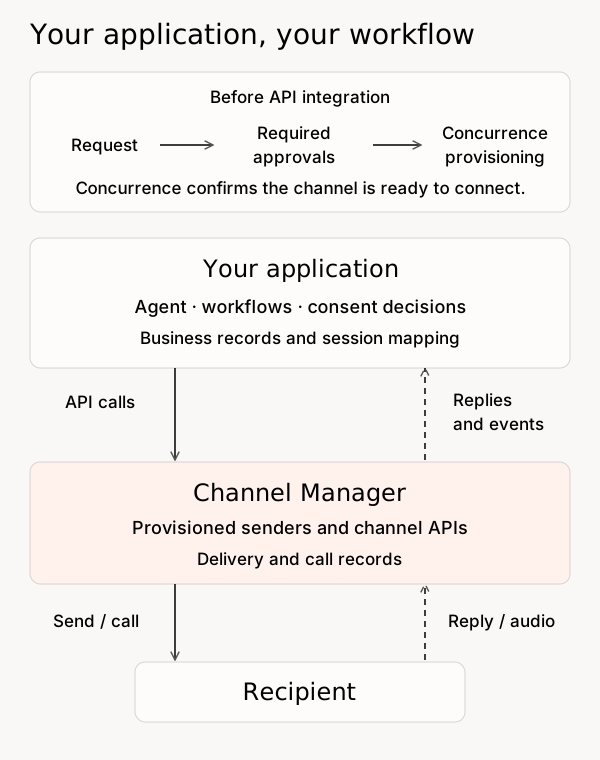
Channel Manager connects your application to phone calls, SMS/MMS, email, iMessage, and WhatsApp. With the standalone API, your team configures and runs the agent. Channel Manager provides the provisioned senders, channel APIs, and delivery records.

Your application owns the conversation, consent decisions, scheduling, and business records. You can use Channel Manager without a Concurrence workspace, agent, service, or Developer Console. Start with [Integrate Channel Manager Through the API](/developer-guide/guides/integrate-channel-manager.md).

<figure><img src="https://1651797362-files.gitbook.io/~/files/v0/b/gitbook-x-prod.appspot.com/o/spaces%2F2YwM0LHtEGLt9S21OyC3%2Fuploads%2Fgit-blob-121a7d8d6e275a21144f9e8b39526027574b4ca9%2Fchannel-manager-ownership.svg?alt=media" alt="Before API integration, request a channel, complete the required approvals, and receive the provisioned setup from Concurrence. The customer application owns its agent, workflow, consent decisions, and records. Channel Manager connects it to the recipient through the approved channel."><figcaption><p>Required approvals and Concurrence provisioning come before API integration. Test the integration before launch. The boxes show responsibilities, not deployment locations.</p></figcaption></figure>

If you use a Concurrence workspace service, follow the separate [service-binding path](#service-binding).

Webchat is separate from the standalone Channel Manager API. Your application can provide its own webchat; to embed a Concurrence Platform agent, see [Serve an Agent From a Web App](/developer-guide/platform-api/conversations/serve-agent-from-web-app.md).

## Supported Channels

Choose a channel for the intended workflow, then confirm that its sender and use case are approved. Access to an API does not establish permission to run a particular outreach program.

| Channel                | Before the first test                                                                                                          | What differs                                                                                                      |
| ---------------------- | ------------------------------------------------------------------------------------------------------------------------------ | ----------------------------------------------------------------------------------------------------------------- |
| SMS/MMS                | Assigned number, required sender registration, and recipient consent                                                           | SMS replies do not identify a specific outbound message. MMS also needs verified content access.                  |
| Email                  | Verified sending domain, sender, `inbound_mode` (receiving modes also need verified inbound MX), and unsubscribe configuration | Replies can carry a parent message reference; bodies and attachments need authenticated retrieval.                |
| iMessage               | Assigned sending lines and an approved recipient                                                                               | Delivery may fall back to SMS. Check the reported service and downgrade result.                                   |
| WhatsApp               | Provisioned business number and a recipient who has contacted the use case                                                     | The current send API accepts free-form replies within 23 hours of an inbound message. It does not send templates. |
| Inbound/outbound voice | Assigned number, voice event receiver, and a compatible audio endpoint                                                         | REST controls the call and participants. Audio uses a separate connection to your runtime.                        |

## Provision a Channel

Request the channel through your Concurrence implementation contact. Describe the intended sender, recipients, purpose, and sample content. Your contact will confirm which sender registrations and channel-provider approvals are required.

Before using the route, get confirmation that the required approvals are complete and the sender and use case are ready. Submitting a request or obtaining API credentials does not approve the channel or provision it automatically.

Ask your Concurrence implementation contact for the setup ID, use-case ID, assigned sender, and setup-scoped client credentials. A **setup** is the access boundary for channel resources. A **use case** identifies the provisioned purpose, channel, and routing configuration within it.

For messaging, provide an HTTPS receiver and obtain its signing secret. For voice, agree the call-event and audio connection contracts as well. Confirm the API host, processing region, retention, and support responsibilities before handling customer data. See [Program Readiness](https://docs.concurrence.com/channels/program-readiness).

## Standalone API

Use Channel Manager-issued IDs to identify resources in your application, API requests, and support records. Save message IDs alongside your own workflow ID; do not depend on provider identifiers.

The current public base URL is `https://channels.api-us.concurrence.com`. Its [OpenAPI schema](https://channels.api-us.concurrence.com/openapi.json) and [full interactive reference](https://channels.api-us.concurrence.com/redoc) are separate from the workspace Platform API. Use the host assigned during onboarding. Using this public endpoint does not mean Channel Manager runs in your cloud account; that deployment requires its own agreement and acceptance.

Keep the host in configuration. Change it only when you receive an explicit API migration notice; a website or email-domain change does not change API URLs or callback destinations.

### Authenticate

Exchange the provisioned client ID and secret for a bearer token. Tokens last one hour; there is no refresh token. Request the scopes needed for your channel and check the returned `scope`: ungranted scopes are omitted. Access is restricted by both operation scope and setup ID.

Keep client secrets on your server. Use separate credentials for runtime traffic and administration. Rotating a client secret prevents new token exchanges with that secret; issued tokens can remain valid until expiry.

{% openapi src="<https://channels.api-us.concurrence.com/openapi.json>" path="/v1/oauth/token" method="post" %}
<https://channels.api-us.concurrence.com/openapi.json>
{% endopenapi %}

### Inspect Provisioned Use Cases

List the use cases in your assigned setup, then read the selected use case. Check its channel, sender configuration, and receiver URL against the provisioning handoff. For phone-based channels, use the detailed read to inspect assigned numbers; the collection response can leave `phone_numbers` empty.

{% openapi src="<https://channels.api-us.concurrence.com/openapi.json>" path="/v1/use-case" method="get" %}
<https://channels.api-us.concurrence.com/openapi.json>
{% endopenapi %}

{% openapi src="<https://channels.api-us.concurrence.com/openapi.json>" path="/v1/use-case/{use\_case\_id}" method="get" %}
<https://channels.api-us.concurrence.com/openapi.json>
{% endopenapi %}

### Send and Reconcile SMS

Save the Channel Manager message `id` with your workflow ID. Use it for message and attachment reads. A successful send response means the provider accepted the message. Read the message again for later delivery or error information.

The send operation has no client-supplied idempotency key. After a timeout, reconcile the attempt before resending. When listing messages, supply `setup_id` and at least one of `use_case_id` or `peer_phone_number`.

{% openapi src="<https://channels.api-us.concurrence.com/openapi.json>" path="/v1/sms/" method="post" %}
<https://channels.api-us.concurrence.com/openapi.json>
{% endopenapi %}

{% openapi src="<https://channels.api-us.concurrence.com/openapi.json>" path="/v1/sms/{message\_id}" method="get" %}
<https://channels.api-us.concurrence.com/openapi.json>
{% endopenapi %}

{% openapi src="<https://channels.api-us.concurrence.com/openapi.json>" path="/v1/sms" method="get" %}
<https://channels.api-us.concurrence.com/openapi.json>
{% endopenapi %}

MMS uses the same send operation with attachments. Test retrieval from your application before enabling inbound media.

{% openapi src="<https://channels.api-us.concurrence.com/openapi.json>" path="/v1/sms/{sms\_id}/attachment/{attachment\_name}" method="get" %}
<https://channels.api-us.concurrence.com/openapi.json>
{% endopenapi %}

### SMS Recipient Opt-In and Opt-Out

Recipient controls use separate setup-scoped permissions: `sms:consent:read` to read opt-outs and `sms:consent:write` to send an opt-in message or clear a setup-wide opt-out. A workspace API key or an `sms:send` grant alone does not authorize these operations. Supply recipient phone numbers in E.164 format.

**Send the registered opt-in message.** Supply `use_case_id` and `to_phone_number`. Channel Manager selects the confirmation copy and sender from the use case's verified campaign or approved US/Canada toll-free registration. This is required before ordinary sends on the supported US long-code and US/Canada toll-free paths. Your application must already hold the appropriate consent evidence.

The operation returns `201` without a message resource ID. Once the recipient has an opt-in record for that use case, repeating it is a no-op. It returns `409` for an active setup-wide opt-out; sending an opt-in message cannot reverse a STOP. The record establishes acceptance of the confirmation send, not receipt or proof of consent.

{% openapi src="<https://channels.api-us.concurrence.com/openapi.json>" path="/v1/sms/opt-in" method="post" %}
<https://channels.api-us.concurrence.com/openapi.json>
{% endopenapi %}

**Read opt-outs.** Supply `setup_id`, with optional `user_phone_number` to check one recipient. Results contain active setup-wide suppressions by default; `include_deleted=true` includes cleared records and their reversal reasons. Use the returned CM record and message IDs for correlation. An empty result is not proof of consent or of clearance on every sending line.

{% openapi src="<https://channels.api-us.concurrence.com/openapi.json>" path="/v1/sms/opt-out" method="get" %}
<https://channels.api-us.concurrence.com/openapi.json>
{% endopenapi %}

**Clear a setup-wide opt-out.** An authorized caller supplies `setup_id`, `user_phone_number`, and a non-empty `reason` after reviewing renewed consent. Success returns `204` and retains the cleared record. The operation returns `404` if no active setup-wide opt-out exists, or `409` while a toll-free line under the setup still has an active opt-out for that recipient. The recipient must text `START` or `UNSTOP` to the affected toll-free line first.

{% openapi src="<https://channels.api-us.concurrence.com/openapi.json>" path="/v1/sms/remove-setup-opt-out" method="post" %}
<https://channels.api-us.concurrence.com/openapi.json>
{% endopenapi %}

Recipients opt out through the supported [SMS keywords](https://docs.concurrence.com/channels/sms#opt-out-and-re-subscription). The current public API exposes opt-out reads and reversal; it does not expose an operation to create an opt-out directly.

### Send and Reconcile Email

Send inline HTML or use a stored template. For an unsubscribable use case, inline HTML must reference both `unsubscribe_link` and `unsubscribe_from_all_link`; Channel Manager supplies the URLs. For a non-unsubscribable use case, inline HTML must contain no template variables. Stored templates have their own declared parameters.

Save the returned Channel Manager email `id`. Use it for email reads and as `email_id` when reading events; the event query also requires `setup_id`. These reads expose delivery, bounce, and complaint information. Treat opens and clicks as tracking signals, not proof of an outcome.

When replying to an inbound email, supply its Channel Manager ID as `reply_to_inbound_email_id`. It must belong to the same setup and use case. The send path has no client-supplied idempotency key, so reconcile uncertain sends before retrying.

To correlate an inbound reply, read the email using the callback's `inbound_message_ref`. The returned `in_reply_to_email_id` identifies the outbound CM email it replies to, or is `null` for an unthreaded message. Use these CM IDs for threading.

{% openapi src="<https://channels.api-us.concurrence.com/openapi.json>" path="/v1/email/" method="post" %}
<https://channels.api-us.concurrence.com/openapi.json>
{% endopenapi %}

{% openapi src="<https://channels.api-us.concurrence.com/openapi.json>" path="/v1/email/{email\_id}" method="get" %}
<https://channels.api-us.concurrence.com/openapi.json>
{% endopenapi %}

{% openapi src="<https://channels.api-us.concurrence.com/openapi.json>" path="/v1/email/event" method="get" %}
<https://channels.api-us.concurrence.com/openapi.json>
{% endopenapi %}

Sending requires the email setup's sending DNS records (DKIM, MAIL FROM, and DMARC) to be verified; otherwise the send returns `409`. The inbound MX record is not needed to send. Whether a use case receives email at all depends on its `inbound_mode` (`send_only`, `replies_only`, or `all_inbound`), shown on the use-case read; a `send_only` use case drops inbound email, including replies. Changing a `send_only` use case to a receiving mode returns `409` until inbound MX is verified. See [Email](https://docs.concurrence.com/channels/email#use-cases-and-sender-identities) for the modes.

Inbound bodies and attachments need a separate read. Confirm that the configured content URLs are accessible from your deployment before relying on email replies.

{% openapi src="<https://channels.api-us.concurrence.com/openapi.json>" path="/v1/email/{email\_id}/body" method="get" %}
<https://channels.api-us.concurrence.com/openapi.json>
{% endopenapi %}

{% openapi src="<https://channels.api-us.concurrence.com/openapi.json>" path="/v1/email/{email\_id}/attachment/{filename}" method="get" %}
<https://channels.api-us.concurrence.com/openapi.json>
{% endopenapi %}

### Send and Reconcile iMessage

Send text, one media file, or both within the operation’s limits. Before the recipient replies to the selected line, sends are text-only within the limits below. The service prefers a pool line the contact has replied to, then the most recently used line, then another available line. Delivery can fall back to SMS; do not use this route when your program requires iMessage-only delivery. Read the message's `service`, `was_downgraded`, and delivery/error fields after sending.

Replies do not carry a parent outbound reference. Use your own session mapping, as described in the [receiver walkthrough](https://docs.concurrence.com/developer-guide/platform-api/conversations/pages/TWFPrOxAvAp4FKKfh07v#id-3.-connect-your-inbound-receiver). Reconcile an uncertain send before retrying; this endpoint has no client-supplied idempotency key.

{% openapi src="<https://channels.api-us.concurrence.com/openapi.json>" path="/v1/imessage/" method="post" %}
<https://channels.api-us.concurrence.com/openapi.json>
{% endopenapi %}

{% openapi src="<https://channels.api-us.concurrence.com/openapi.json>" path="/v1/imessage/{message\_id}" method="get" %}
<https://channels.api-us.concurrence.com/openapi.json>
{% endopenapi %}

{% openapi src="<https://channels.api-us.concurrence.com/openapi.json>" path="/v1/imessage/{message\_id}/media" method="get" %}
<https://channels.api-us.concurrence.com/openapi.json>
{% endopenapi %}

Before a contact’s first reply to the selected line, messages are limited to 300 characters, cannot include media, links, phone numbers, or email addresses, and stop after six recorded sent/delivered messages. A pre-reply restriction returns `422`; a content-check failure does not silently authorize the send. Setup-wide iMessage opt-outs also block sends with `422`; the recipient can text `START` to opt back in. These controls are separate from [SMS recipient controls](#sms-recipient-opt-in-and-opt-out).

### Reply Through WhatsApp

Use the business-scoped recipient ID (BSUID) from the inbound event's `caller_ref`, not a phone number. The recipient must have sent a message to this use case within the last 23 hours. The current send operation supports free-form messages; the presence of a template-creation API does not provide template sending or cold outreach through this route.

Save the returned `message_id`, which is a Channel Manager-issued message ID. The current public schema has no WhatsApp message-read or delivery-event-list operation. Before launch, ask your channel operator how to investigate delivery and uncertain sends. The messaging receiver does not provide a delivery-event feed.

{% openapi src="<https://channels.api-us.concurrence.com/openapi.json>" path="/v1/whatsapp/" method="post" %}
<https://channels.api-us.concurrence.com/openapi.json>
{% endopenapi %}

### Control Voice Calls

Voice separates call control from audio. Creating a call reserves a call reference and sender number; it does not dial anyone. Add a `media` participant to connect your runtime's `wss://` audio endpoint, and a `dial` participant to call the recipient. The audio endpoint must implement the provisioned media protocol; a generic agent WebSocket is not sufficient.

Participant creation returns before the person answers or joins. Read the call and participants to track those transitions. Keep `call_ref` and each `participant_ref` with your application's session ID. Ending a connected call requests teardown; read it again to confirm `ended_at`.

These APIs also support human participants and participant redirection. Design and test the handoff with your voice integration owner before using it with customers. Confirm recording, retention, and disclosure requirements during provisioning.

Deleting a participant removes that leg, including canceling a still-ringing destination. A leg already recorded as having left returns `204`; an unknown call or participant remains `404`. Until the conference reference is available, deletion returns `409`, so retry after checking call state rather than assuming removal.

{% openapi src="<https://channels.api-us.concurrence.com/openapi.json>" path="/v1/voice-call/{call\_ref}/participant/{participant\_ref}" method="delete" %}
<https://channels.api-us.concurrence.com/openapi.json>
{% endopenapi %}

{% openapi src="<https://channels.api-us.concurrence.com/openapi.json>" path="/v1/voice-call/" method="post" %}
<https://channels.api-us.concurrence.com/openapi.json>
{% endopenapi %}

{% openapi src="<https://channels.api-us.concurrence.com/openapi.json>" path="/v1/voice-call/{call\_ref}/participant" method="post" %}
<https://channels.api-us.concurrence.com/openapi.json>
{% endopenapi %}

{% openapi src="<https://channels.api-us.concurrence.com/openapi.json>" path="/v1/voice-call/{call\_ref}" method="get" %}
<https://channels.api-us.concurrence.com/openapi.json>
{% endopenapi %}

{% openapi src="<https://channels.api-us.concurrence.com/openapi.json>" path="/v1/voice-call/{call\_ref}" method="delete" %}
<https://channels.api-us.concurrence.com/openapi.json>
{% endopenapi %}

The participant media-stream operation below forks that participant's incoming audio in one direction. It is separate from the `media` participant used to connect the agent's audio. Start it only after the participant has joined and before it leaves; either an unjoined or departed participant returns `409`, as does a repeated start. If the participant leg has already ended by the time the fork is attempted - for example when the leave notification lags the recorded departure - the operation also returns `409` rather than a server error, and the once-only start guard is not consumed, so you can reconcile and retry. Supply per-fork string metadata in `stream_context`, which is echoed in the stream connection parameters; do not rely on URL query parameters for that context.

{% openapi src="<https://channels.api-us.concurrence.com/openapi.json>" path="/v1/voice-call/{call\_ref}/participant/{participant\_ref}/media-stream" method="post" %}
<https://channels.api-us.concurrence.com/openapi.json>
{% endopenapi %}

**Forwarding destinations.** Voice use cases require approved forwarding destinations in `allowed_forwarding_numbers`, set when the use case is created. The list applies to dialed operator and transfer participants and to dial redirects. An empty list denies them, and a denied target returns `422` with `forwarding_number_not_allowed`. The ordinary outbound callee and media participants are not gated. Have the provisioning owner configure the list, then verify each transfer destination. A configured service forwarding number alone does not establish channel approval.

For inbound calls, have Concurrence configure the number's routing and your call-event receiver. The receiver starts or resumes your agent and attaches its media participant to the received call. Voice events are separate from messaging `inbound-turn` callbacks; the public schema does not currently define their payloads. Obtain and test the event contract during voice onboarding.

### Messaging Webhook Secrets

Messaging callbacks use a per-use-case signing secret. Explicit rotation returns the new secret once and an `old_secret_lasts_until` boundary. During the overlap, a callback can carry signatures from both secrets. Changing the receiver URL also rotates the secret, without the same overlap. Coordinate either change with the receiver owner.

See the [receiver walkthrough](https://docs.concurrence.com/developer-guide/platform-api/conversations/pages/TWFPrOxAvAp4FKKfh07v#id-3.-connect-your-inbound-receiver) for signature checks, duplicate handling, and session mapping.

{% openapi src="<https://channels.api-us.concurrence.com/openapi.json>" path="/v1/use-case/{use\_case\_id}/webhook-secret" method="post" %}
<https://channels.api-us.concurrence.com/openapi.json>
{% endopenapi %}

## Service Binding

A service binding is needed when a Concurrence workspace service handles the conversation. It links the provisioned use case to that workspace and service. Rebinding can select another service in the same workspace; it cannot claim a use case already bound elsewhere.

A customer-owned application using the standalone API does not need this binding. See [Use Cases & Bindings](/developer-guide/platform-api/workspaces/use-cases.md#service-binding) for the workspace API operations.


---

# Agent Instructions
This documentation is published with GitBook. GitBook is the documentation platform designed so that both humans and AI agents can read, navigate, and reason over technical content effectively. Learn more at gitbook.com.

## Querying This Documentation
If you need additional information that is not directly available in this page, you can query the documentation by asking a question.

Perform an HTTP GET request on the following URL with the `ask` and `goal` query parameters:

```
GET https://docs.concurrence.com/developer-guide/platform-api/conversations/channel-manager.md?ask=<question>&goal=<user_goal>
```

`ask` is the immediate question: it should be specific, self-contained, and written in natural language.
`goal` is what the user is ultimately trying to achieve, the reason they need the answer. Sharing it helps GitBook give you a better, more relevant answer. A goal is most helpful when it describes the outcome the user wants rather than restating the question. For example, with `ask=how do I create an API token`, a goal like `automate deployments from our CI pipeline` lets GitBook tailor the answer to that use case.

The response will contain a direct answer to the question and relevant excerpts and sources from the documentation.

Use this mechanism when the answer is not explicitly present in the current page, you need clarification or additional context, or you want to retrieve related documentation sections.
