> For the complete documentation index, see [llms.txt](https://docs.concurrence.com/llms.txt). Markdown versions of documentation pages are available by appending `.md` to page URLs; this page is available as [Markdown](https://docs.concurrence.com/developer-guide/platform-api/conversations/voice-agent.md).

# Voice Agent

Understand the real-time voice pipeline, context graph execution, tool calls, emotion adaptation, operator takeover, recordings, and post-call analysis.

The Concurrence voice agent powers real-time voice conversations. It handles inbound and outbound phone calls with speech understanding, text-to-speech, tool execution, safety monitoring, and context-graph or native/realtime runtime behavior. Supported service configurations can load projected patient context, emit source-attributed world events, and adapt responses from best-effort acoustic analysis; those capabilities vary by runtime and configured tools.

{% hint style="warning" %}
**Reliability target.** This system handles healthcare scheduling calls where callers may be in distress, pain, or crisis. Optional intelligence features use best-effort fallbacks where the active runtime supports them. Failures in required telephony, speech, model, or runtime dependencies can still delay or end a call, so monitor call and session outcomes.
{% endhint %}

{% hint style="info" %}
**Voice settings and Classic API differences.** Voice settings (tone, speed, keyterms, sensitive topics, post-call flags) are configured at the workspace level; see [Workspaces, Voice Settings](/developer-guide/platform-api/workspaces.md#voice-settings). Classic API offers [WebSocket voice streaming](/developer-guide/classic-api/core-api/conversations/conversations-voice.md) for text-based apps. Platform API voice supports phone calls and, when configured, acoustic emotion analysis, projected context, and operator escalation.
{% endhint %}

## Audio Pipeline Architecture

The standard phone-call runtime uses the five-layer pipeline below. Optional emotion, world-model, and post-call stages depend on service configuration, available data, and runtime support.

```mermaid
%%{init: {"theme":"base","themeVariables":{"fontFamily":"Inter, sans-serif","fontSize":"16px","background":"#FAF8F6","primaryColor":"#F1EAE7","primaryTextColor":"#1A1817","primaryBorderColor":"#D7D2D0","secondaryColor":"#FDFCFB","tertiaryColor":"#F6F2F0","lineColor":"#575452","textColor":"#3D3937","clusterBkg":"#FDFCFB","clusterBorder":"#E8E2DF","edgeLabelBackground":"#FAF8F6","actorBkg":"#F1EAE7","actorTextColor":"#1A1817","actorBorder":"#D7D2D0","actorLineColor":"#575452","signalColor":"#575452","signalTextColor":"#3D3937","labelBoxBkgColor":"#F1EAE7","labelBoxBorderColor":"#D7D2D0","labelTextColor":"#3D3937","loopTextColor":"#3D3937","noteBkgColor":"#F6F2F0","noteBorderColor":"#D7D2D0","noteTextColor":"#3D3937","activationBkgColor":"#F1EAE7","activationBorderColor":"#D7D2D0","altSectionBkgColor":"#FAF8F6","altSectionColor":"#3D3937"},"fontFamily":"Inter, sans-serif"}}%%
flowchart TB
    subgraph Input["1. Signal Capture"]
        A["Caller Audio<br/>(telephony stream)"]
        A --> B["Speech-to-Text<br/>(streaming)"]
        A --> C["Emotion Detection<br/>(9 acoustic classes + V/A)"]
    end

    subgraph Intel["2. Intelligence Layer"]
        D["Emotional State<br/>(4-segment roll +<br/>5-turn compounds)"]
        E["Voice Context<br/>(per-turn steering)"]
        C --> D --> E
    end

    subgraph Engine["3. Context Graph Engine"]
        F["Navigator<br/>(select action + filler)"]
        G["Engage LLM<br/>(generate response)"]
        B --> F --> G
        E -->|"emotional steering<br/>+ filler guidelines"| F
        E -->|"emotional steering<br/>+ micro-behaviors"| G
    end

    subgraph Output["4. Audio Output"]
        H["Text-to-Speech<br/>(emotion-adaptive,<br/>provider timing metadata)"]
        G --> H
        E -->|"emotion + speed<br/>+ volume"| H
    end

    subgraph Post["5. Post-Call Intelligence"]
        I["Call intelligence summary<br/>(terminal operational signals)"]
        J["Separately configured evaluations<br/>(trace analysis, judges, evals)"]
    end

    subgraph World["World Model"]
        K["Patient Context<br/>(ambient injection)"]
        L["Source-Attributed Events<br/>(confidence metadata)"]
    end

    K -.->|"ambient context<br/>(3 channels)"| G
    G -.->|"tool results<br/>(confidence-gated writes)"| L
```

### Layer 1: Signal Capture

Speech recognition and optional acoustic emotion analysis use separate processing paths. Backpressure on the emotion path can drop analysis segments rather than blocking transcription; shared session, audio, or infrastructure failures can still affect both paths.

**Speech-to-Text**: real-time streaming transcription. Three sources of domain vocabulary can improve recognition of configured terms:

1. **Service-level keyterms**: managed by workspace administrators, applied to all calls for that service.
2. **Workspace voice settings keyterms**: API-configurable per workspace (see [voice settings](/developer-guide/platform-api/workspaces.md#voice-settings)).
3. **System defaults**: engineering-level fallback vocabulary.

All sources are merged and deduplicated per call. Configurable end-of-turn detection with tunable confidence thresholds determines when the caller has finished speaking, balancing responsiveness against cutting off mid-sentence.

**Emotion detection** is a best-effort parallel stream. The runtime converts supported caller audio and sends approximately 2-second segments to the emotion service. Each result contains a nine-class acoustic score distribution plus valence and arousal. Raw classes are mapped to runtime labels such as Anger, Disgust, Fear, Joy, Calmness, Sadness, Surprise, and Contemplation.

Final transcripts can be sent separately for sentiment and toxicity analysis. Acoustic inference and transcript analysis are independent inputs; the current contract does not include a separate vocal-burst taxonomy.

The emotion service can return a dominance value for observer telemetry, but dominance is not used in the rolling state or turn-level compound resolver. Runtime adaptation uses the mapped acoustic scores, valence/arousal, transcript signals when available, and behavioral/contextual evidence.

**Backpressure behavior**: acoustic analysis uses approximately 2-second audio segments. Under load, a segment can be dropped rather than delaying the transcription and call path.

**Failure behavior**: an initial connection failure leaves the call running without acoustic adaptation. Repeated receive failures disable the emotion stream for that session after the configured limit; the contract does not promise automatic reconnection during the same call.

### Layer 2: Intelligence

The **Emotional State** maintains the latest four acoustic segments (about 8 seconds at the normal segment size) with linear recency weighting. At each caller turn, the controller snapshots that state and keeps up to five turn snapshots for compound-emotion resolution.

```mermaid
%%{init: {"theme":"base","themeVariables":{"fontFamily":"Inter, sans-serif","fontSize":"16px","background":"#FAF8F6","primaryColor":"#F1EAE7","primaryTextColor":"#1A1817","primaryBorderColor":"#D7D2D0","secondaryColor":"#FDFCFB","tertiaryColor":"#F6F2F0","lineColor":"#575452","textColor":"#3D3937","clusterBkg":"#FDFCFB","clusterBorder":"#E8E2DF","edgeLabelBackground":"#FAF8F6","actorBkg":"#F1EAE7","actorTextColor":"#1A1817","actorBorder":"#D7D2D0","actorLineColor":"#575452","signalColor":"#575452","signalTextColor":"#3D3937","labelBoxBkgColor":"#F1EAE7","labelBoxBorderColor":"#D7D2D0","labelTextColor":"#3D3937","loopTextColor":"#3D3937","noteBkgColor":"#F6F2F0","noteBorderColor":"#D7D2D0","noteTextColor":"#3D3937","activationBkgColor":"#F1EAE7","activationBorderColor":"#D7D2D0","altSectionBkgColor":"#FAF8F6","altSectionColor":"#3D3937"},"fontFamily":"Inter, sans-serif"}}%%
flowchart TB
    subgraph Inputs["Signal Sources"]
        P["Acoustic inference<br/>(9 classes + valence/arousal)"]
        L["Transcript analysis<br/>(sentiment + toxicity)"]
        BH["Behavioral<br/>(barge-ins, silences,<br/>short responses)"]
    end

    subgraph State["Emotional State (Latest 4 Segments)"]
        V["Valence: -1.0 to +1.0"]
        AR["Arousal: 0.0 to 1.0"]
        DOM["Dominant emotion + score"]
        TR["Trend: improving/stable/deteriorating"]
        COH["Coherence: acoustic vs transcript"]
        PH["Call phase: early/mid/late"]
    end

    subgraph Turns["Turn Window (Latest 5 Caller Turns)"]
        CE["Compound emotions<br/>(acoustic + linguistic + behavioral + context)"]
    end

    subgraph Output["Per-Turn Voice Context"]
        TTS["TTS: emotion + speed + volume"]
        FG["Filler: guidelines + suppression"]
        ES["Emotional steering → system prompt"]
        FE["Filler enabled/disabled"]
    end

    P --> State
    L --> State
    BH --> State
    State --> Turns
    State --> Output
    Turns --> Output
```

**Valence/arousal aggregation**: the emotion engine supplies valence and arousal per segment. The runtime linearly weights the latest four segments, derives an internal dominant label from the aggregate, and uses the latest acoustic distribution plus the five-turn window to resolve compound labels. Dominance does not affect resolution.

**Trend detection**: compares first-half vs second-half valence of the rolling window. A delta > 0.1 → **improving**; delta < -0.1 → **deteriorating**; otherwise **stable**. This powers the call-phase escalation system: deteriorating trends trigger increasingly urgent adaptation.

**Acoustic/transcript coherence**: when transcript sentiment is available, the runtime compares it with acoustic valence and accounts for toxicity. Near-neutral voice is treated as ambiguous rather than automatic agreement. Coherence remains telemetry and steering input; it is absent or less informative when transcript analysis is unavailable.

**Behavioral signal tracking**: updated in real-time from the session and turn controller:

| Signal                  | Detection                       | Threshold | Meaning                              |
| ----------------------- | ------------------------------- | --------- | ------------------------------------ |
| `barge_in_count`        | Caller interrupts agent speech  | ≥ 2       | Frustration (agent talking too much) |
| `short_response_streak` | Consecutive responses ≤ 4 words | ≥ 3       | Disengagement (caller withdrawing)   |
| `silence_gap_count`     | Gaps ≥ 5 seconds                | ≥ 2       | Confusion, hesitation, or distress   |

{% hint style="info" %}
**Recognized-speech barge-in.** On the platform-managed runtime, caller speech cuts the agent off only with recognized words and only when the active state's turn policy allows it, and never during the [call-opening notice](#call-opening). See [Barge-in](/developer-guide/platform-api/workspaces/voice-configuration.md#barge-in) for the full rule and its settings. These gates reduce false triggers but do not eliminate recognition errors or background speech.
{% endhint %}

These behavioral signals can be injected into the system prompt alongside emotional steering, giving the LLM additional evidence about both *how the caller sounds* and *how they are behaving*.

### Layer 3: Context Graph Engine

Each turn processes through a **two-stage LLM pipeline**:

1. **Navigator**: selects the next action or exit condition from the current context graph state, and can carry the chosen option's authored filler hint to cover the wait. If navigation fails or runs out of time, the agent stays in its current state.
2. **Engage LLM**: generates the caller-facing response, informed by the selected action, available conversation history with per-message emotion annotations (`[VOICE: EmotionName, valence=V.VVV]`), emotional steering context, ambient patient context, and available tools.

**Emotion reaches the LLM via two independent paths:**

| Path                        | Scope                                       | What It Contains                                                                                                                |
| --------------------------- | ------------------------------------------- | ------------------------------------------------------------------------------------------------------------------------------- |
| **Per-message annotations** | Annotated user messages retained in context | Inline `[VOICE: Anxiety, valence=-0.312]`, so the LLM can use the emotional trajectory in the available history                 |
| **Session-level steering**  | System prompt                               | Dominant emotion + trend, quadrant-specific adaptation instructions, behavioral signals, call-phase urgency, coherence warnings |

**Communication micro-behaviors**: when the standard engage template is used, it includes guidelines for micro-level conversational behaviors independently of whether emotion data is available:

| Behavior                    | Description                                                                              |
| --------------------------- | ---------------------------------------------------------------------------------------- |
| **Speech rhythm mirroring** | If the caller speaks in short bursts, respond concisely; if conversational, match warmth |
| **Emotional name usage**    | Use the caller's name at moments of emotional significance, not mechanically             |
| **Pause injection**         | When delivering difficult information, pause naturally before the key detail             |
| **Pace inversion**          | When the caller is rushing, slow the pace with longer sentences and gentle transitions   |
| **Completion inference**    | When the caller trails off mid-sentence, acknowledge what they were trying to say        |
| **Emotion concealment**     | Instruct the model not to mention emotion detection explicitly                           |
| **Natural laughter**        | Contextual laughter available for naturally warm moments, used sparingly                 |

### Layer 4: Audio Output

The engage LLM's text streams to the TTS engine for speech synthesis with **per-turn dynamic controls**:

* **Emotion**: selected through the [voice tone selection](#voice-tone-selection) path.
* **Speed**: from workspace [voice settings](/developer-guide/platform-api/workspaces.md#voice-settings).
* **Volume**: from workspace voice settings.

When the active TTS provider supplies word timing metadata, the runtime can retain start/end offsets for transcript-to-audio alignment. Clients must not assume every provider or utterance includes complete word-level timestamps.

### Layer 5: Post-Call Intelligence

Terminal operational intelligence, retained analysis artifacts, and separately configured evaluations have different prerequisites and can be absent on an otherwise completed call.

**Transcripts.** The platform does not re-transcribe calls after they end or score transcript accuracy. Read the live transcript and available recording; do not wait for verification fields or manufacture a zero accuracy score. Terminal operational summaries are available; there is no separate transcript-only sentiment, topic, or intent analysis.

**Quality analysis**: `call_analysis` is an optional compatibility field, and the `post_call_analysis_enabled` setting does not start a recording-analysis job. Use [Call Trace Analysis](/developer-guide/platform-api/safety/call-trace-analysis.md), [Voice Judge](/developer-guide/platform-api/safety/voice-judge.md), and [Production Evals](/developer-guide/platform-api/safety/production-evals.md) for their separately documented outputs and prerequisites.

#### Call Intelligence Persistence

The platform-managed runtime records a structured intelligence summary at call end, independently of recording analysis. It captures operational signals that are not available from transcript scoring alone.

Fully analyzed call intelligence records contain:

| Field                            | Type          | Description                                                                                                               |
| -------------------------------- | ------------- | ------------------------------------------------------------------------------------------------------------------------- |
| `quality_score`                  | float or null | Rule-based operational quality score (0-100), penalty-based                                                               |
| `emotion_summary`                | object        | `dominant_emotion`, `average_valence`, arousal, peak negative, shifts, final trend                                        |
| `latency_summary`                | object        | Engine response time (avg/p50/p95), audio TTFB (avg/p50/p95); `silence_ratio` is null because call silence isn't measured |
| `conversation_summary`           | object        | `turn_count`, `states_visited_count`, `unique_states`, `loop_count`, barge-in count, completion reason                    |
| `tool_summary`                   | object        | Total calls, success/failure counts, failure rate, per-tool breakdown                                                     |
| `operator_summary`               | object        | Whether the call escalated and, when it did, whether an operator was active                                               |
| `risk_summary`, `safety_summary` | object        | Compatibility fields that are empty in the current runtime; they are not active risk-scoring or safety-triage outputs     |
| `completion_reason`              | string        | Why the call ended (hangup, terminal state, silence, etc.)                                                                |
| `final_state`                    | string        | Last context graph state at call end                                                                                      |

Some external voice runtimes produce only a terminal call-intelligence envelope, with `quality_score` null and the analysis summaries empty. That does not mean their conversation history is empty: the `gpt_realtime` path separately retains transcripts and tool calls when persistence succeeds. See [Call Record & Persistence](#call-record-and-persistence).

**Quality score penalties:**

| Signal        | Threshold               | Penalty    |
| ------------- | ----------------------- | ---------- |
| High latency  | p95 audio TTFB > 1000ms | -5 to -15  |
| Barge-ins     | > 2                     | -5 to -15  |
| Agent loops   | > 0 revisited states    | -10 to -20 |
| Escalation    | Any                     | -10        |
| Tool failures | Failure rate > 5%       | -5 to -15  |

#### Call Intelligence Endpoints

The call intelligence endpoint exposes the persisted terminal summary for a completed call:

{% openapi src="<https://platform.api-us.concurrence.com/v1/openapi.json>" path="/v1/{workspace\_id}/calls/{call\_id}/intelligence" method="get" %}
<https://platform.api-us.concurrence.com/v1/openapi.json>
{% endopenapi %}

Returns 404 if the call or intelligence data is not found.

**Recognition review**: compare the live transcript with available recordings and validate recognition keyterms explicitly. The platform does not emit an `stt_suggestions` completion payload; clients should not wait for one.

## How Calls Work

Supported phone-call flows use a **conference architecture**, a multi-party audio bridge that lets the caller, AI agent, and optionally a human [operator](/developer-guide/platform-api/conversations/operators.md) participate simultaneously.

Call identifiers returned as `call_sid` are opaque platform handles, distinct from run IDs and individual carrier call-leg identifiers. Preserve them unchanged across observer, recording, and supported call-scoped operations; see [Calls](/developer-guide/platform-api/conversations/calls.md). Inbound phone identity can be absent: valid caller numbers are normalized to E.164, while anonymous, withheld, invalid, or non-phone origins remain unidentified. Handle missing identity before relying on caller lookup or automatic [channel context](/developer-guide/guides/conversation-context.md#reserved-channel-identity).

### Inbound Call Preparation

Supported inbound telephony paths can reduce startup delay through best-effort **parallel pre-warming**: engine initialization, greeting preparation, patient-context resolution, and the agent connection can begin while the phone is ringing. Completion before pickup is not guaranteed.

```mermaid
%%{init: {"theme":"base","themeVariables":{"fontFamily":"Inter, sans-serif","fontSize":"16px","background":"#FAF8F6","primaryColor":"#F1EAE7","primaryTextColor":"#1A1817","primaryBorderColor":"#D7D2D0","secondaryColor":"#FDFCFB","tertiaryColor":"#F6F2F0","lineColor":"#575452","textColor":"#3D3937","clusterBkg":"#FDFCFB","clusterBorder":"#E8E2DF","edgeLabelBackground":"#FAF8F6","actorBkg":"#F1EAE7","actorTextColor":"#1A1817","actorBorder":"#D7D2D0","actorLineColor":"#575452","signalColor":"#575452","signalTextColor":"#3D3937","labelBoxBkgColor":"#F1EAE7","labelBoxBorderColor":"#D7D2D0","labelTextColor":"#3D3937","loopTextColor":"#3D3937","noteBkgColor":"#F6F2F0","noteBorderColor":"#D7D2D0","noteTextColor":"#3D3937","activationBkgColor":"#F1EAE7","activationBorderColor":"#D7D2D0","altSectionBkgColor":"#FAF8F6","altSectionColor":"#3D3937"},"fontFamily":"Inter, sans-serif"}}%%
sequenceDiagram
    participant Caller
    participant Tel as Telephony
    participant Agent as Voice Agent

    Caller->>Tel: Dials phone number
    Tel->>Agent: Inbound webhook
    Note over Agent: Resolve: phone → workspace → service → version set

    par Pre-warm during ring time (parallel)
        Agent->>Agent: Initialize engine + load context graph + load tools
        Agent->>Agent: Generate greeting text via LLM
        Agent->>Agent: Resolve caller → patient context from world model
        Agent->>Tel: Create agent conference leg (via conference name)
        Tel->>Agent: Agent WebSocket connects
        Note over Agent: Greeting ready if preparation completes
    end

    Note over Tel: Phone rings...

    Caller->>Tel: Picks up
    Tel->>Agent: Caller joins conference
    Agent-->>Caller: AI and recording notice, then the greeting when ready

    loop Conversation Turns
        Caller->>Agent: Speech audio (bidirectional stream)
        par Signal Processing
            Agent->>Agent: STT (transcript + end-of-turn)
            Agent->>Agent: Emotion (acoustic + transcript signals)
        end
        Agent->>Agent: Navigator → Filler → Engage LLM → TTS
        Agent-->>Caller: Emotionally adaptive audio response
    end

    Note over Agent: Call ends (terminal state, silence, or hangup)
    Note over Agent: Persist call record + emotional summary
    Note over Agent: Post-call analysis (background)
```

The conference name is available at webhook time in the standard telephony implementation, allowing the runtime to begin creating the agent leg before pickup. Whether the agent connection, context, and greeting are ready at answer time depends on ring duration and downstream dependencies.

{% hint style="info" %}
**Pre-warm is best-effort.** Startup work that has not finished by pickup continues through the ordinary initialization path. Time to first audio varies by provider, runtime, configuration, and dependency health; pre-warming is not a latency guarantee.
{% endhint %}

### Call Opening <a href="#call-opening" id="call-opening"></a>

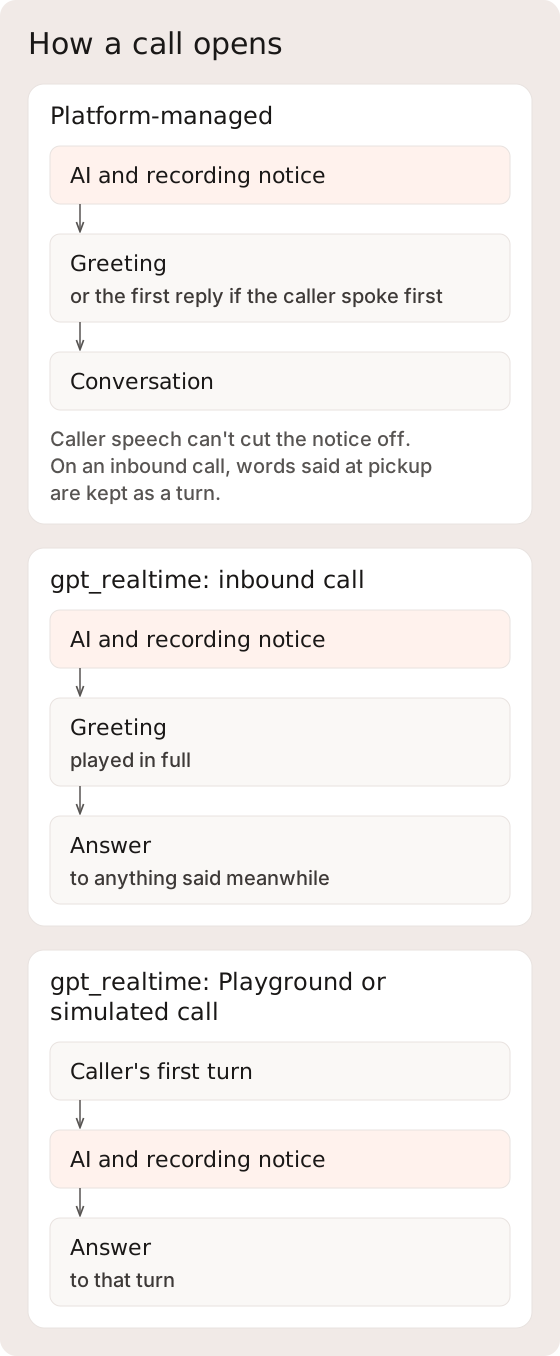
Platform-managed and `gpt_realtime` calls open with a notice that discloses AI use and call recording to the caller. A call whose voice speaks Spanish hears the same notice in Spanish, and other languages hear the English wording. The notice is part of the call's transcript.

<figure><img src="https://1651797362-files.gitbook.io/~/files/v0/b/gitbook-x-prod.appspot.com/o/spaces%2F2YwM0LHtEGLt9S21OyC3%2Fuploads%2Fgit-blob-f1eba8d3a87608444c6d2eb80c91837616fe5c27%2Fcall-opening-by-runtime.svg?alt=media" alt="On the platform-managed runtime, the AI and recording notice plays before the greeting or first reply. On gpt_realtime, an inbound call hears it before the greeting, and a Playground or simulated call hears it after the caller&#x27;s first turn."><figcaption><p>Where the notice plays depends on the runtime and the kind of call. A platform-managed outbound call opens once the callee answers.</p></figcaption></figure>

* **Platform-managed runtime.** The notice plays ahead of the call's first speech, whether that is the greeting or the first reply on a call where the caller speaks first. Caller speech does not cut it off; barge-in waits until it has played. On an inbound call, what the caller says at pickup is held while speech recognition connects and is transcribed once it is ready, so an opening "hello" becomes a turn. An outbound call opens once the callee answers; see [Outbound Call Flow](#outbound-call-flow).
* **`gpt_realtime`.** The model speaks the notice as the call's first response. An inbound call hears it before the greeting, and the greeting then plays in full; anything the caller says meanwhile is answered after it. A Playground or simulated call hears it after the caller's first turn, then the answer to that turn.

If the notice cannot be rendered, for example after a speech-synthesis error, the call continues without it. Remove any AI or recording notice from your own greetings and prompts so callers do not hear it twice, and check greeting timing in a test call. Text conversations, on every channel, do not open with this notice. A call that takes the [safe exit](#graceful-degradation) before the caller has heard all of the notice hears the notice first.

### Outbound Call Flow

Outbound calls start through the [Calls API](/developer-guide/platform-api/conversations/calls.md).

**Outbound preparation**: the standard outbound path prepares the first agent audio before dialing the callee. If that preparation fails or exceeds its budget, the request fails instead of falling through to an unprepared dial. Provider connection and playback can add latency after answer, so this is not a time-to-first-audio guarantee.

**Waiting for the callee**: on the platform-managed runtime, the agent says nothing while the phone rings. When the callee answers, the call opens with the [notice](#call-opening) and the greeting. A voicemail that picks up counts as an answer, so the notice and greeting play to it; keep the greeting fit to leave on a voicemail. A dial that is busy, goes unanswered, or fails ends the call before the agent speaks.

### Conference Architecture

<details>

<summary>Conference architecture: telephony details</summary>

The conference architecture supports multiple simultaneous audio participants with independent per-participant streams:

```mermaid
%%{init: {"theme":"base","themeVariables":{"fontFamily":"Inter, sans-serif","fontSize":"16px","background":"#FAF8F6","primaryColor":"#F1EAE7","primaryTextColor":"#1A1817","primaryBorderColor":"#D7D2D0","secondaryColor":"#FDFCFB","tertiaryColor":"#F6F2F0","lineColor":"#575452","textColor":"#3D3937","clusterBkg":"#FDFCFB","clusterBorder":"#E8E2DF","edgeLabelBackground":"#FAF8F6","actorBkg":"#F1EAE7","actorTextColor":"#1A1817","actorBorder":"#D7D2D0","actorLineColor":"#575452","signalColor":"#575452","signalTextColor":"#3D3937","labelBoxBkgColor":"#F1EAE7","labelBoxBorderColor":"#D7D2D0","labelTextColor":"#3D3937","loopTextColor":"#3D3937","noteBkgColor":"#F6F2F0","noteBorderColor":"#D7D2D0","noteTextColor":"#3D3937","activationBkgColor":"#F1EAE7","activationBorderColor":"#D7D2D0","altSectionBkgColor":"#FAF8F6","altSectionColor":"#3D3937"},"fontFamily":"Inter, sans-serif"}}%%
flowchart TB
    subgraph Conference["Telephony Conference"]
        C["Caller<br/>(PSTN - phone network)"]
        A["AI Agent<br/>(WebSocket stream)"]
        O["Operator<br/>(PSTN)<br/>[optional]"]
    end

    subgraph STT["Per-Participant Speech-to-Text"]
        CS["Caller STT<br/>(speaker attribution)"]
        OS["Operator STT<br/>(human transcript capture)"]
        AS["Agent STT<br/>(turn processing)"]
    end

    C --> CS
    O --> OS
    A --> AS

    subgraph Resolution["Speaker Resolution"]
        R["Priority: Operator > Caller > Default"]
    end

    CS --> Resolution
    OS --> Resolution
```

| Participant  | Role                              | Audio Transport         | STT                              |
| ------------ | --------------------------------- | ----------------------- | -------------------------------- |
| **Caller**   | Person who called or was called   | PSTN                    | Dedicated per-participant stream |
| **Agent**    | AI voice agent                    | Bidirectional WebSocket | Main session STT                 |
| **Operator** | Human monitor/takeover (optional) | PSTN                    | Dedicated per-participant stream |

**Three-party speaker resolution**: when multiple parties are on the call, speaker attribution uses a priority chain: operator STT → caller STT → default (caller). Recorded turns can carry `speaker_id` and `speaker_role` to support transcript attribution; clients should tolerate missing or ambiguous metadata when a stream or persistence step is incomplete.

</details>

## Context Graph Engine

The platform-managed voice runtime executes a **Hierarchical State Machine** loaded from the service's version set. Each call maintains isolated conversation state. The state types and navigation flow below describe this runtime.

The separate realtime-provider runtime builds workflow instructions from exactly one `ActionState`. It renders the state's objective, action descriptions, action guidelines, and global guidance into the provider's instructions. A save that would run this runtime on any other graph returns `422`; see [Session Provider](/developer-guide/platform-api/workspaces/services.md#session-provider). A save that leaves a version set's runtime and graph as they are isn't checked; on a service whose graph isn't exactly one action state, that rendering step fails, and the call can continue with fallback instructions. A connected call is therefore not proof that the configured workflow loaded. The provider selects from the authorized tools without the platform-managed navigator. Operator takeover and session event injection are not supported on this path, and [approval-gated tools](#execution-model) are not offered on it. Confirm runtime support before reusing a workflow or control.

When a `forward_call` is emitted by a response that the caller barged in on, the realtime turn owner can still dispatch that transfer if its arguments arrived as a complete JSON object, treating the transfer as if it had landed just before the barge-in. Other tool calls from an interrupted response - including reads, writes, and `end_call` - are not executed and return a not-executed result instead, and a superseded tool result is not spoken after the caller interrupts. A transfer whose arguments are cut off or empty is also not executed. Separately, caller speech while a transfer is still playing its announcement cancels the transfer. This behavior is specific to the `gpt_realtime` runtime.

### State Types

| State Type              | Purpose                                                                               | LLM Call?                                 |
| ----------------------- | ------------------------------------------------------------------------------------- | ----------------------------------------- |
| **ActionState**         | Produces user-facing responses, eligible tool calls, and exit-condition evaluation    | Yes (engagement and navigation as needed) |
| **DecisionState**       | Selects among authored exits without producing a user-facing turn                     | Yes (navigation only)                     |
| **AnnotationState**     | Injects authored internal guidance and advances to its fixed next state               | No additional model call                  |
| **DataCollectionState** | Collects declared fields across turns, with turn limits and optional Surface fallback | Yes (engageable)                          |

### Per-Turn Flow

```mermaid
%%{init: {"theme":"base","themeVariables":{"fontFamily":"Inter, sans-serif","fontSize":"16px","background":"#FAF8F6","primaryColor":"#F1EAE7","primaryTextColor":"#1A1817","primaryBorderColor":"#D7D2D0","secondaryColor":"#FDFCFB","tertiaryColor":"#F6F2F0","lineColor":"#575452","textColor":"#3D3937","clusterBkg":"#FDFCFB","clusterBorder":"#E8E2DF","edgeLabelBackground":"#FAF8F6","actorBkg":"#F1EAE7","actorTextColor":"#1A1817","actorBorder":"#D7D2D0","actorLineColor":"#575452","signalColor":"#575452","signalTextColor":"#3D3937","labelBoxBkgColor":"#F1EAE7","labelBoxBorderColor":"#D7D2D0","labelTextColor":"#3D3937","loopTextColor":"#3D3937","noteBkgColor":"#F6F2F0","noteBorderColor":"#D7D2D0","noteTextColor":"#3D3937","activationBkgColor":"#F1EAE7","activationBorderColor":"#D7D2D0","altSectionBkgColor":"#FAF8F6","altSectionColor":"#3D3937"},"fontFamily":"Inter, sans-serif"}}%%
sequenceDiagram
    participant Caller
    participant STT as Speech-to-Text
    participant Emo as Emotion Detection
    participant Nav as Navigator
    participant Engage as Engage LLM
    participant TTS as Text-to-Speech
    participant Tools as Tool Executor

    Caller->>STT: Speech audio
    par Signal Processing
        STT->>Nav: Transcript + end-of-turn
        Caller->>Emo: Audio when analysis is enabled
        Emo->>Nav: Emotional state when available
    end

    Nav->>Nav: Select state/action + optional filler
    opt Filler selected
        Nav->>TTS: Filler phrase
        TTS-->>Caller: Filler audio plays
    end

    Nav->>Engage: State guidance + available context
    Engage->>TTS: Response text (streaming)
    TTS-->>Caller: Response audio with supported tone controls

    opt Tool calls in response
        Engage->>Tools: Dispatch eligible tool
        Tools-->>Engage: Result or later continuation when successful
    end
```

The navigator handles multi-state traversal automatically. Decision and annotation states can resolve without user interaction before landing on an action state for the engage LLM.

**Navigator resilience**: a navigation that fails or runs out of time leaves the agent in its current state, and the agent answers the turn from there. The runtime never takes an option that navigation did not choose.

### Action State Extensions

Action states support three optional extension fields for asynchronous workflows:

| Field                   | Type   | Description                                                                                                                                                                                                       |
| ----------------------- | ------ | ----------------------------------------------------------------------------------------------------------------------------------------------------------------------------------------------------------------- |
| `wait_for`              | string | Pause navigation until an async condition clears. Values: `surface_submission`, `human_approval`.                                                                                                                 |
| `channel_overrides`     | object | Per-channel overrides keyed by channel kind (`voice`, `sms`). Each override can set `objective`, `action_guidelines`, and `progress` (a [progress hint](#tool-wait-progress-hints) for tool waits in that state). |
| `surface_spec_template` | object | Surface spec auto-created on state entry. Uses the [Surfaces](/developer-guide/platform-api/conversations/surfaces.md) field schema. The entity ID defaults to the session's primary entity.                      |

**Wait conditions**: when the navigator returns a `waiting_for` value, the engine skips context graph navigation on subsequent turns. The engage prompt includes a `WAITING_FOR_CONDITION` block that constrains the agent to empathetic small-talk until the condition clears. For voice sessions, clearance comes via the real-time event stream. For text sessions, the session blocks on a dedicated event listener.

**Channel overrides**: the `channel_kind` is set on the engine session (`voice` for calls, `sms` for text sessions). Prompt rendering merges the channel-specific objective and guidelines into the engage prompt. For voice, the override can also carry a `progress` hint that shapes how the agent covers tool waits in that state (see [Tool-Wait Progress Hints](#tool-wait-progress-hints)).

**Surface templates**: on state entry, if the new state has a `surface_spec_template`, the engine requests a surface through the Platform API and tracks the `surface_id` when creation succeeds. This makes surface creation configuration-driven rather than dependent on a model-selected tool call.

### Terminal State & Auto-Hangup

When the platform-managed runtime reaches the Context Graph's configured terminal state, it speaks a final response and then ends the call:

1. Navigation lands on the terminal state.
2. The agent speaks its closing response.
3. The runtime waits for that audio to finish playing, and for any tool still running.
4. It ends the call through telephony.

When a caller's turn is recognized as a request for a person, navigation does not land on the terminal state on that turn: the agent stays in its current state and answers the request (see [Safety & Escalation](#safety-and-escalation)).

**Silence**: on both voice runtimes, 10 seconds of quiet after the agent finishes speaking brings a check-in, one short new sentence such as asking whether the caller is still there. The next 10 seconds of quiet brings a second check-in, and the 10 seconds after that ends the call without a closing line. When the caller speaks, the count starts over.

<figure><img src="https://1651797362-files.gitbook.io/~/files/v0/b/gitbook-x-prod.appspot.com/o/spaces%2F2YwM0LHtEGLt9S21OyC3%2Fuploads%2Fgit-blob-20d8491b81e1755a1a69aea6ad3faad7164bc05a%2Fsilence-check-ins.svg?alt=media" alt="On both voice runtimes, 10 seconds of quiet after the agent speaks brings a check-in, another 10 seconds brings a second one, and the next 10 seconds ends the call. Caller speech starts the count over."><figcaption><p>The same sequence runs on the platform-managed runtime and on <code>gpt_realtime</code>.</p></figcaption></figure>

While a tool is still running, the platform-managed runtime gives a short progress update in place of a check-in, for a limited number of updates, and `gpt_realtime` holds check-ins until the tool finishes. If the caller starts speaking before a check-in plays, the check-in is dropped. Silence counts for nothing while a transfer is under way, through its hold, dial, and briefing. On the platform-managed runtime it also counts for nothing while an operator has the call, and the count starts over when the caller is handed back.

**Session shutdown behavior**: the standard shutdown handlers stop both the session and audio speaker for hangup, STT failure, WebSocket disconnect, and terminal-state paths. Clients should rely on the reported terminal outcome rather than assuming cleanup timing.

## World Model Integration

The voice agent connects to the workspace's [world model](/developer-guide/platform-api/data-world-model.md) through three data channels. See [Storage and Projection Boundaries](/developer-guide/platform-api/data-world-model.md#storage-and-projection-boundaries) for the distinction between durable events and asynchronously projected entity state.

```mermaid
%%{init: {"theme":"base","themeVariables":{"fontFamily":"Inter, sans-serif","fontSize":"16px","background":"#FAF8F6","primaryColor":"#F1EAE7","primaryTextColor":"#1A1817","primaryBorderColor":"#D7D2D0","secondaryColor":"#FDFCFB","tertiaryColor":"#F6F2F0","lineColor":"#575452","textColor":"#3D3937","clusterBkg":"#FDFCFB","clusterBorder":"#E8E2DF","edgeLabelBackground":"#FAF8F6","actorBkg":"#F1EAE7","actorTextColor":"#1A1817","actorBorder":"#D7D2D0","actorLineColor":"#575452","signalColor":"#575452","signalTextColor":"#3D3937","labelBoxBkgColor":"#F1EAE7","labelBoxBorderColor":"#D7D2D0","labelTextColor":"#3D3937","loopTextColor":"#3D3937","noteBkgColor":"#F6F2F0","noteBorderColor":"#D7D2D0","noteTextColor":"#3D3937","activationBkgColor":"#F1EAE7","activationBorderColor":"#D7D2D0","altSectionBkgColor":"#FAF8F6","altSectionColor":"#3D3937"},"fontFamily":"Inter, sans-serif"}}%%
flowchart TB
    subgraph WM["World Model"]
        EV["Source-attributed events<br/>(confidence metadata)"]
        EN["Entities<br/>(asynchronous projected state)"]
        EG["Entity Graph<br/>(relationships)"]
        EV -.->|"asynchronous projection"| EN
        EN --- EG
    end

    subgraph Channels["Three Data Channels"]
        direction TB
        A["Ambient (pushed)<br/>Patient state in system prompt<br/>Location context<br/>Related entities"]
        B["Queried (pulled)<br/>Slot search, patient lookup<br/>Typed entity lookup"]
        C["Extracted (captured)<br/>Insurance details from speech<br/>Contact info from conversation"]
    end

    subgraph LLM["LLM Context"]
        CTX["System prompt + conversation history<br/>+ tool results + emotional steering"]
    end

    EN -->|"At session start +<br/>mid-call refresh"| A
    B <-->|"Tool calls<br/>↔ results"| EN
    C -->|"Transcript extraction<br/>(moderate confidence)"| EV
    A --> CTX
    B --> CTX
    C -.->|"implicit capture"| EV
```

### Channel 1: Ambient (Pushed)

Supported runtimes can inject selected ambient data without an explicit agent lookup. Patient fields load only after [caller verification](#caller-verification). Available fields depend on verification, projected state, service configuration, and successful prompt construction, and can include:

* **Patient demographics**: name, DOB, MRN, phone, email, address.
* **Clinical context**: active conditions, medications, allergies (filtered to text-only for LLM consumption).
* **Upcoming appointments**: with patient entity references for cross-referencing.
* **Insurance coverage**: active plans and subscriber info.
* **Location context**: clinic details, available appointment types, hours (resolved from the inbound phone number).

**Design principle: ambient over queried.** If the LLM will almost certainly need this data, push it into context. Don't make it ask. A voice agent that already has the patient's insurance in context doesn't need to dispatch a tool call to look it up.

### Caller Verification <a href="#caller-verification" id="caller-verification"></a>

A caller who matches a record by phone number, or a session opened with an `entity_id`, starts unverified. The agent is told a record may match, but the record's demographics and clinical context stay out of its context. They load after the caller's stated full name and date of birth match exactly one candidate record through the `world_confirm_patient_identity` tool. A failed attempt does not say which field was wrong, and repeated failures lock verification for the rest of the conversation. Text sessions restore the verified or locked state from the conversation history on each turn.

<figure><img src="https://1651797362-files.gitbook.io/~/files/v0/b/gitbook-x-prod.appspot.com/o/spaces%2F2YwM0LHtEGLt9S21OyC3%2Fuploads%2Fgit-blob-dc33c96c0185d7bb91e736d96fe0b6c8ccba8d5f%2Fcaller-verification-states.svg?alt=media" alt="A caller matched by phone number or entity_id starts unverified, and built-in patient reads return verification_required. A full name and date of birth that match one record load the patient context, and repeated failures lock verification for the conversation."><figcaption><p>The check covers the built-in patient-record tools on voice and text conversations.</p></figcaption></figure>

Add `world_confirm_patient_identity` to the Context Graph state that confirms identity, and have that state ask for the caller's full name and date of birth. Until a graph offers the tool, the agent works without the record. The tool's result says whether the caller verified, and after a failed attempt, how many attempts remain. Sessions anchored to an authenticated operator skip this check.

The record tools follow the same rule:

* **Before verification,** every built-in patient-record read, such as `world_patient_lookup`, `world_appointment_lookup`, `world_get_medications`, and the typed clinical lookups, returns status `verification_required` with no record, and `world_confirm_patient_identity` is offered next to it so the agent can verify and retry. Operator-anchored, simulation, and test sessions are not gated.
* **After a lock,** those reads return status `verification_locked` for the rest of the conversation. The agent is told not to ask for the caller's details again, and to offer to connect them with staff or help with something that needs no patient record.
* **After verification,** those reads return the caller's own record, or a household member's whose record names the caller as guardian or under a power of attorney. A read for anyone else returns status `not_caller_record`. A relationship the caller states does not widen this.
* **Scope.** The check covers the built-in `world_*` record tools. Patient reads through your own [integration](/developer-guide/platform-api/integrations.md) endpoints are not gated by it; the agent is instructed not to share another person's details from any tool, which is model guidance, so test other-person requests on graphs that read records through integrations.

A date of birth can be spoken in words, such as "May fifteenth nineteen ninety". On a graph that branches on `world_patient_lookup`, a caller who verifies follows the found branch, and a caller whose name and date of birth match no record follows the not-found branch, without the refused lookup revealing anything. `world_patient_create` on a medical record number already on file does not say whose record it is.

### Channel 2: Queried (Pulled)

Data that can't be ambient because the search space is too large. The agent calls [built-in clinical tools](#built-in-clinical-tools) to retrieve specific information.

**Key simplification**: standard queried tools return human-readable results rather than database internals. Slot search can return doctor names and times while the runtime carries the selected scheduling identifiers into a later booking request, so raw template IDs and slot UUIDs do not need to be exposed to the LLM.

### Channel 3: Extracted (Captured)

Supported voice runtimes can extract structured observations such as insurance details, contact information, and preferences from conversation evidence. When extraction and event publication succeed, those observations enter the world model without a separate conversational tool call. Extraction is model-generated, can be incomplete, and is not enabled identically on every runtime.

Extracted data uses a source-appropriate confidence class below authoritative records. Explicit write tools remain the controlled path for supported high-stakes mutations. Extraction complements those tools; it does not prove that every mentioned fact was captured or externally delivered.

### Confidence-Gated Writes

World-model observations written by the voice agent during calls carry a **confidence level**: a source-class ranking, not a calibrated probability of truth. Confidence is one input to the policies that govern external synchronization.

| Confidence | Level          | Source Class                                          |
| ---------- | -------------- | ----------------------------------------------------- |
| 0.0        | Rejected       | Human-rejected or system-invalidated                  |
| 0.3        | Agent raw      | Raw voice agent inference (unverified)                |
| 0.5        | Self report    | Patient-confirmed or patient-submitted data           |
| 0.7        | Verified       | Verified or EHR-ingested data                         |
| 0.8        | EHR trusted    | Selected trusted clinical data                        |
| 0.9        | High           | Operator-verified or high-quality source              |
| 0.95       | Human approved | Named registry class; not assigned by proposal review |
| 1.0        | Authoritative  | Manual entry or authoritative API                     |

**Confirmation-gated confidence**: the agent chooses a confirmation level per write based on how the information surfaced in conversation - `confirmed` (the caller explicitly confirmed the fact, written at self-report confidence), `mentioned` (mentioned in passing, written at agent-raw confidence), or `inferred` (inferred from context, written below agent-raw confidence).

**External delivery**: these observations stay in the world model; an external change needs its own integration call. Confidence is available as source evidence for workflows that act on it.

### Patient Safety Isolation

Supported entity-anchored write tools enforce a **write scope** for the session and reject a target outside the resolved patient anchor. This is an authorization guard, not proof that the selected field, value, or patient anchor is clinically correct. Write tools also have **in-flight deduplication**: if the model re-calls the same write tool with identical parameters while the first call is still executing, the concurrent duplicate is suppressed. Once the first execution finishes, the same parameters can execute again, except an integration write whose outcome is unknown, which is not sent again in that conversation (see [Execution Model](#execution-model)). This guard is not general request idempotency or an exactly-once guarantee.

## Emotional Adaptation

When acoustic data is available, the rolling valence/arousal state can influence prompt steering, TTS tone, filler behavior, and empathy pacing. These effects are best-effort and depend on the active runtime and speech provider; workspace and service settings can override or disable them. For the conceptual treatment of emotion detection and adaptation, see [Emotion Detection](https://docs.concurrence.com/channels/voice/emotion-detection).

### Valence-Arousal Model

The emotion engine returns valence and arousal for each acoustic segment. The runtime aggregates the latest four segments and derives an internal label from that two-dimensional state:

```
        High Arousal (1.0)
             │
    ANGER ───┼─── EXCITEMENT
  Frustration│    Joy
  Fear       │    Enthusiasm
             │
  ───────────┼───────────── Valence
  Negative   │    Positive
  (-1.0)     │    (+1.0)
             │
    SADNESS ──┼─── CONTENTMENT
  Disappointment  Relief
  Boredom    │    Gratitude
             │
        Low Arousal (0.0)
```

| Quadrant                  | Agent Strategy | Voice Tone                    | LLM Behavior                                                |
| ------------------------- | -------------- | ----------------------------- | ----------------------------------------------------------- |
| **High-arousal negative** | De-escalate    | `calm` when supported         | Direct, concise, acknowledge frustration, skip pleasantries |
| **Low-arousal negative**  | Comfort        | `sympathetic` when supported  | Warm, patient, gentle language, give extra space            |
| **High-arousal positive** | Match energy   | `enthusiastic` when supported | Keep momentum and match positive energy                     |
| **Low-arousal / neutral** | Stay steady    | `content` when supported      | Conversational and grounded                                 |

### Voice Tone Selection

The standard voice-context path chooses a TTS tone in this order:

1. With at least two acoustic segments and aggregate signal strength of at least `0.25`, map the rolling internal label to a supported TTS tone.
2. If no new mapped tone is available, reuse the previous mapped tone as momentum.
3. If neither produces a tone and the current action matches a configured sensitive topic, select `sympathetic`.
4. If workspace `tone` is configured, it explicitly overrides the computed tone.

Tone momentum prevents a weak or unmapped segment from snapping the voice back to a default:

```
Turn 1: Sadness aggregate (score 0.72) → "sympathetic" → stored as momentum
Turn 2: weak aggregate (score 0.18)    → momentum returns "sympathetic"
Turn 3: Joy aggregate (score 0.65)     → "enthusiastic" → replaces momentum
```

The turn-level compound resolver can also attach labels derived from acoustic scores, sentiment/toxicity, barge-in and silence behavior, empathy tier, and conversation context. Those compound labels are stored with turn/call intelligence; they are not a separate vocal-burst model or an independent first-priority TTS signal.

### Filler Speech

Fillers can cover processing latency. The system uses **principle-based guidance** rather than relying only on hardcoded phrase lists, generating contextually appropriate fillers from available emotional context, the current action, and expected latency.

**Three-layer filler generation:**

| Layer                    | When                                    | What It Controls                                                                                                                                     |
| ------------------------ | --------------------------------------- | ---------------------------------------------------------------------------------------------------------------------------------------------------- |
| **Latency adaptation**   | When filler generation runs             | Filler length can reflect expected processing time (typically 2-4 words)                                                                             |
| **Emotional attunement** | When emotion data available             | Emotional register matches the caller's state. Not specific phrases, but principles like "gentle and reassuring" or "a verbal hand on the shoulder". |
| **Action context**       | When an action description is available | The action description can steer a filler toward what the agent is about to do                                                                       |

**Per-action filler hints**: context graph actions can include optional PM-configured filler suggestions. In non-deterministic mode, the LLM sees them as suggestions alongside emotional and contextual guidance, not commands. Explicit deterministic phrases follow the separate contract below.

**Suppression rule**: when `valence < -0.2 AND arousal > 0.4 AND emotion is NOT Anxiety/Fear/Distress` → fillers disabled entirely. Frustrated callers don't want acknowledgments, they want the answer. **Exception**: anxious callers still receive reassuring fillers, because anxiety benefits from reassurance while frustration does not.

#### Tool-Wait Progress Hints

When a tool is running, the agent narrates the wait based on a `ProgressHint` declared on the state's channel override and/or on the individual tool binding. The hint describes the *shape* of the wait, not a phrase list - the engine composes the actual utterance from tool semantics, turn emotion, and conversation context.

| Field                 | Type                                                                                  | Description                                                                                                                                                                                                                                                                                                                                                                                                                                                                                    |
| --------------------- | ------------------------------------------------------------------------------------- | ---------------------------------------------------------------------------------------------------------------------------------------------------------------------------------------------------------------------------------------------------------------------------------------------------------------------------------------------------------------------------------------------------------------------------------------------------------------------------------------------- |
| `mode`                | `"auto"` \| `"silent"` \| `"backchannel"` \| `"verbal"`                               | How the agent covers the wait. `auto` lets the engine decide from class and latency; `silent` drops filler text; `backchannel` emits a single token ("Mm."); `verbal` produces a contextual filler.                                                                                                                                                                                                                                                                                            |
| `progress_class`      | `"lookup"` \| `"write"` \| `"external_call"` \| `"compute"` \| `"multi_step"` \| null | Semantic category of the work the tool is doing. Drives the templated language the engine picks for retries.                                                                                                                                                                                                                                                                                                                                                                                   |
| `expected_latency_ms` | integer (0-60000) \| null                                                             | How long the tool is expected to take. Used to choose filler length and pacing.                                                                                                                                                                                                                                                                                                                                                                                                                |
| `trigger_delay_ms`    | integer (0-30000) \| null                                                             | How long to wait after a tool starts before playing the first filler. Set to `0` for immediate playback. When unset, the delay is calculated from `expected_latency_ms`; when unset and deterministic phrases are configured, the first filler fires immediately.                                                                                                                                                                                                                              |
| `interval_ms`         | integer (100-30000) \| null                                                           | Milliseconds between subsequent fillers. Overrides the global progress interval for this hint.                                                                                                                                                                                                                                                                                                                                                                                                 |
| `deterministic`       | boolean (default `false`)                                                             | Whether `phrases` play verbatim. `true`: scripted - the engine plays the phrases exactly as written, in order. `false`: the engine picks - phrases are hints.                                                                                                                                                                                                                                                                                                                                  |
| `phrases`             | array of strings (1-10 items) \| null                                                 | Ordered filler phrases, each at most 30 words. With `deterministic: true`, phrases play verbatim in order, cycling back to the start for attempts beyond the list length. With `deterministic: false` (the default), phrases are used as hints for early attempts - attempt N plays `phrases[N-1]` while within the list, and later attempts fall back to class templates, vocabulary, and retry fillers. `backchannel` mode preempts phrases. When set, `phrases` supersedes `custom_phrase`. |
| `custom_phrase`       | string (max 500 chars) \| null                                                        | Operator-authored filler utterance for the first filler attempt. In `auto` mode: requires `expected_latency_ms` >= 4000 and `progress_class` to be set. In `verbal` mode: always honored (word cap still applies). Ignored when `phrases` is set. Subsequent attempts use class templates.                                                                                                                                                                                                     |

**Placement**: `progress` can be set on `channel_overrides[channel].progress` (state-level default for that channel) and on each entry of `action_tool_call_specs` or `exit_condition_tool_call_specs` (per tool). Per-tool fields merge field-wise over the channel override, so a state can declare the default wait shape once and individual tools only override fields that actually differ.

**Retry narration**: when a tool retries, the engine uses deterministic attempt-aware templates keyed on `progress_class` - acknowledgement on attempt 1, brief apology on attempt 2, a "still working" update from attempt 3 - so retry audio stays off the LLM hot path and latency stays bounded. With `deterministic: true`, the engine skips templates and plays the scripted phrases in order, cycling through the list; with `deterministic: false`, phrases cover early attempts and templates take over for attempts beyond the list.

**Deterministic vs non-deterministic**: scripted flows (demo flows, regulated disclosures) that need exact control over what the agent says during tool waits must set `phrases` with `deterministic: true`. Deterministic fillers require the tool binding's `execution: "background"` - write-time validation rejects a blocking binding combined with `deterministic: true`. Use `custom_phrase` + `progress_class` when you want to steer the first filler but let the engine handle retries with contextual templates.

### Call Phase Escalation

The system automatically increases urgency as calls extend with negative sentiment:

| Phase     | Duration | Condition           | Adaptation                                                                                 |
| --------- | -------- | ------------------- | ------------------------------------------------------------------------------------------ |
| **Early** | < 5 min  | Any                 | Standard emotional adaptation                                                              |
| **Mid**   | 5-10 min | Trend deteriorating | "Focus on resolution speed. Shorten responses."                                            |
| **Late**  | ≥ 10 min | Negative valence    | **URGENCY.** "Prioritize resolution. Be maximally concise. Escalate if unable to resolve." |

### Proactive Intelligence

The system detects emotionally sensitive topics from the current context graph action **before the caller shows distress**:

```mermaid
%%{init: {"theme":"base","themeVariables":{"fontFamily":"Inter, sans-serif","fontSize":"16px","background":"#FAF8F6","primaryColor":"#F1EAE7","primaryTextColor":"#1A1817","primaryBorderColor":"#D7D2D0","secondaryColor":"#FDFCFB","tertiaryColor":"#F6F2F0","lineColor":"#575452","textColor":"#3D3937","clusterBkg":"#FDFCFB","clusterBorder":"#E8E2DF","edgeLabelBackground":"#FAF8F6","actorBkg":"#F1EAE7","actorTextColor":"#1A1817","actorBorder":"#D7D2D0","actorLineColor":"#575452","signalColor":"#575452","signalTextColor":"#3D3937","labelBoxBkgColor":"#F1EAE7","labelBoxBorderColor":"#D7D2D0","labelTextColor":"#3D3937","loopTextColor":"#3D3937","noteBkgColor":"#F6F2F0","noteBorderColor":"#D7D2D0","noteTextColor":"#3D3937","activationBkgColor":"#F1EAE7","activationBorderColor":"#D7D2D0","altSectionBkgColor":"#FAF8F6","altSectionColor":"#3D3937"},"fontFamily":"Inter, sans-serif"}}%%
flowchart TB
    A["Current Action:<br/>'Discuss test results'"] --> B{"Matches<br/>sensitive_topics?"}
    B -->|Yes| C["Preemptive shift to<br/>sympathetic tone<br/>(priority level 3<br/>in tone chain)"]
    B -->|No| D["Normal tone<br/>priority chain"]
```

`sensitive_topics` is configurable via [voice settings](/developer-guide/platform-api/workspaces.md#voice-settings). Falls back to healthcare defaults: test results, diagnosis, billing, payment, insurance, denial, emergency, referral, specialist, surgery, procedure, medication.

This fallback applies only when acoustic selection and tone momentum produced no tone. An explicitly configured workspace `tone` then overrides the result.

### Coherence Detection

When what the caller *says* doesn't match how they *sound* (coherence < 0.4), the system shifts its steering: *"The caller's words suggest X but voice sounds Y. Trust the vocal tone over the words, respond to how they sound, not what they claim."*

This is injected into the system prompt without the agent ever explicitly mentioning the discrepancy to the caller.

### Control Plane ↔ Adaptation

How each workspace voice setting interacts with the automatic emotion adaptation system:

| Voice Setting                | What You Control                    | What the System Overrides                                                  | Override Condition                                                                           |
| ---------------------------- | ----------------------------------- | -------------------------------------------------------------------------- | -------------------------------------------------------------------------------------------- |
| `tone`                       | Explicit workspace TTS tone         | Replaces acoustic, momentum, and sensitive-topic selection when configured | Whenever the setting is present                                                              |
| `speed`                      | Base speech rate                    | Can be reduced by supported empathy pacing logic                           | When an empathy baseline is active; configured service floors apply                          |
| `volume`                     | Base volume                         | No adaptive override in the standard voice-context path                    | Provider support still applies                                                               |
| `voice_id`                   | Voice persona                       | Per-agent voice config overrides                                           | Agent version has voice config set                                                           |
| `keyterms`                   | Domain vocabulary for STT boost     | Merged with service keyterms and deduplicated                              | Subject to selected STT provider support                                                     |
| `sensitive_topics`           | Topics for proactive tone softening | Falls back to healthcare defaults                                          | Preemptive, not reactive                                                                     |
| `post_call_analysis_enabled` | Retained workspace setting          | None                                                                       | Does not establish an active automatic scoring pipeline; use the documented evaluation paths |

**Key principle**: automatic acoustic selection is best-effort. Explicit workspace and service settings remain authoritative where the active runtime supports them.

### Graceful Degradation

The standard runtime implements the best-effort behaviors below. Optional emotion and post-call failures can leave those features unavailable without ending an otherwise healthy call, but failures in required telephony, speech, model, or context-engine dependencies can interrupt or end the session.

If speech recognition fails and can't reconnect on a platform-managed call, the agent leaves when an operator has taken over the call, and the operator keeps it. Otherwise the call switches once to another recognizer configured for the caller's language. If none is available or it can't connect, the call takes the safe exit: the agent plays the AI and recording notice if the caller hasn't heard all of it, then an apology, and cold-transfers the caller to the service's fixed `forward_to`. With no fixed destination, or if that transfer fails, it plays a closing line that asks the caller to call back, and to call their local emergency number in an emergency, then hangs up. Set a fixed `forward_to` on services that should hand these calls to a person.

A `gpt_realtime` call takes the same safe exit when its realtime session doesn't open: the connection to the realtime model fails or doesn't open in time, the call's session setup can't be sent, or the model doesn't answer the setup within a few seconds or refuses it, for example over a custom `realtime.voice` id it doesn't recognize. Nothing from the model plays. The caller hears the notice when it can be rendered, then the apology and a transfer, or the closing line and the end of the call. These lines play in the agent's text-to-speech voice, or the service's own TTS configuration when it sets one, chosen as on a platform-managed call; see [Default TTS Model](/developer-guide/platform-api/workspaces/voice-configuration.md#default-tts-model). `realtime.voice` never applies to them.

<figure><img src="https://1651797362-files.gitbook.io/~/files/v0/b/gitbook-x-prod.appspot.com/o/spaces%2F2YwM0LHtEGLt9S21OyC3%2Fuploads%2Fgit-blob-37c8c14e9eddf2c4bda696a77b6c3b82fe4b6479%2Fstt-failure-safe-exit.svg?alt=media" alt="When speech recognition fails and can&#x27;t reconnect on a platform-managed call, the agent leaves if an operator has taken over the call, or the call switches once to another recognizer. If that isn&#x27;t possible, the agent plays the AI and recording notice if the caller hasn&#x27;t heard all of it, then apologizes and cold-transfers to a fixed forward_to, or plays a closing line and hangs up."><figcaption><p>If the caller hasn't heard all of the AI and recording notice, it plays before the apology. The notice, the apology, and the closing line play in English or Spanish; other languages hear English.</p></figcaption></figure>

| Layer                    | Failure Mode                                  | Fallback                                                                                                                            | Impact                                                           |
| ------------------------ | --------------------------------------------- | ----------------------------------------------------------------------------------------------------------------------------------- | ---------------------------------------------------------------- |
| **Emotion connection**   | Auth error, timeout, unavailable service      | Session continues without emotion detection                                                                                         | No acoustic adaptation; configured defaults remain               |
| **Emotion stream**       | Repeated processing error or connection close | Disable for the remainder of the session after the configured consecutive-failure limit                                             | No automatic same-call recovery guarantee                        |
| **Emotion detection**    | Insufficient data (< 2 segments)              | No emotional steering, default fillers                                                                                              | First few seconds may lack adaptation                            |
| **Transcript analysis**  | No sentiment/toxicity result                  | Continue with acoustic and behavioral inputs                                                                                        | Compound/coherence evidence is reduced                           |
| **Voice settings**       | Parse error                                   | Defaults (filler on, emotion on)                                                                                                    | Baseline experience still works                                  |
| **Post-call analysis**   | Any error                                     | Logged, not raised (fire-and-forget)                                                                                                | Quality data missing, call unaffected                            |
| **TTS connection**       | Close/error mid-stream                        | A later turn can attempt reconnection                                                                                               | Audio gap; session can fail if recovery does not succeed         |
| **STT connection**       | Connection loss                               | Reconnection is attempted; after a lasting failure, the path in the figure above                                                    | Transcription gap while recovering; the call can transfer or end |
| **Reply generation**     | Model error, or a reply that stops arriving   | A request that fails with a transient error before the reply starts can be retried once while time allows; otherwise the reply ends | What remains of that reply does not play                         |
| **Context graph engine** | Backend unavailable                           | Any configured runtime fallback is attempted                                                                                        | The response or session can fail when no fallback is available   |

## Tool Execution

Tool bindings can execute inline or in the background during calls. Background bindings let the agent acknowledge the action and continue speaking while results arrive through the configured continuation-delivery mode.

```mermaid
%%{init: {"theme":"base","themeVariables":{"fontFamily":"Inter, sans-serif","fontSize":"16px","background":"#FAF8F6","primaryColor":"#F1EAE7","primaryTextColor":"#1A1817","primaryBorderColor":"#D7D2D0","secondaryColor":"#FDFCFB","tertiaryColor":"#F6F2F0","lineColor":"#575452","textColor":"#3D3937","clusterBkg":"#FDFCFB","clusterBorder":"#E8E2DF","edgeLabelBackground":"#FAF8F6","actorBkg":"#F1EAE7","actorTextColor":"#1A1817","actorBorder":"#D7D2D0","actorLineColor":"#575452","signalColor":"#575452","signalTextColor":"#3D3937","labelBoxBkgColor":"#F1EAE7","labelBoxBorderColor":"#D7D2D0","labelTextColor":"#3D3937","loopTextColor":"#3D3937","noteBkgColor":"#F6F2F0","noteBorderColor":"#D7D2D0","noteTextColor":"#3D3937","activationBkgColor":"#F1EAE7","activationBorderColor":"#D7D2D0","altSectionBkgColor":"#FAF8F6","altSectionColor":"#3D3937"},"fontFamily":"Inter, sans-serif"}}%%
flowchart TB
    A["LLM returns<br/>tool call"] --> B["Filler plays<br/>while tool runs"]
    B --> C["Tool executes<br/>(async, background)"]
    C --> D["Result arrives"]
    D --> E["Agent relays<br/>result to caller"]
```

On the platform-managed runtime, one caller turn can run up to six rounds of tool calls. After the sixth, the agent answers with the results it has, and the count starts over when the caller speaks. If one request needs a longer chain, combine steps into fewer tools or a companion skill.
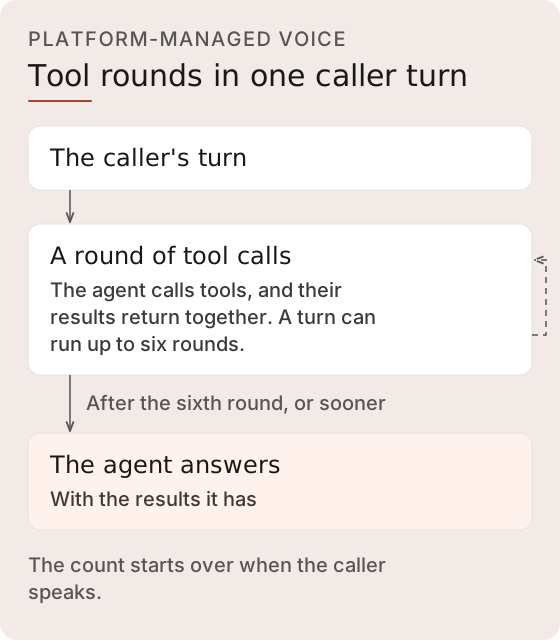
<figure><img src="https://1651797362-files.gitbook.io/~/files/v0/b/gitbook-x-prod.appspot.com/o/spaces%2F2YwM0LHtEGLt9S21OyC3%2Fuploads%2Fgit-blob-6b9b93d10e29bbcefaf2d8a1b358b27efabce677%2Ftool-rounds-per-turn.svg?alt=media" alt="On the platform-managed runtime, one caller turn can run up to six rounds of tool calls, each returning its results together. After the sixth, the agent answers with the results it has, and the count starts over when the caller speaks."><figcaption><p>The results of one round's tool calls return to the agent together.</p></figcaption></figure>

### Execution Model

Tool calls are routed by tool family, and each state-level tool binding declares how the call executes and how its result is delivered:

| Tool Family                | Prefix      | Execution Model                                                                                                                                                                     |
| -------------------------- | ----------- | ----------------------------------------------------------------------------------------------------------------------------------------------------------------------------------- |
| **World tools**            | `world_*`   | Built-in reads/writes against the world model (patient, appointment, insurance, typed entity lookups)                                                                               |
| **Surface tools**          | `surface_*` | Create, deliver, and track [surfaces](/developer-guide/platform-api/conversations/surfaces.md)                                                                                      |
| **Skills**                 | (by slug)   | LLM-backed companion micro-agents: multi-turn reasoning with the skill's configured integration and static tools (see [Skills](/developer-guide/platform-api/workspaces/skills.md)) |
| **Platform functions**     | `fn_*`      | Registered [platform functions](/developer-guide/platform-api/functions.md) executed against the data warehouse                                                                     |
| **Workspace data queries** | `wsq_*`     | Parameterized SQL against [workspace tables](/developer-guide/platform-api/functions/workspace-data-queries.md)                                                                     |
| **System tools**           | -           | `forward_call`, `complete_transfer`, `resume_patient`, `get_tool_call_status`, `cancel_background_task`; handled inline by the turn controller                                      |

**Blocking vs background execution**: each state x tool binding declares an `execution` axis. Blocking tools are awaited inline. Background tools start without being awaited, so the agent can acknowledge and keep talking. When background execution and delivery succeed, the result can arrive as a continuation turn. The binding's `delivery` axis controls how that result lands: `interrupt` (a continuation turn that can cut current speech) or `queue` (folded in on the next user turn). A separate `failure_delivery` axis can route reported failures differently from successes.

**State gating**: in the standard HSM runtime, tool calls are validated against the tools offered for the current context-graph state, and an unavailable call is rejected. Native and realtime runtimes can also attach shared platform or system tools globally to each phase. In every runtime, authorization, explicit tool enablement, and patient/write scope remain the security boundary; state membership alone is not one.

**In-flight write deduplication**: an identical write call is suppressed only while the first call is still running. It does not deduplicate a later retry after completion and does not provide request-level exactly-once semantics.

**Writes with an unknown outcome**: an integration write that got no answer saying whether it went through reports `"outcome": "unknown"`. On both runtimes, the platform doesn't send it again in that conversation, and the agent is told to say it couldn't confirm the request went through. Reconcile these writes in the destination system; see [Endpoint Retries](/developer-guide/platform-api/integrations.md#endpoint-retries).

**Repeated requests**: when the caller asks again for a lookup or action already done in the conversation, the agent is prompted to call the tool again rather than repeat the earlier result. This is model behavior, so test repeated requests in your flows.

**Approval-gated tools**: voice calls on either runtime don't offer gated endpoints or skills marked `approval_required`, so move those steps into a text flow or remove the gate. See [Approval-Gated Integration Writes](/developer-guide/platform-api/integrations/approval-gated-integration-writes.md#key-concepts).

### Built-in Clinical Tools

The Platform API publishes a catalog of built-in `world_*` tools. A supported runtime can expose eligible catalog entries after applying service configuration, Context Graph bindings, authorization, and entity scope. Catalog presence is therefore discovery information, not proof that a tool is callable in every session.

**Read tools:**

| Tool                                                                                                                                                                                                                                                                                                                                                                                                                            | Purpose                                                                                                                                                            |
| ------------------------------------------------------------------------------------------------------------------------------------------------------------------------------------------------------------------------------------------------------------------------------------------------------------------------------------------------------------------------------------------------------------------------------- | ------------------------------------------------------------------------------------------------------------------------------------------------------------------ |
| `world_patient_lookup`                                                                                                                                                                                                                                                                                                                                                                                                          | Search patients by DOB, name, phone, or MRN (DOB preferred for accuracy)                                                                                           |
| `world_confirm_patient_identity`                                                                                                                                                                                                                                                                                                                                                                                                | Verify the caller: compares the stated full name and date of birth with the session's candidate records and loads the record when exactly one matches              |
| `world_persons_lookup`                                                                                                                                                                                                                                                                                                                                                                                                          | Generic person-entity lookup with server-side filters                                                                                                              |
| `world_slot_search`                                                                                                                                                                                                                                                                                                                                                                                                             | Available appointment slots by location and date. Returns human-readable times and doctor names while retaining the identifiers needed for a later scheduling call |
| `world_appointment_lookup`                                                                                                                                                                                                                                                                                                                                                                                                      | Patient's existing appointments, with references for cancel/confirm/reschedule                                                                                     |
| `world_payer_search`                                                                                                                                                                                                                                                                                                                                                                                                            | Look up insurance payers/carriers                                                                                                                                  |
| `world_reference_data_lookup`                                                                                                                                                                                                                                                                                                                                                                                                   | Look up reference data (locations, appointment types, providers)                                                                                                   |
| `world_get_medications`                                                                                                                                                                                                                                                                                                                                                                                                         | Patient's medications and prescription references                                                                                                                  |
| `world_get_encounters`                                                                                                                                                                                                                                                                                                                                                                                                          | Patient's encounter history                                                                                                                                        |
| `world_queue_lookup`                                                                                                                                                                                                                                                                                                                                                                                                            | Read the queue of pending outbound call tasks                                                                                                                      |
| `world_conditions_lookup`, `world_allergies_lookup`, `world_observations_lookup`, `world_medication_statements_lookup`, `world_clinical_notes_lookup`, `world_family_history_lookup`, `world_questionnaire_responses_lookup`, `world_intake_uploads_lookup`, `world_care_plans_lookup`, `world_goals_lookup`, `world_tasks_lookup`, `world_service_requests_lookup`, `world_consents_lookup`, `world_diagnostic_reports_lookup` | Typed read tools over projected entity shapes                                                                                                                      |
| `world_conversations_lookup`, `world_calls_lookup`                                                                                                                                                                                                                                                                                                                                                                              | Conversation and call record lookups                                                                                                                               |
| `world_state_resolve`                                                                                                                                                                                                                                                                                                                                                                                                           | Batch entity-ID to current world-state resolver                                                                                                                    |

**Write tools:**

| Tool                                 | Purpose                                                                                                     |
| ------------------------------------ | ----------------------------------------------------------------------------------------------------------- |
| `world_patient_create`               | Create a patient after the supported duplicate checks; ambiguous matches still require reconciliation       |
| `world_patient_update`               | Update contact info (phone, email, address); requires an entity reference                                   |
| `world_save_patient`                 | Create or update after the supported duplicate check; accepts natural field names and flexible date formats |
| `world_schedule_appointment`         | Book from a supported slot-search result and resolve its scheduling identifiers                             |
| `world_cancel_appointment`           | Cancel by appointment reference                                                                             |
| `world_confirm_appointment`          | Confirm a booked appointment                                                                                |
| `world_reschedule_appointment`       | Move an appointment to a new slot                                                                           |
| `world_insurance_create`             | Record an insurance event for the patient                                                                   |
| `world_refill_prescription`          | Submit a refill request for a specific prescription                                                         |
| `world_log_call`, `world_log_triage` | Record call and triage outcomes                                                                             |
| `world_ticket_create`                | Create a support-ticket event for a supported downstream workflow                                           |

World write results carry source and confidence metadata. A world write is not delivered to an external system; an external change needs its own integration call. Entity-anchored tools also apply the available [write scope](#patient-safety-isolation); catalog membership alone is not a delivery or safety guarantee.

### Call Forwarding

The service's `voice_config.forwarding` controls whether the runtime exposes `forward_call`. A null or omitted block disables forwarding. When configured, `forward_to` selects a fixed E.164 destination. When it is null, the service uses dynamic mode, and `forward_call` offers only the numbers in `approved_destinations`, each with its label. Any other number is refused without dialing, and a dynamic service with no approved destinations offers no `forward_call`. `warm_transfer` must explicitly select warm or cold transfer. There is no workspace destination fallback.

Confirm destination approval in the provisioned channel as well. Channel Manager enforces a per-use-case forwarding allowlist, `allowed_forwarding_numbers`, separately from service configuration. See [Forwarding destinations](/developer-guide/platform-api/conversations/channel-manager.md#control-voice-calls).

<figure><img src="https://1651797362-files.gitbook.io/~/files/v0/b/gitbook-x-prod.appspot.com/o/spaces%2F2YwM0LHtEGLt9S21OyC3%2Fuploads%2Fgit-blob-b5a16d8e86442d1ba21a410a88a8aa7928814f4f%2Ftransfer-resolution.svg?alt=media" alt="The forwarding block offers forward_call to a fixed number or, in dynamic mode, only to approved destinations, and each must be on the line&#x27;s allowlist. A transfer that can&#x27;t connect, including a warm transfer that misses or fails, returns the caller to the agent."><figcaption><p>The service's forwarding block chooses the destination, and the line's forwarding allowlist applies on top of it.</p></figcaption></figure>

State policy can further restrict forwarding. Authored instructions to transfer do not prove that the tool was invoked or that the destination answered.

On the conference warm-transfer path, the caller stays on hold while the destination is dialed. The briefing waits for a human-answer classification. Once a person answers, the caller comes off hold and hears the agent's briefing, and caller speech doesn't interrupt it. On both runtimes, the [reply checks](https://docs.concurrence.com/operations-and-safety/runtime-safety#reply-checks) review the briefing as they do any other reply. Voicemail, a fax, no answer, or a hold or dial that fails takes the caller off hold and returns them to the agent, which is told to let them know and keep helping. Until a person answers, what the agent hears on the dialed line is not treated as the caller speaking. This applies on both runtimes. Before the agent leaves, the platform confirms the caller is off hold, and if it can't, the agent stays on the call. Provider answer classification is fallible.

If the platform cannot hand the caller off on a cold transfer, for example because the line's forwarding allowlist does not include the destination, the caller stays on the call with the agent and `forward_call` resolves as failed. The platform-managed runtime gives the agent a follow-up turn with the failure so it can tell the caller and keep helping. On `gpt_realtime` the model reads the failure as the tool result and is instructed to tell the caller and keep helping. Once the hand-off succeeds, the caller has left the agent's call.

See [Voice Configuration](/developer-guide/platform-api/workspaces/voice-configuration.md) for authoring and [Operators and Escalation](https://docs.concurrence.com/operations-and-safety/operators) for the operational sequence.

## Safety & Escalation

Safety behavior comes from the agent definition, Context Graph guidance and turn policy, eligible tools, and operator workflows. Model reasoning can still miss or misclassify a concern, so these controls require scenario testing and a human fallback. Supported escalation paths include:

* **Call forwarding**: the agent invokes the built-in [`forward_call` tool](#call-forwarding) to transfer the caller to a human.
* **Operator join**: a human operator joins in listen or takeover mode. Takeover suspends agent speech while the operator drives; listen mode does not.
* **Silence**: on both runtimes, quiet after the agent speaks brings up to two check-ins, and the next silence ends the call. See [Terminal State & Auto-Hangup](#terminal-state-and-auto-hangup).
* **Speech recognition failure**: a platform-managed call switches once to another recognizer when one is available. If that isn't possible, the call takes the safe exit: the AI and recording notice if the caller hasn't heard all of it, an apology, and a cold transfer to the service's fixed `forward_to`, or a closing line and a hangup. See [Graceful Degradation](#graceful-degradation).
* **Realtime session setup**: a `gpt_realtime` call takes the same safe exit when its realtime session doesn't open, because the connection fails or times out, the session setup can't be sent, or the realtime model refuses or doesn't answer it. See [Graceful Degradation](#graceful-degradation).
* **Request for a person**: a turn recognized as a request for a person does not end the conversation, and on `gpt_realtime` the agent is instructed the same way. The paths it is told to take are below.

When someone asks for a person, the agent is told to take the first path that fits:

1. **Transfer** with `forward_call` when the call can transfer.
2. **Take a message**, only when its current action state offers a tool whose write records one: `world_ticket_create`, an integration endpoint [declared `message`](/developer-guide/platform-api/integrations.md#endpoint-write-declarations), or a companion skill that can call one of those endpoints without an approval gate (a `varies` endpoint counts when the skill's `write_kind` is `message`). It is told to record what the caller needs and how to reach them, and to confirm the message only after the write succeeds.
3. **Explain how to reach the team**, from a number in its instructions or a tool result, or where to find one, such as the website or a recent bill, letter, or appointment reminder, with office hours when known.

<figure><img src="https://1651797362-files.gitbook.io/~/files/v0/b/gitbook-x-prod.appspot.com/o/spaces%2F2YwM0LHtEGLt9S21OyC3%2Fuploads%2Fgit-blob-e574c6cc0ca29678db315bb189c59bd30a4e9f03%2Fperson-request-paths.svg?alt=media" alt="When someone asks for a person, the agent is told to transfer if it can, otherwise to take a message through a tool that records one, and otherwise to explain how to reach the team, without making up a number or promising a callback."><figcaption><p>Voice and text follow the same rule. On <code>gpt_realtime</code>, the agent is told to transfer when the call has <code>forward_call</code> and otherwise to explain how to reach the team, without offering a message.</p></figcaption></figure>

When it explains how to reach the team, the agent is told never to make up a number or promise a callback. If an earlier message through the message tool has an [unknown outcome](#execution-model), it is told to say it couldn't confirm the message went through instead of recording another. The reply check stops a message claimed as taken when no message write succeeded, on voice and, within the same turn, on [text](/developer-guide/platform-api/conversations.md#reply-check). On `gpt_realtime` without `forward_call`, the agent is told that nothing on the call can take a message.

The crisis-resource guidance, the reply checks on voice and text, and the self-harm script on text are described in [Runtime Safety](https://docs.concurrence.com/operations-and-safety/runtime-safety#control-map).

The Console does not provide takeover navigation or operator pages. Use All runs and its Live status filter to inspect available active records. Intervention requires a separate integration with the operator APIs and a supported runtime. See [Operators](/developer-guide/platform-api/conversations/operators.md) for those resources and [Safety & Monitoring](/developer-guide/platform-api/safety.md) for the safety model, audit trail, and compliance reporting.

### Realtime Crisis Line <a href="#realtime-crisis-line" id="realtime-crisis-line"></a>

Every `gpt_realtime` session opens its instructions with the platform's crisis rule and the deployment region's crisis resource. The rule covers hints as well as plain words, for example saying they won't be around after a certain day, that they've said their goodbyes, or that others would be better off without them. In its reply to the first such sign, the agent is told to give the resource.

This is model guidance, not a deterministic check. Test realtime services with plain and hinted cases.

## Observer WebSocket

Monitor active calls in real time via a WebSocket connection:

```
WS /agent/observe/{call_sid}
Sec-WebSocket-Protocol: auth, {api_key}
```

Requires a valid workspace API key, sent only in the `Sec-WebSocket-Protocol` header as `auth, <token>`. The server accepts the `auth` subprotocol. A `?token=` query parameter is not read, and a connection without the subprotocol closes with `4001`. The Platform SDK's `observers.subscribe` sends the credential this way. Any observer can monitor any active call in the workspace, regardless of which server handles the call.

**Late-join replay**: observers connecting mid-call receive a buffered replay of recent events before transitioning to the live stream. Events carry monotonic sequence numbers for ordering.

**Reconnecting**: the server can close an observer connection with code `1012` when it restarts. Reconnect to keep watching the call; the Platform SDK's `observers.subscribe` reconnects on its own.

### Observer Event Types

The observer stream emits session lifecycle, transcript, state transition, tool, timing, emotion, and call control events. The full catalog with field lists and PHI annotations lives on the observer events page:

{% content-ref url="/pages/Qm4yWkfviMbMOVLEbCzJ" %}
[Observer Events](/developer-guide/platform-api/conversations/observer-events.md)
{% endcontent-ref %}

## Session Event Injection

External systems can inject events into supported platform-managed voice sessions. The separate realtime-provider runtime does not process these injections. When delivery and response generation succeed, the platform-managed runtime handles the event without Context Graph navigation and can speak a response. Injection acceptance does not guarantee response timing, exact wording, or that a response will be produced.

### Injection Paths

Use the Platform session injection operation below. The `/test-call` WebSocket also accepts control frames for developer playground testing.

#### Platform Session Injection

Use workspace authentication for frontend or third-party injection.

{% openapi src="<https://platform.api-us.concurrence.com/v1/openapi.json>" path="/v1/{workspace\_id}/sessions/{call\_sid}/inject" method="post" %}
<https://platform.api-us.concurrence.com/v1/openapi.json>
{% endopenapi %}

#### Operator Guidance

Use operator-scoped guidance when the caller should be identified and checked for `Operator:Update` permission.

{% openapi src="<https://platform.api-us.concurrence.com/v1/openapi.json>" path="/v1/{workspace\_id}/operators/{operator\_id}/send-guidance" method="post" %}
<https://platform.api-us.concurrence.com/v1/openapi.json>
{% endopenapi %}

### Injected Event Types

| Type             | Behavior                      | Example                                        |
| ---------------- | ----------------------------- | ---------------------------------------------- |
| `external_event` | Queues behind current speech. | "Appointment confirmed for 2pm tomorrow"       |
| `guidance`       | Interrupts current speech.    | "Ask for their insurance ID before confirming" |

The agent's response to either counts as agent speech for the silence rules in [Terminal State & Auto-Hangup](#terminal-state-and-auto-hangup): the next 10 seconds of quiet count from when it ends, and an injected event doesn't start the check-in count over.

The distinction matters: external events carry factual information that can wait for the agent to finish speaking, while guidance is prioritized as an instruction and can interrupt current speech. Delivery can still be delayed or fail, and the model is not guaranteed to follow the instruction verbatim.

### Response

The endpoint returns delivery status indicating whether the event was received by the session:

```json
{
  "status": "delivered",
  "call_sid": "2c725f98-a9c6-4be2-8a48-6eb42d1f81cb"
}
```

A `status` of `"queued_no_subscriber"` indicates the event was published but no active session was listening. This can happen during a brief window when a session is initializing or if the call has already ended. A `status` of `"deduplicated"` indicates that an identical injection (same message, sender, and event type) for the same call was suppressed within a 30-second window. This reduces duplicate processing for ordinary retries but is not an end-to-end delivery or exactly-once guarantee.

### Delivery Resilience

Injection can cross runtime instances to reach the active call. Inspect the returned status: `delivered` confirms that a session listener received the publication, not that the model followed it or that a caller heard a response. Runtime interruptions can delay or prevent later processing.

### Active Sessions

List currently active sessions via the platform API:

{% openapi src="<https://platform.api-us.concurrence.com/v1/openapi.json>" path="/v1/{workspace\_id}/sessions/active" method="get" %}
<https://platform.api-us.concurrence.com/v1/openapi.json>
{% endopenapi %}

Returns a best-effort real-time list of active sessions with call metadata. A live session can appear late or be temporarily absent, so use the canonical Runs surface for durable inventory.

A trusted backend can use an entry's `call_sid` to set verified context on that call. Match exactly one entry before doing so; see [Set Context on a Live Voice Call](/developer-guide/guides/live-call-context.md#find-the-call).

### WebSocket Control Channel

Test calls and direct streams accept text-frame control messages for injection and session control:

```jsonc
// Inject an external event
{"type": "inject_event", "message": "...", "sender": "..."}

// Inject operator guidance (interrupts speech)
{"type": "inject_guidance", "message": "..."}

// Force context refresh (reloads patient data)
{"type": "refresh_context"}

// Stop the session
{"type": "stop"}
```

### Test-Call Scenarios

The `/test-call` WebSocket endpoint supports scenario-based testing:

| Parameter                 | Default      | Description                                                                                                 |
| ------------------------- | ------------ | ----------------------------------------------------------------------------------------------------------- |
| `scenario`                | `inbound`    | `inbound` (agent greets first), `outbound` (task context greeting), `silent` (no greeting)                  |
| `caller_id`               | empty string | Simulated caller phone number. Test calls are tagged with source `playground` independently of `caller_id`. |
| `outbound_task_entity_id` | -            | Entity ID for outbound task context (required for `outbound` scenario)                                      |
| `system_prompt`           | -            | Freeform prompt override (takes precedence over scenario-derived prompts)                                   |

```
WS /agent/test-call?encoding=mulaw&scenario=outbound&outbound_task_entity_id=123&caller_id=+15551234567
Sec-WebSocket-Protocol: auth, {api_key}
```

Send the credential in `Sec-WebSocket-Protocol`, as on the observer socket. A `?token=` query parameter is not read, and a connection without the `auth` subprotocol closes with `4001`. The audio encoding must be `mulaw`; any other `encoding` closes with `4008`. A workspace can hold up to 5 test calls at once, and starting another returns `429` until one ends.

A test call always runs in the credential's workspace. A `workspace_id` query parameter that names a different workspace closes the socket with code `4003` before the session starts; omitting it uses the credential's workspace.

## Call Record & Persistence

Realtime-provider phone and playground calls attempt to open a conversation record when the call starts and finalize the same record when it ends. Finalization records the end time, duration, completion reason, final state, and a turn count that accounts for provider-reported turns and captured transcript/tool entries. Call startup can continue after a persistence failure; failed finalization can leave a record non-terminal.

For `gpt_realtime`, completed user and agent transcripts and completed tool calls are retained in the provider's conversation-item order, rather than the order in which asynchronous transcription finishes. Tool entries include the name, call identifier, arguments, full output, duration, and success/failure. An observer's shortened tool-output preview is not the full retained result.

History is written incrementally during the call. An unfinished earlier item can delay later entries; at teardown, unfinished items are skipped and completed unsaved entries are retried. Missing provider completions or failed writes can still leave gaps. A retained lifecycle record, turn count, or live observer event does not establish complete history, recordings, or quality analysis. This transcript and tool behavior is specific to the `gpt_realtime` runtime.

The platform-managed pipeline normally persists the call record at completion and can also retain intermediate checkpoints. Use [Runs](/developer-guide/platform-api/conversations/runs.md) for the relationship between live visibility and retained history. Depending on the runtime, enabled capture, and successful persistence, the record can include:

* **Turns**: each turn carries a timing model with four field groups (all fields in milliseconds):
  * **User speech boundaries**: `user_speech_start_ms`, `user_speech_end_ms` (when the caller's speech started and ended).
  * **Processing breakdown**: `engine_ms`, `nav_ms`, `render_ms`, `audio_ttfb_ms` (reasoning-engine, navigation, render, and audio time-to-first-byte latency).
  * **Agent speech boundaries**: `agent_speech_start_ms`, `agent_speech_end_ms` (when the line's first and last agent audio were sent, which is ahead of when the caller heard them). Each line that played has its own, a filler and the reply that follows it included.
  * **Audio window**: `audio_window_start_ms`, `audio_window_end_ms` (the turn's bounding audio interval).
* **Tool calls**: name, input, output, duration, success/failure.
* **State transitions**: recorded context graph navigation events.
* **Emotional summary**: see [below](#emotional-summary).
* **Escalation history**: recorded escalation lifecycle events when an operator joined.

For what ran the call, read `session_provider` and `manifest` on the [run](/developer-guide/platform-api/conversations/runs.md#what-ran-a-run) or conversation detail.

## Calls API

### Voice Run Inventory

{% openapi src="<https://platform.api-us.concurrence.com/v1/openapi.json>" path="/v1/{workspace\_id}/runs" method="get" %}
<https://platform.api-us.concurrence.com/v1/openapi.json>
{% endopenapi %}

`/runs` is the canonical workspace inventory for current clients. Filter by live status, conversation kind, and voice channel for active calls; omit the status filter for history. Active-call visibility is best-effort, so clients should tolerate a live call appearing late or being temporarily absent.

### Compatibility Voice Listing

{% openapi src="<https://platform.api-us.concurrence.com/v1/openapi.json>" path="/v1/{workspace\_id}/calls" method="get" %}
<https://platform.api-us.concurrence.com/v1/openapi.json>
{% endopenapi %}

This voice-specific compatibility listing is deprecated and returns `Deprecation: true` and `Sunset: 2026-07-01` response headers. Migrate inventory reads to `/runs`.

### Compatibility Call Detail

{% openapi src="<https://platform.api-us.concurrence.com/v1/openapi.json>" path="/v1/{workspace\_id}/calls/{call\_id}" method="get" %}
<https://platform.api-us.concurrence.com/v1/openapi.json>
{% endopenapi %}

Available call-record fields can include turns with timing data, tool calls, state transitions, an emotional summary, escalation history, and safety state. Turns are listed in the order they sit in the recording, and each timeline turn's `turn_index` is its row in `turns`. To review a saved platform-managed call however long ago it ended, read [conversation detail](/developer-guide/platform-api/conversations.md#voice-call-detail), whose turns carry their place in the recording.

This compatibility detail route returns the same deprecation and sunset headers. Use `/runs/{run_id}` for the canonical run record; call-specific subordinate analytics and recording routes remain documented below where no run-scoped replacement is available.

### Recordings

{% openapi src="<https://platform.api-us.concurrence.com/v1/openapi.json>" path="/v1/{workspace\_id}/recordings/{call\_sid}" method="get" %}
<https://platform.api-us.concurrence.com/v1/openapi.json>
{% endopenapi %}

The operation checks workspace access and issues temporary links to stored caller, agent, and stereo audio. It does not check whether the objects exist before issuing the links. A successful response is therefore not proof that recording finalization completed; handle missing objects and expired links when downloading.

Recordings store separate 8 kHz mu-law mono WAV files and create a decoded PCM stereo WAV during finalization, on platform-managed and `gpt_realtime` calls alike. Read each file's header for its codec and sample rate. Some calls lack the merged stereo artifact even when mono files exist.

There are no separate metadata, URL-suffix, or download-proxy endpoints. Playback clients fetch the links and derive metadata or waveforms from the audio. See [Call Recordings](https://docs.concurrence.com/channels/voice/recordings) for retention and availability boundaries.

### Outbound Calls

Outbound calls are placed through the Platform API outbound call endpoint, which handles use-case-based caller ID selection, an explicit startup instruction on the `amigo` runtime, response reuse for some same-key retries, and best-effort world-model lineage. The patient identifier validates and anchors lineage but is not passed as a dedicated voice-runtime context field:

{% content-ref url="/pages/B2fvwH4YLDTlmhMXUy84" %}
[Calls](/developer-guide/platform-api/conversations/calls.md)
{% endcontent-ref %}

## Text Sessions

Text conversations - REST, WebSocket, SMS, and WhatsApp - can use the same Context Graph definitions and many of the same tool families as voice calls, but transport behavior, runtime tool exposure, turn handling, safety fallbacks, and persistence details differ by channel. The canonical documentation for text transports lives on [Conversations](/developer-guide/platform-api/conversations.md): WebSocket connection and close codes, the `tool_events` default, SSE streaming event shapes, message queuing and coalescing, outbound SMS parameters, and inbound SMS and WhatsApp behavior.

{% content-ref url="/pages/js8kvebm1nrcYWgMPlI0" %}
[Conversations](/developer-guide/platform-api/conversations.md)
{% endcontent-ref %}

### WhatsApp Voice Notes

{% openapi src="<https://platform.api-us.concurrence.com/v1/openapi.json>" path="/v1/{workspace\_id}/services/{service\_id}/voice-turn" method="post" %}
<https://platform.api-us.concurrence.com/v1/openapi.json>
{% endopenapi %}

This operation transcribes a recorded audio turn, runs the configured reasoning path, and returns synthesized speech to the calling integration. The integration is responsible for delivering that audio to WhatsApp or another destination; the operation does not send a managed WhatsApp reply.

The response defaults to OGG Opus. A client that prefers WAV through content negotiation can receive PCM WAV instead. The embedded contract defines the accepted request, response media types, silence response, and concurrent-turn conflict.

See [Process a Voice-Note Turn](/developer-guide/platform-api/workspaces/services.md#process-a-voice-note-turn) for how the platform picks a note's language and for the errors to handle.

Voice-note sessions use workspace, service, and phone number for continuity. Their state remains separate from managed WhatsApp conversations, which use business-scoped recipient identity and asynchronous text delivery. Voice notes do not provide live barge-in or operator takeover.

## Agent Trace & Debugging

Three endpoints provide deep inspection into agent reasoning and call quality.

### Execution Trace

```
GET /agent/calls/{call_id}/trace
```

Per-turn execution log showing recorded agent decisions. Each turn can include:

| Field           | Type           | Description                                                                            |
| --------------- | -------------- | -------------------------------------------------------------------------------------- |
| `action`        | string         | The action taken (speak, navigate, tool call, escalate)                                |
| `signal_kind`   | string         | What triggered this turn (caller speech, tool result, state transition, barge-in)      |
| `effect_kind`   | string         | What the agent did (spoke, invoked tool, navigated, escalated)                         |
| `tools`         | array          | Tool calls with name, parameters, result, and duration                                 |
| `state`         | string         | Context graph state at this turn                                                       |
| `emotion`       | object         | Detected caller emotion at this turn                                                   |
| `inner_thought` | string or null | Agent's internal reasoning (when available)                                            |
| `latency_ms`    | integer        | Response latency for this turn                                                         |
| `barge_in`      | object or null | Barge-in details if the agent was interrupted (interrupted text, discarded utterances) |

### Prompt Trace

```
GET /agent/calls/{call_id}/prompts
```

Captured LLM prompt data can include the system prompt, conversation history, tool definitions, and model response for a turn. Availability depends on runtime capture and retention, and the data is intended for debugging unexpected agent behavior.

### Call Trace Analysis

{% openapi src="<https://platform.api-us.concurrence.com/v1/openapi.json>" path="/v1/{workspace\_id}/calls/{call\_id}/trace-analysis" method="get" %}
<https://platform.api-us.concurrence.com/v1/openapi.json>
{% endopenapi %}

Audio-native intelligence analysis computed asynchronously after call completion. See [Call Trace Analysis](/developer-guide/platform-api/safety/call-trace-analysis.md) for the full endpoint reference.

Returns `status: pending` while analysis is in progress and `status: unavailable` if analysis is not possible for this call.

## Emotional Summary

When acoustic and behavioral telemetry is available and persistence succeeds, the call detail response can include an emotional summary:

```json
{
  "dominant_emotion": "Sadness",
  "average_valence": -0.312,
  "average_arousal": 0.654,
  "peak_negative_valence": -0.587,
  "peak_negative_emotion": "Fear",
  "emotional_shifts": 3,
  "final_trend": "improving",
  "segment_count": 42,
  "barge_in_count": 2,
  "short_response_streak": 0,
  "silence_gap_count": 1,
  "coherence": 0.72,
  "language_sentiment": 0.45,
  "language_toxicity": null,
  "compound_emotions": [
    {"name": "Concern", "score": 0.61}
  ]
}
```


---

# Agent Instructions
This documentation is published with GitBook. GitBook is the documentation platform designed so that both humans and AI agents can read, navigate, and reason over technical content effectively. Learn more at gitbook.com.

## Querying This Documentation
If you need additional information that is not directly available in this page, you can query the documentation by asking a question.

Perform an HTTP GET request on the following URL with the `ask` and `goal` query parameters:

```
GET https://docs.concurrence.com/developer-guide/platform-api/conversations/voice-agent.md?ask=<question>&goal=<user_goal>
```

`ask` is the immediate question: it should be specific, self-contained, and written in natural language.
`goal` is what the user is ultimately trying to achieve, the reason they need the answer. Sharing it helps GitBook give you a better, more relevant answer. A goal is most helpful when it describes the outcome the user wants rather than restating the question. For example, with `ask=how do I create an API token`, a goal like `automate deployments from our CI pipeline` lets GitBook tailor the answer to that use case.

The response will contain a direct answer to the question and relevant excerpts and sources from the documentation.

Use this mechanism when the answer is not explicitly present in the current page, you need clarification or additional context, or you want to retrieve related documentation sections.
