> For the complete documentation index, see [llms.txt](https://docs.concurrence.com/llms.txt). Markdown versions of documentation pages are available by appending `.md` to page URLs; this page is available as [Markdown](https://docs.concurrence.com/developer-guide/platform-api/workspaces/voice-configuration.md).

# Voice Configuration

Configure per-service voice latency, fillers, barge-in, response limits, provider inheritance, call forwarding, and conversation tool availability.

Every voice service has a `voice_config` object that controls how the real-time pipeline behaves during calls. It covers latency tuning, filler behavior, response length limits, barge-in sensitivity, emotion modulation, voice model and TTS provider selection, and tool access. If you leave `voice_config` null, the service has no service-level overrides.

Each field is optional, but inheritance depends on the field. `session_provider` resolves service > agent > environment. `tts_provider` resolves service > agent > workspace, and with none named the [Default TTS Model](#default-tts-model) rule picks the provider. Per-language maps check the exact language, base language, and `multilingual` key in that order, with service > agent > workspace precedence within each key. Unset tuning fields use their runtime defaults.

## Field Reference

### Latency

These fields control how quickly the agent responds after the caller stops speaking.

| Field                    | Type              | Default   | Description                                                                                                                                                                                                                                                                                                |
| ------------------------ | ----------------- | --------- | ---------------------------------------------------------------------------------------------------------------------------------------------------------------------------------------------------------------------------------------------------------------------------------------------------------- |
| `max_buffer_delay_ms`    | `int` (200-1000)  | `500`     | How long the pipeline buffers generated text before sending it to TTS. Lower values make the agent start speaking sooner, but may produce choppier speech because each TTS chunk has less context.                                                                                                         |
| `eager_eot_threshold`    | `float` (0.0-1.0) | inherited | End-of-turn confidence threshold. Higher values make the system more aggressive about deciding the caller has finished talking. A value of 0.8 means "start responding when 80% confident the caller is done." Lower values reduce latency but increase the chance of cutting the caller off mid-sentence. |
| `eot_timeout_ms`         | `int`             | inherited | Hard silence timeout in milliseconds. If the caller stops speaking for this long, the system forces an end-of-turn regardless of the confidence score. Useful as a safety net for the confidence-based detection.                                                                                          |
| `post_eot_pause_ms`      | `int`             | `200`     | Intentional breath after the caller stops speaking, in milliseconds.                                                                                                                                                                                                                                       |
| `transition_deadline_ms` | `int`             | `800`     | Maximum silence after caller end-of-turn before a filler is injected, in milliseconds.                                                                                                                                                                                                                     |
| `empathy_hold_ms`        | `int`             | `500`     | Intentional silence held for empathy moments, in milliseconds.                                                                                                                                                                                                                                             |

### Fillers

Fillers are the short sounds or phrases the agent produces while the LLM generates the full response. They fill what would otherwise be dead air.

| Field                  | Type                                       | Default         | Description                                                                                                                                                                                                                                                                                                                                                                                            |
| ---------------------- | ------------------------------------------ | --------------- | ------------------------------------------------------------------------------------------------------------------------------------------------------------------------------------------------------------------------------------------------------------------------------------------------------------------------------------------------------------------------------------------------------ |
| `filler_style`         | `"backchannel"`, `"phrase"`, or `"silent"` | `"backchannel"` | Controls the agent's autonomous fillers. Only `silent` changes runtime behavior: it mutes the agent's autonomous backchannels (the navigation acknowledgment and tool-wait acknowledgments). `backchannel` and `phrase` are advisory: the per-tool wait style is driven by the context graph's progress hints, not this field. Explicit context graph progress phrases still play even under `silent`. |
| `filler_vocabulary`    | `list[str]`                                | null            | Custom words for the short acknowledgment played when navigation is skipped (e.g., `["Mm", "Yeah", "Mhm"]`). Does not change tool-execution wait phrases - those come from `progress_vocabulary` or the context graph's progress phrases.                                                                                                                                                              |
| `backchannel_delay_ms` | `int` (400-1000)                           | `400`           | How many milliseconds the pipeline waits before playing a backchannel when navigation is skipped (the caller said something that doesn't require a state change). Lower values make the agent feel more responsive; higher values feel more deliberate.                                                                                                                                                |
| `progress_vocabulary`  | `list[str]`                                | null            | Custom phrases for the tool-execution wait filler (distinct from `filler_vocabulary`). Ignored when the active tool's context graph progress hint is deterministic - scripted progress phrases play verbatim in that case.                                                                                                                                                                             |
| `filler_cooldown_ms`   | `int`                                      | `2000`          | Minimum gap in milliseconds between consecutive fillers.                                                                                                                                                                                                                                                                                                                                               |
| `progress_interval_ms` | `int`                                      | `3000`          | How often to produce progress audio during tool execution, in milliseconds.                                                                                                                                                                                                                                                                                                                            |

Built-in fillers and progress lines play in the voice's language, English or Spanish, and a voice language without built-in fillers gets none. Your own filler text, from `filler_vocabulary`, `progress_vocabulary`, or Context Graph hints and phrases, plays only while the voice speaks the language the call started in. If custom fillers matter in more than one language, test them with a caller who switches languages; see [Language Selection](https://docs.concurrence.com/channels/voice/audio-pipeline#language-selection).

### Response

Response limits are applied while generated text is consumed. Sentence counting is approximate across streamed fragments; these settings are not exact bounds on an utterance a caller will hear.

| Field                    | Type  | Default          | Description                                                                        |
| ------------------------ | ----- | ---------------- | ---------------------------------------------------------------------------------- |
| `max_response_sentences` | `int` | null (unlimited) | Streamed-response sentence cap. Counting is approximate across streamed fragments. |
| `max_response_words`     | `int` | null (unlimited) | Streamed-response word cap, enforced while consuming generated text.               |

### Barge-in

Barge-in is when caller speech cuts the agent off. On the platform-managed runtime, one rule decides it, for the greeting and for every later reply.

<figure><img src="https://1651797362-files.gitbook.io/~/files/v0/b/gitbook-x-prod.appspot.com/o/spaces%2F2YwM0LHtEGLt9S21OyC3%2Fuploads%2Fgit-blob-926797a7e862cf84a268ab1a16eb3c482e2d8417%2Fbarge-in-rule.svg?alt=media" alt="On the platform-managed runtime, caller speech cuts the agent off only when the state&#x27;s turn policy allows it and the speech has recognized words; speech still in progress also needs a minimum duration and a cooldown. The call-opening notice always plays to the end."><figcaption><p>On the platform-managed runtime, the same rule covers the greeting and every later reply.</p></figcaption></figure>

* The active state's turn policy must allow barge-in. `barge_in_enabled` is on by default; turn it off in a state whose replies must play in full, such as a consent read-out.
* A finished caller utterance with recognized words takes the floor at once, with no minimum duration and no cooldown, except over the notice below.
* Speech still in progress takes the floor only with recognized words, at least `barge_in_min_speech_s` of speech, and at least `barge_in_cooldown_s` after the caller last cut the agent off. Sound with no recognized words, such as breathing or background noise, does not interrupt, although background speech and recognition errors can.
* The [call-opening notice](/developer-guide/platform-api/conversations/voice-agent.md#call-opening) always plays to the end, and speech still in progress waits until it has played. A finished utterance spoken over the notice is answered once the notice ends, instead of the greeting or reply that would have played next.

When the caller takes the floor, the agent's audio stops and nothing more of that reply plays. Conversation history keeps the interrupted reply only up to the words the caller heard, so the next turn reasons from what the caller actually heard. The trim uses word timing from the voice provider and is best-effort.

On `gpt_realtime`, the realtime session's turn detection (`realtime.turn_detection`) decides interruptions, and the fields below do not apply.

| Field                   | Type    | Default | Description                                                                                                                                                                                        |
| ----------------------- | ------- | ------- | -------------------------------------------------------------------------------------------------------------------------------------------------------------------------------------------------- |
| `barge_in_min_speech_s` | `float` | `0.5`   | Minimum duration of speech still in progress, with recognized words, before it can cut the agent off. Lower values let in-progress speech interrupt sooner. A finished utterance needs no minimum. |
| `barge_in_cooldown_s`   | `float` | `1.5`   | Time after the caller last cut the agent off before speech still in progress can do so again. Prevents rapid back-and-forth interruptions.                                                         |

### Emotion Modulation

| Field           | Type                      | Default         | Description                                                                                                                                                                                                                                                                                                                                                                               |
| --------------- | ------------------------- | --------------- | ----------------------------------------------------------------------------------------------------------------------------------------------------------------------------------------------------------------------------------------------------------------------------------------------------------------------------------------------------------------------------------------- |
| `min_tts_speed` | `float` (0.5-1.0) or null | null (no floor) | Minimum TTS speed the empathy engine can set. The empathy system reduces speaking speed after detecting caller distress, but without a floor the reduction can make the agent sound unnaturally slow. Set this to prevent over-modulation while preserving the warmth response. Values are relative to normal speed (e.g., `0.85` means the agent never drops below 85% of normal speed). |

### Voice Model and TTS Provider

| Field                | Type                           | Default   | Description                                                                                                                                                                                                                                                                                                                        |
| -------------------- | ------------------------------ | --------- | ---------------------------------------------------------------------------------------------------------------------------------------------------------------------------------------------------------------------------------------------------------------------------------------------------------------------------------- |
| `session_provider`   | `"amigo"` or `"gpt_realtime"`  | inherited | Overrides the voice model family at the service level. Null inherits the agent value and then the environment default. `gpt_realtime` needs a Context Graph version that is exactly one action state; see [Session Provider](/developer-guide/platform-api/workspaces/services.md#session-provider).                               |
| `tts_provider`       | `"cartesia"` or `"elevenlabs"` | inherited | Overrides the TTS provider at the service level. Null inherits from the agent, then the workspace; see [Default TTS Model](#default-tts-model) when none is named.                                                                                                                                                                 |
| `tts_config`         | object                         | null      | Provider-specific configuration bag; keys depend on `tts_provider`.                                                                                                                                                                                                                                                                |
| `language_providers` | object                         | null      | Per-language TTS provider map (up to 10 entries). Each key is a language code, such as `es` or `es-MX`, or `multilingual`; a call uses the entry for its exact language, then its base language, then `multilingual`. Workspace voice settings take only `en`, `es`, `ar`, `fr`, `de`, `pt`, `zh`, `ja`, `ko`, and `multilingual`. |
| `realtime`           | object                         | null      | Realtime session controls. Requires `session_provider` `gpt_realtime`; see [Realtime Session Models](#realtime-session-models).                                                                                                                                                                                                    |

### Realtime Session Models <a href="#realtime-session-models" id="realtime-session-models"></a>

On the `gpt_realtime` runtime, `realtime.model` accepts `gpt-realtime-2.1`, the default, and `gpt-realtime-2.1-mini`. Caller-audio transcription, `realtime.transcription.model`, accepts `gpt-transcribe`, which is also its default. Other ids return `422`, including `gpt-realtime-1.5`, `gpt-realtime-2`, `whisper-1`, `gpt-4o-mini-transcribe`, and `gpt-4o-transcribe`. `realtime.reasoning_effort` is accepted with either model.

`realtime.transcription.language` is optional. When set, it must match one of the codes the schema lists exactly, such as `en`, `es`, or `eng`, or the save returns `422`. The list holds lowercase two- and three-letter language codes plus `zh-cn`, `zh-hk`, and `zh-tw`, so `EN`, `en-US`, and `en-us` are refused. When it is unset, the caller is transcribed in the agent's spoken language when that language is `en`, `es`, `ar`, `fr`, `de`, `pt`, `zh`, `ja`, or `ko`, the languages workspace voice settings take. For a `multilingual` agent, the transcriber expects English or Spanish and leans toward English, so set this field when a service's callers mostly speak a language other than English. An agent with any other language gets transcription that detects the language as the caller speaks. The language the agent speaks comes from its instructions, not from this setting.

### Default TTS Model

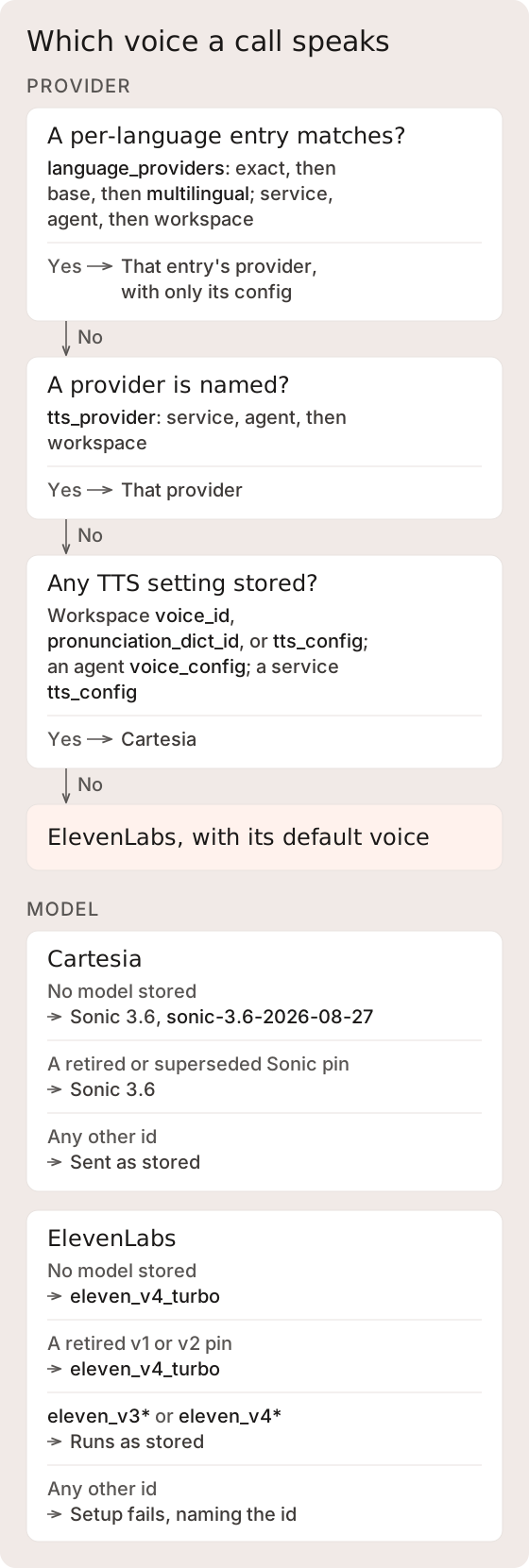
<figure><img src="https://1651797362-files.gitbook.io/~/files/v0/b/gitbook-x-prod.appspot.com/o/spaces%2F2YwM0LHtEGLt9S21OyC3%2Fuploads%2Fgit-blob-242310b59873ed29ec174a07a7a2ac422737f35f%2Ftts-provider-model.svg?alt=media" alt="A call&#x27;s TTS provider comes from a matching language_providers entry, then a named tts_provider, then Cartesia when any TTS setting is stored, and otherwise ElevenLabs with its default voice. Each provider then uses a stored model or its default, and retired pins use the default."><figcaption><p>Retired pins keep their voice and other settings, and stored configuration is not rewritten. Voice notes always speak ElevenLabs, as described below.</p></figcaption></figure>

A live call picks its TTS provider in this order:

1. A `language_providers` entry for the call's language: the exact language, then its base language, then `multilingual`, checking the service, then the agent, then the workspace for each key. The entry brings only its own config.
2. A `tts_provider` named on the service, then the agent, then the workspace.
3. With no provider named, Cartesia when any TTS setting is stored: a workspace `voice_id`, `pronunciation_dict_id`, or `tts_config`, an agent `voice_config` with a `voice_id` or `tts_config`, or a service `tts_config`. With none of these stored, the call speaks ElevenLabs `eleven_v4_turbo` with the ElevenLabs default voice.

To keep an unconfigured service on Cartesia, set `tts_provider` to `cartesia`.

When the resolved configuration stores no model, Cartesia calls use Sonic 3.6 (`sonic-3.6-2026-08-27`), and ElevenLabs calls use `eleven_v4_turbo`.

A stored model, `tts_config.model` at the workspace, agent, or service level or a per-language entry's `config.model`, takes precedence over the default unless it is a retired id listed below. To keep a call on a specific model, pin it in the service `tts_config.model`. The service `voice_config.tts_model` field does not select a model: a request that sends it is accepted, but the value is ignored. A matching `language_providers` entry, including `multilingual`, brings only its own config, so pin the model in that entry's `config.model` too. An entry without one uses the default even when the base config pins a model.

Voice notes sent to the [voice-turn operation](/developer-guide/platform-api/workspaces/services.md#process-a-voice-note-turn) always speak ElevenLabs. When a live call from the same caller would speak ElevenLabs, the reply uses that call's ElevenLabs voice and model, with `language_providers` matched on the language the note was spoken in. Otherwise the reply uses the ElevenLabs default voice on `eleven_v4_turbo`.

#### Retired Cartesia Models <a href="#retired-cartesia-models" id="retired-cartesia-models"></a>

When the resolved Cartesia model is one of the ids below, the call uses Sonic 3.6 instead. Voice, speed, volume, tone, and language settings are kept, and the stored configuration is not rewritten.

The remap covers `sonic`, `sonic-english`, `sonic-multilingual`, `sonic-2024-10-19`, `sonic-2024-12-12`, `sonic-2` and its snapshots, `sonic-turbo` and its snapshots, `sonic-3-2025-10-27`, and the Sonic 3 and Sonic 3.5 ids `sonic-3`, `sonic-3-preview`, `sonic-3-2026-01-12`, `sonic-3.5`, and `sonic-3.5-2026-05-04`. `sonic-3.6`, `sonic-preview`, and ids the platform does not recognize are sent as stored.

This applies to every place a model can be stored. Replace these pins with a current model so the configuration shows what the call speaks.

#### Retired ElevenLabs Models <a href="#retired-elevenlabs-models" id="retired-elevenlabs-models"></a>

A stored ElevenLabs pin of `eleven_flash_v2_5`, `eleven_flash_v2`, `eleven_turbo_v2_5`, `eleven_turbo_v2`, `eleven_multilingual_v2`, `eleven_multilingual_v1`, or `eleven_monolingual_v1` uses `eleven_v4_turbo` instead, on live calls and voice notes. The voice and stored configuration are kept.

On live calls, ElevenLabs voices apply only `stability` from the voice settings. It defaults to 0.5; configuration or a sympathetic tone can change it. `style` and `speed`, whether configured or emotion-driven, and stored `similarity_boost` and `use_speaker_boost` have no effect. Voice notes send no voice settings, so they use the voice's own. Test a service that depends on a slower or faster speaking rate.

ElevenLabs voice runs only `eleven_v3*` and `eleven_v4*` models. A stored model that is neither one of those nor a retired id listed above, for example a bare `v3`, `eleven_ttv_v3`, `eleven_english_sts_v2`, or a case variant such as `Eleven_v4_turbo`, fails the voice session at setup with an error naming the id. Pin a current `eleven_v3*` or `eleven_v4*` id, or leave the model unset to use the default.

### Call Forwarding

A service destination must also be on the provisioned voice use case's `allowed_forwarding_numbers`. Confirm the [Channel Manager forwarding restrictions](/developer-guide/platform-api/conversations/channel-manager.md#control-voice-calls) before using transfers.

Configure forwarding in `voice_config.forwarding`. Omitting that block or setting it to null leaves the forwarding tool unavailable. When present, choose warm or cold transfer explicitly and configure either a fixed destination or dynamic destination mode. There is no workspace-number fallback.

A fixed destination sets `forward_to` to one E.164 number. Dynamic mode sets `forward_to` to null and lists every number a transfer may dial in `approved_destinations`, a map of E.164 number to a label for what answers there, such as `{"+16095550199": "Scheduling desk"}`, with up to 50 entries. The agent picks from those numbers and sees their labels. Any other number is refused without dialing, and a dynamic block with no approved destinations offers no `forward_call` tool. Setting `approved_destinations` with a fixed `forward_to` returns `422`.

```json
{
  "forwarding": {
    "forward_to": null,
    "warm_transfer": true,
    "approved_destinations": {
      "+16095550199": "Scheduling desk",
      "+16095550123": "Billing office"
    }
  }
}
```

<figure><img src="https://1651797362-files.gitbook.io/~/files/v0/b/gitbook-x-prod.appspot.com/o/spaces%2F2YwM0LHtEGLt9S21OyC3%2Fuploads%2Fgit-blob-b5a16d8e86442d1ba21a410a88a8aa7928814f4f%2Ftransfer-resolution.svg?alt=media" alt="The forwarding block offers forward_call to a fixed number or, in dynamic mode, only to approved destinations, and each must be on the line&#x27;s allowlist. A transfer that can&#x27;t connect, including a warm transfer that misses or fails, returns the caller to the agent."><figcaption><p>A null or omitted <code>forwarding</code> block offers no <code>forward_call</code>, and there is no workspace fallback number.</p></figcaption></figure>

A cold transfer hands the caller to the destination. A warm transfer connects once a person answers and the agent briefs them. A cold transfer can't connect when it can't hand the caller off, for example because the destination isn't on the line's forwarding allowlist. A warm transfer can't connect when it reaches voicemail, a fax, no answer, or a failed dial. Either way, the caller stays on the call with the agent, which is told to let them know and keep helping. This works the same on both voice runtimes. Author the agent's instructions for a transfer that can't connect, and test them.

The `forwarding` block is the enablement control; there is no separate `forward_call_enabled` flag. The embedded service schema is authoritative for the forwarding object. Active turn policy can further restrict forwarding. See [Call Forwarding](/developer-guide/platform-api/conversations/voice-agent.md#call-forwarding) for the hold and answer-handling sequence.

## Named Presets

Agent Forge exposes four named presets. A preset sets multiple fields at once as a starting configuration.

| Preset              | TTS Model | Buffer Delay | Filler Style  | Backchannel Delay | Response Cap | Best For                                                                                                                                                                                                                            |
| ------------------- | --------- | ------------ | ------------- | ----------------- | ------------ | ----------------------------------------------------------------------------------------------------------------------------------------------------------------------------------------------------------------------------------- |
| `ultra_low_latency` | (default) | 200ms        | `backchannel` | 400ms             | 1 sentence   | Quick intake, high-volume triage, yes/no flows                                                                                                                                                                                      |
| `balanced`          | (default) | 500ms        | (default)     | (default)         | (unlimited)  | General-purpose conversations                                                                                                                                                                                                       |
| `quality`           | (default) | 500ms        | `phrase`      | (default)         | (unlimited)  | Sensitive topics, empathetic conversations where natural speech quality matters more than speed                                                                                                                                     |
| `gpt_realtime`      | n/a       | n/a          | n/a           | n/a               | n/a          | Realtime speech-to-speech provider selection where enabled. The save needs a Context Graph version that is exactly one action state; see [Session Provider](/developer-guide/platform-api/workspaces/services.md#session-provider). |

Presets are a starting point. You can apply a preset and then override individual fields on top of it. Presets do not select a Cartesia model, so pin a model in `tts_config.model` when you need one.

## API Usage

Voice config is a field on the service model. You set it when creating or updating a service.

### Setting voice config via PUT

{% openapi src="<https://platform.api-us.concurrence.com/v1/openapi.json>" path="/v1/{workspace\_id}/services/{service\_id}" method="put" %}
<https://platform.api-us.concurrence.com/v1/openapi.json>
{% endopenapi %}

```json
{
  "voice_config": {
    "max_buffer_delay_ms": 200,
    "filler_style": "backchannel",
    "backchannel_delay_ms": 400,
    "max_response_sentences": 1,
    "barge_in_min_speech_s": 0.25,
    "forwarding": null
  }
}
```

The `voice_config` object is replaced wholesale, not merged. Merge behavior on service update applies only across other top-level service fields - within `voice_config`, whatever you send becomes the entire config. To change one field, send the full object: read the current config via `GET`, modify the field, and `PUT` the complete object back.

A partial body like this:

```json
{
  "voice_config": {
    "filler_style": "silent"
  }
}
```

changes the filler style, but it also drops every omitted nullable field (`max_buffer_delay_ms`, `eot_timeout_ms`, and so on return to their field-specific inheritance or runtime defaults) and resets defaulted fields to their defaults (`backchannel_delay_ms` to `400`, `forwarding` to `null`).

### Reading current config

The service response includes the full `voice_config` object:

{% openapi src="<https://platform.api-us.concurrence.com/v1/openapi.json>" path="/v1/{workspace\_id}/services/{service\_id}" method="get" %}
<https://platform.api-us.concurrence.com/v1/openapi.json>
{% endopenapi %}

```json
{
  "id": "svc_abc123",
  "name": "Intake Line",
  "voice_config": {
    "max_buffer_delay_ms": 200,
    "filler_style": "backchannel",
    "filler_vocabulary": null,
    "backchannel_delay_ms": 400,
    "eager_eot_threshold": null,
    "eot_timeout_ms": null,
    "max_response_sentences": 1,
    "max_response_words": null,
    "barge_in_min_speech_s": 0.25,
    "barge_in_cooldown_s": null,
    "forwarding": null
  }
}
```

Fields that are `null` apply no service-level override. Depending on the field, the runtime then consults agent, workspace, or environment configuration, or uses a runtime default. See [Field-Specific Resolution](#field-specific-resolution).

## CLI Usage

The `forge` CLI provides a shorthand for voice config operations.

### Apply a preset

```bash
forge platform service voice-config <service_id> --preset ultra_low_latency
```

This sets all the fields in the preset at once.

### Set individual fields

```bash
forge platform service voice-config <service_id> \
  --body '{"filler_style": "silent", "max_response_sentences": 1}'
```

### Read current config

```bash
forge platform service voice-config <service_id> --get
```

## Field-Specific Resolution

Voice settings do not use one universal first-non-null cascade. Resolution depends on the field:

| Configuration                        | Resolution order                                                                                                                                                                                                                                                                                                                                                                                                                               |
| ------------------------------------ | ---------------------------------------------------------------------------------------------------------------------------------------------------------------------------------------------------------------------------------------------------------------------------------------------------------------------------------------------------------------------------------------------------------------------------------------------- |
| Session provider                     | Service, then agent, then environment                                                                                                                                                                                                                                                                                                                                                                                                          |
| Flat TTS provider                    | Service, then agent, then workspace. With none named, Cartesia when any TTS setting is stored, otherwise ElevenLabs; see [Default TTS Model](#default-tts-model)                                                                                                                                                                                                                                                                               |
| Per-language TTS provider            | Exact language, base language, then `multilingual`; for each key, service, then agent, then workspace                                                                                                                                                                                                                                                                                                                                          |
| TTS provider configuration and model | Workspace settings form the base, agent `tts_config` overrides them, and service `tts_config` overrides both; unresolved values use the platform defaults. A workspace `voice_id` applies only when the call speaks Cartesia, and an agent `voice_id` only when the call speaks the agent's `tts_provider` (Cartesia when unset). When a per-language entry selects the provider, that entry's config replaces the merged base provider config |
| Voice language                       | The matched caller's record language, then the workspace voice `language`, then English. On the platform-managed runtime the voice can follow a caller who switches language; see [Language Selection](https://docs.concurrence.com/channels/voice/audio-pipeline#language-selection)                                                                                                                                                          |
| Service tuning fields                | The service value applies when set; otherwise the field's documented runtime default or supported fallback applies                                                                                                                                                                                                                                                                                                                             |

### Workspace Voice Settings

Workspace Voice Settings provide baseline voice identity, tone, speed, volume, language, keyterms, and sensitive topics. See [Workspaces](/developer-guide/platform-api/workspaces.md#voice-settings) for how those settings interact with service overrides.

{% openapi src="<https://platform.api-us.concurrence.com/v1/openapi.json>" path="/v1/{workspace\_id}/settings/voice" method="get" %}
<https://platform.api-us.concurrence.com/v1/openapi.json>
{% endopenapi %}

{% openapi src="<https://platform.api-us.concurrence.com/v1/openapi.json>" path="/v1/{workspace\_id}/settings/voice" method="put" %}
<https://platform.api-us.concurrence.com/v1/openapi.json>
{% endopenapi %}

Context Graph `TurnPolicy` and channel overrides control separate state- and channel-specific behavior. They can gate capabilities or alter objectives and guidance, but they are not additional tiers in a generic voice-setting cascade.

## Turn-Level Emotion Selection

During each turn, the voice pipeline selects an emotional tone alongside the state transition, based on the caller's emotional state and the conversation context. The selected tone is applied to the entire response - the filler and the main response share it - so each turn is spoken with one consistent voice.

### Available Emotions

The pipeline chooses from eight emotions:

| Emotion        | When to use                                                                |
| -------------- | -------------------------------------------------------------------------- |
| `friendly`     | Default warmth. General conversations, greetings, confirmations.           |
| `sympathetic`  | Caller is frustrated, upset, or sharing bad news.                          |
| `calm`         | Sensitive topics, de-escalation, anxious callers.                          |
| `enthusiastic` | Positive outcomes, good news, caller is excited.                           |
| `serious`      | Important information, disclaimers, medical details.                       |
| `cheerful`     | Light conversations, small talk, closing on a positive note.               |
| `curious`      | Asking clarifying questions, exploring a topic.                            |
| `content`      | Neutral satisfaction. Wrapping up, confirmations after a good interaction. |

Because the tone applies to the whole utterance, the prosody stays consistent from the first filler word to the end of the response - there are no uncanny emotional shifts partway through a sentence.

The empathy system can override the turn-level selection at higher tiers. At Tier 2 (full empathy), the system forces warmth regardless of the selected emotion. At Tier 3 (hold space), filler is suppressed entirely and silence replaces speech.


---

# Agent Instructions
This documentation is published with GitBook. GitBook is the documentation platform designed so that both humans and AI agents can read, navigate, and reason over technical content effectively. Learn more at gitbook.com.

## Querying This Documentation
If you need additional information that is not directly available in this page, you can query the documentation by asking a question.

Perform an HTTP GET request on the following URL with the `ask` and `goal` query parameters:

```
GET https://docs.concurrence.com/developer-guide/platform-api/workspaces/voice-configuration.md?ask=<question>&goal=<user_goal>
```

`ask` is the immediate question: it should be specific, self-contained, and written in natural language.
`goal` is what the user is ultimately trying to achieve, the reason they need the answer. Sharing it helps GitBook give you a better, more relevant answer. A goal is most helpful when it describes the outcome the user wants rather than restating the question. For example, with `ask=how do I create an API token`, a goal like `automate deployments from our CI pipeline` lets GitBook tailor the answer to that use case.

The response will contain a direct answer to the question and relevant excerpts and sources from the documentation.

Use this mechanism when the answer is not explicitly present in the current page, you need clarification or additional context, or you want to retrieve related documentation sections.