> For the complete documentation index, see [llms.txt](https://docs.concurrence.com/llms.txt). Markdown versions of documentation pages are available by appending `.md` to page URLs; this page is available as [Markdown](https://docs.concurrence.com/operations-and-safety/operators.md).

# Operators and Escalation

Plan human escalation and supported API-based intervention, including phone takeover, handback, and transfer fallbacks.

Human operators handle work that needs their judgment or authority. The platform supplies controls for inspecting and intervening in eligible interactions; the organization defines staffing, handoff criteria, and the destination for unresolved work. [Operating Model](/platform-overview/operating-model.md#agent-to-operator) explains that division.

The Developer Console does not provide operator pages or takeover controls. Runs has **All runs** and **Overview**, including a Live status filter. To provide intervention controls, build an integration with the Platform operator and run-control APIs. Confirm runtime support and operator access before designing that integration.

Distinguish live takeover, transfer to an external phone destination, and approval of a proposed write. Each addresses a different problem and has its own lifecycle. The sections below cover live operation and transfer.

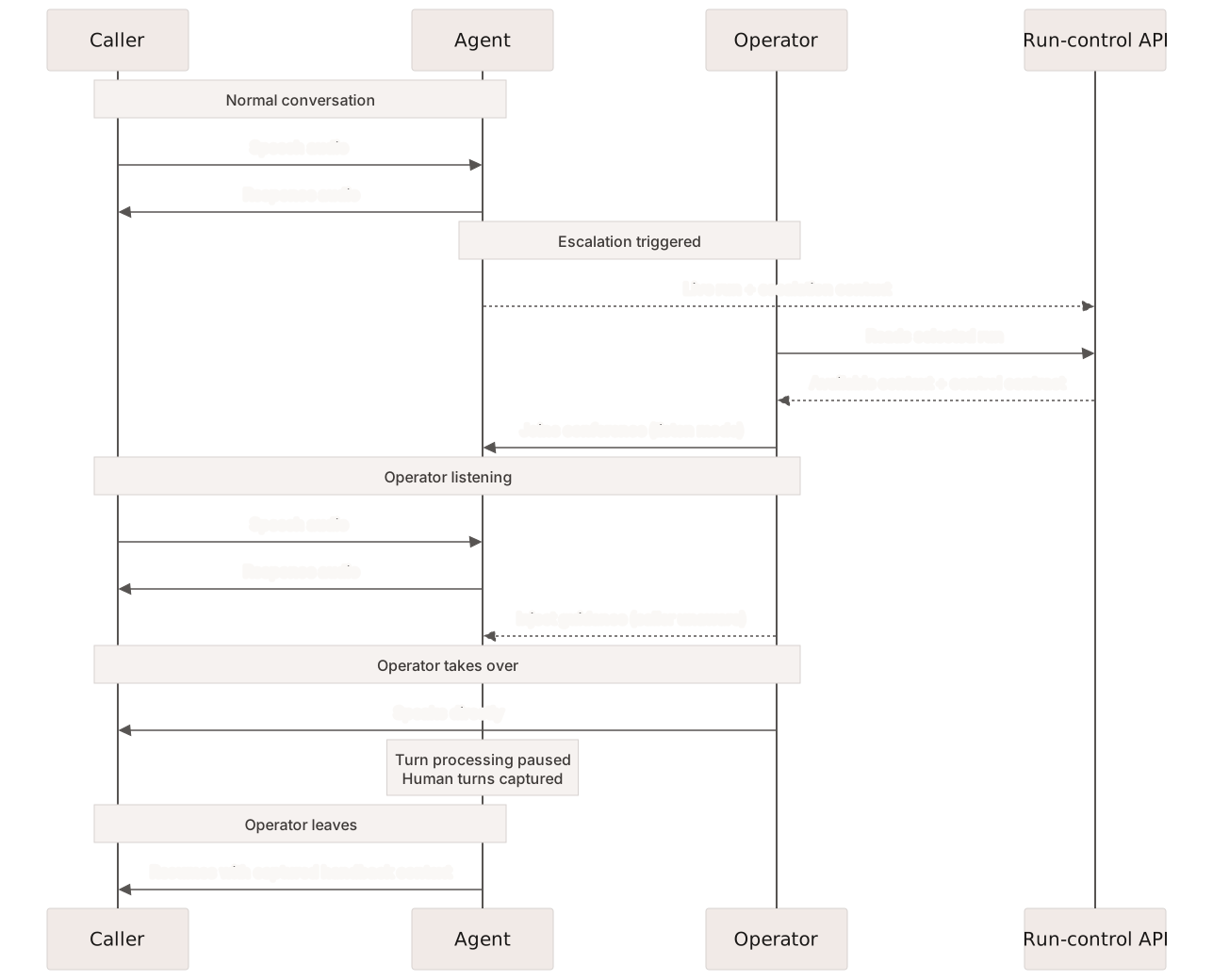
On a supported voice path, an operator joins the same conference as the caller and agent. Listen mode does not transfer or reconnect the call. An integration should request listen mode explicitly and require confirmation before switching to takeover, which unmutes the operator and suppresses the agent's voice.

For eligible text, SMS, email, and web runs, takeover pauses the agent while the operator authors replies, then resumes it when the operator hands control back.

<figure><img src="https://3635224444-files.gitbook.io/~/files/v0/b/gitbook-x-prod.appspot.com/o/spaces%2FvcLyiHRcwv7g83p6vxAd%2Fuploads%2Fgit-blob-46cfc2f4198ad0a4d5e63971df55888a15a75af3%2Foperator-takeover.svg?alt=media" alt="Sequence showing an operator opening an escalated run, joining in listen mode, taking over while agent turn processing pauses, and returning control with captured handback context."><figcaption><p>Voice intervention through an API integration, from listen mode to takeover and handback.</p></figcaption></figure>

## How Escalation Policy Works

Escalation behavior is authored in the agent's context graph and instructions. Teams define which user requests, safety boundaries, unavailable tools, or uncertain situations require a transfer, callback, refusal, or operator involvement. The current runtime does not provide a separate monitor-concept system that can replace those instructions.

An integration can use the Runs and operator APIs to locate eligible active work and request intervention. Check channel, live status, and runtime support before joining; a listed realtime-provider call does not necessarily support takeover. Supported join paths emit escalation and operator-attribution events.

Define a fallback for times when no operator is available. Depending on the workflow, that can mean a configured external transfer target, a callback task, emergency instructions, or a bounded response that does not continue beyond the agent's authority.

## Build an Intervention Workflow <a href="#runs-live-and-takeover" id="runs-live-and-takeover"></a>

An intervention client needs to find eligible work, connect the operator, and verify each change of control.

### Find Active Runs <a href="#live-queue" id="live-queue"></a>

Use the **Live** status filter in **All runs** to inspect running and paused conversation records. It is a browse filter: it does not rank work or open takeover controls.

Live visibility and retained records are best-effort. Framework history normally becomes available at terminal completion and is not authoritative real-time dispatch state. An intervention integration needs its own queue, staffing, and eligibility checks using the [Runs API](https://docs.concurrence.com/developer-guide/platform-api/conversations/runs).

### Operator Modes

Voice operators work in one of two modes:

* **Listen mode** - The operator hears the conversation but is muted at the telephony level, and the agent continues handling the call. The platform does not add operator speech or an audible join announcement; organizations remain responsible for any monitoring disclosures required by policy or law.
* **Takeover mode** - The operator is unmuted and speaks directly with the caller. Agent speech and turn processing are suspended, and caller and operator speech is captured for the handback when transcription succeeds. When the operator leaves the call from takeover, the agent resumes in the existing session with that conversation as context. Switching back to listen mode also resumes the agent. The client must provide any confirmation step before requesting this mode.

During takeover, the operator's speech is transcribed on its own stream, so the handback tells the agent who said what.

### Text-Channel Takeover

For eligible live text, SMS, email, and web runs, the integration pauses the agent, stages an operator reply, and hands control back explicitly. Only one pending reply is retained; staging another replaces it, and downstream delivery can still fail. See [Author a Non-Voice Turn](https://docs.concurrence.com/developer-guide/platform-api/conversations/runs#author-a-non-voice-turn).

### Phone Connection

Voice operators connect over the phone network. The platform dials the phone number on the operator's profile and adds them to the conference when they answer. The integration provides controls and displays available transcripts; the operator's phone carries the audio. Carrier conditions affect the additional media leg.

Operators join by phone, not through a browser microphone or headset. Configure a reachable operator phone number before testing listen mode or takeover.

Only one operator can be active on a call at a time. If a second operator attempts to join the same call, they receive a conflict error. The same operator joining the same call again receives the cached response (the join is idempotent).

### Run Context

Run detail provides the available channel-specific record. Retain the selected workspace and run identifiers, resolve the supported call, and display its caller and service context before requesting control.

### Guidance Injection

Operators in listen mode can send text guidance to the agent without taking over the call. When delivery reaches the active session, the current voice runtime interrupts agent speech and frames the guidance for the agent's next response. The API can also report queued or failed delivery, so clients should inspect the returned status rather than assume the instruction was applied.

This is useful when an operator sees the conversation going in the wrong direction and wants to steer the agent without adding operator audio to the call. For example, an operator monitoring a scheduling call could send "Ask for their insurance ID before confirming the appointment" for the agent to incorporate into its next response.

Guidance messages are distinct from external events. External events carry factual information ("The appointment has been confirmed") and queue behind the agent's current speech. Guidance carries instructions ("Ask about their insurance") and interrupts because instructions are time-sensitive.

Both event types use the active voice-session delivery path, which routes the event to the session handling the call.

## Silence Management

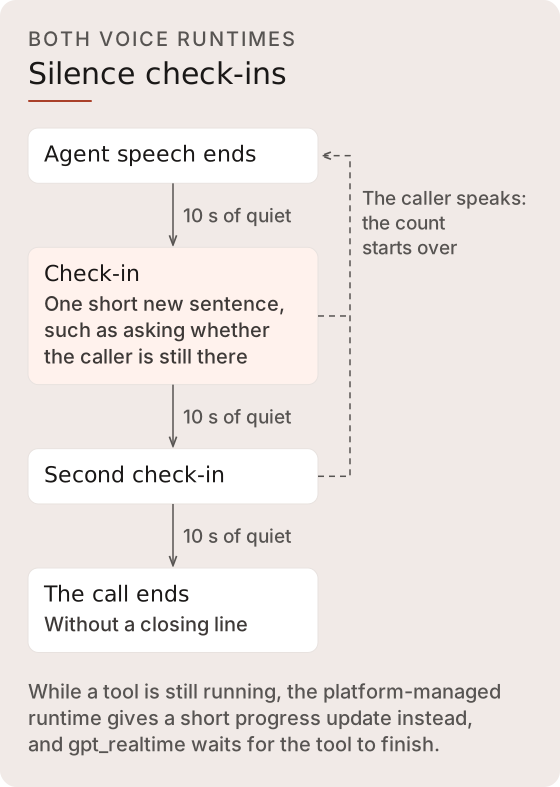
Silence handling is a dedicated voice-runtime behavior, the same on the platform-managed runtime and on `gpt_realtime`. It does not depend on a composite risk score or a separate conversation-monitoring service. After 10 seconds of quiet following the agent's speech, the agent checks in with one short new sentence, checks in once more after another 10 seconds, and ends the call after the next 10 seconds of quiet. Caller speech starts the count over. Silence counts for nothing while a transfer is under way. On the platform-managed runtime it also counts for nothing while an operator has the call, and the count starts over when the caller is handed back. See [Terminal State & Auto-Hangup](https://docs.concurrence.com/developer-guide/platform-api/conversations/voice-agent#terminal-state-and-auto-hangup) for how a tool still running changes this.

<figure><img src="https://3635224444-files.gitbook.io/~/files/v0/b/gitbook-x-prod.appspot.com/o/spaces%2FvcLyiHRcwv7g83p6vxAd%2Fuploads%2Fgit-blob-20d8491b81e1755a1a69aea6ad3faad7164bc05a%2Fsilence-check-ins.svg?alt=media" alt="On both voice runtimes, 10 seconds of quiet after the agent speaks brings a check-in, another 10 seconds brings a second one, and the next 10 seconds ends the call. Caller speech starts the count over."><figcaption><p>The same sequence runs on the platform-managed runtime and on <code>gpt_realtime</code>.</p></figcaption></figure>

Safety and escalation behavior remains governed by the authored agent policy and explicit operator or forwarding workflows.

## Speaker Resolution

With three participants in a conference (caller, agent, operator), the system resolves who is speaking at any given moment using a priority chain:

1. **Operator in takeover mode** - Highest priority. Agent audio is suppressed.
2. **Caller** - Barge-in detection applies. If the caller speaks during agent output, the agent stops.
3. **Agent** - Speaks when neither the operator nor the caller is active.

Operator takeover suppresses the agent. Caller interruptions depend on the active barge-in policy and recognized speech, so background noise or speech below the configured threshold does not necessarily stop playback.

## Warm Hand-Off

Warm forwarding is a service-level call-forwarding mode, separate from an operator joining through the run-control API. When the agent invokes `forward_call` and the resolved forwarding configuration uses `warm_transfer: true`, the runtime keeps the caller in the conference, dials the configured destination, and gives the agent a brief hand-off turn before leaving the caller with the person who answered. Cold forwarding remains available when a briefing is inappropriate, such as an IVR, voicemail, or emergency destination.

### Phase 1: Normal

The agent and caller are in conversation as usual. Authored instructions decide when the agent should invoke `forward_call`. The destination is the service's fixed number, or in dynamic mode the approved destination the agent chose from the service's list.

### Phase 2: Briefing

After the agent finishes speaking, the runtime holds the caller and dials the destination. The runtime waits for a human-answer classification before beginning the briefing; an answered call alone is insufficient. Once a person answers, the caller comes off hold and hears the agent's briefing to the destination. The hand-off is intentionally brief and does not guarantee transfer of the full transcript, patient record, risk assessment, or recommended actions.

Barge-in is disabled during the briefing phase so speech from the caller or the destination does not interrupt the agent's introduction.

### Phase 3: Connected

After the briefing plays, the runtime confirms the caller is off hold before it removes the agent; if it can't, the agent stays on the call. Voicemail, a fax, no answer, or a failed dial returns the caller to the agent. Answer classification is provider-dependent and is not a guarantee that a destination is a suitable human operator.

```mermaid
%%{init: {"theme":"base","fontFamily":"Inter, sans-serif","themeVariables":{"fontFamily":"Inter, sans-serif","fontSize":"16px","background":"#FAF8F6","primaryColor":"#F1EAE7","primaryTextColor":"#1A1817","primaryBorderColor":"#D7D2D0","secondaryColor":"#FDFCFB","tertiaryColor":"#F6F2F0","lineColor":"#575452","textColor":"#3D3937","clusterBkg":"#FDFCFB","clusterBorder":"#E8E2DF","edgeLabelBackground":"#FAF8F6","actorBkg":"#F1EAE7","actorTextColor":"#1A1817","actorBorder":"#D7D2D0","actorLineColor":"#575452","signalColor":"#575452","signalTextColor":"#3D3937","labelBoxBkgColor":"#F1EAE7","labelBoxBorderColor":"#D7D2D0","labelTextColor":"#3D3937","loopTextColor":"#3D3937","noteBkgColor":"#F6F2F0","noteBorderColor":"#D7D2D0","noteTextColor":"#3D3937","activationBkgColor":"#F1EAE7","activationBorderColor":"#D7D2D0","altSectionBkgColor":"#FAF8F6","altSectionColor":"#3D3937"}}}%%
sequenceDiagram
    participant Patient
    participant Agent
    participant Destination

    Note over Patient,Agent: Phase 1: Normal
    Patient->>Agent: "Can I speak to someone?"

    Note over Patient,Destination: Phase 2: Briefing
    Agent->>Destination: Dials configured target
    Note over Patient: On hold until a person answers
    Agent->>Destination: AI briefing (caller and destination hear)

    Note over Patient,Destination: Phase 3: Connected
    Note over Agent: Removed from call
    Patient->>Destination: Direct conversation
```

A service forwarding configuration explicitly selects warm or cold transfer and either a fixed destination or dynamic mode. In dynamic mode the agent can transfer only to the service's approved destinations, which it picks by label; any other number, including one the caller reads out or one in a tool result, is refused without dialing, and a dynamic service with no approved destinations offers no forwarding tool. Without a forwarding configuration, the forwarding tool is unavailable. Each destination must also be on the line's forwarding allowlist. State policy can further restrict forwarding. Destination selection does not inherit a fallback number from workspace settings. See [Call Forwarding](https://docs.concurrence.com/developer-guide/platform-api/workspaces/voice-configuration#call-forwarding).

## Deferred Transfer

When the agent initiates a call transfer (for example, forwarding to a clinic's front desk), the transfer is deferred until the agent's goodbye message finishes playing. This prevents the caller from being redirected mid-sentence. If the caller speaks during the goodbye (barge-in), the transfer is cancelled and the conversation continues. If an operator joins the call during this window, the transfer is also cancelled.

If the platform cannot hand the caller off after the goodbye, for example because the line's forwarding allowlist does not include the destination, the caller stays on the call with the agent. The transfer reports a failure to the agent, which can then tell the caller and keep helping. Once a cold transfer hands the caller off, the caller has left the agent's call.

## Operations Views

Operators register with a profile that includes their name, skills, phone number, and role. Their status is tracked as online, busy, or offline.

The Developer Console retains run browsing. Operator-specific views require an API integration:

* **Runs > All runs** - Filterable conversation and framework history, including the Live status filter.
* **Runs > Overview** - Workspace totals and status distributions.
* **Operator analytics and audit APIs** - Escalation, response-time, handle-time, and attributed operator-action records for your integration.

## Escalation as Collaboration

The agent handles the routine part, and the operator handles the part that needs human judgment. Both contribute to the same run record. After a voice takeover, the agent can resume with the captured caller and operator turns as handback context.

Use escalation rates, response times, handle times, and fallback outcomes to plan staffing. Assign people to the authored escalation paths and maintain a fallback for times when they are unavailable.

{% hint style="info" %}
**Developer Guide** - For API endpoints and integration details, see the [Operators](https://docs.concurrence.com/developer-guide/platform-api/conversations/operators) reference in the developer guide.
{% endhint %}


---

# Agent Instructions
This documentation is published with GitBook. GitBook is the documentation platform designed so that both humans and AI agents can read, navigate, and reason over technical content effectively. Learn more at gitbook.com.

## Querying This Documentation
If you need additional information that is not directly available in this page, you can query the documentation by asking a question.

Perform an HTTP GET request on the following URL with the `ask` and `goal` query parameters:

```
GET https://docs.concurrence.com/operations-and-safety/operators.md?ask=<question>&goal=<user_goal>
```

`ask` is the immediate question: it should be specific, self-contained, and written in natural language.
`goal` is what the user is ultimately trying to achieve, the reason they need the answer. Sharing it helps GitBook give you a better, more relevant answer. A goal is most helpful when it describes the outcome the user wants rather than restating the question. For example, with `ask=how do I create an API token`, a goal like `automate deployments from our CI pipeline` lets GitBook tailor the answer to that use case.

The response will contain a direct answer to the question and relevant excerpts and sources from the documentation.

Use this mechanism when the answer is not explicitly present in the current page, you need clarification or additional context, or you want to retrieve related documentation sections.