> For the complete documentation index, see [llms.txt](https://docs.concurrence.com/llms.txt). Markdown versions of documentation pages are available by appending `.md` to page URLs; this page is available as [Markdown](https://docs.concurrence.com/self-serve/web-forge.md).

# Web Forge (Beta)

Web Forge (Beta) helps authorized users inspect, change, test, and review agent service configuration through a guided workflow.

Web Forge is a guided workspace for changing a Concurrence agent service. Start with a service, describe the behavior you want, inspect the proposed field-level diff, and explicitly apply the changes you accept. The conversation keeps the proposal, saved version, change history, test evidence, and any linked production review together.

Forge can place a requested change in the service's [agent](/agent/agents.md), [context graph](/agent/context-graphs.md), or applied [dynamic behaviors](/agent/context-graphs/dynamic-behaviors.md). Chat can prepare a draft, but it cannot silently write a configuration version.

{% hint style="info" %}
Open **Capabilities** in the chat toolbar for the in-app guide. Its **Try** examples put a suggested request in the composer. If you have not selected a service yet, Forge opens service selection first. A suggested request is not sent or applied automatically.
{% endhint %}

The workflow has two deliberate review boundaries: one before a staging write and another before any eligible production apply. The screenshots below use the current Web Forge interface with synthetic example data. Workspace labels in the full-page view are anonymized.

<figure><img src="https://3635224444-files.gitbook.io/~/files/v0/b/gitbook-x-prod.appspot.com/o/spaces%2FvcLyiHRcwv7g83p6vxAd%2Fuploads%2Fgit-blob-6a453a71961cacab1c8323c9a30c333fc8e08d7b%2Fweb-forge-current-workspace.png?alt=media" alt="Full Web Forge workspace showing the selected staging organization and service, conversation history, a chat request, a reviewable field diff, and the message composer" width="900"><figcaption><p>The full workspace: choose a service, request a change, and review the proposed diff before applying it.</p></figcaption></figure>

## Get started <a href="#workflow" id="workflow"></a>

1. **Sign in** with the identity provider configured for your deployment.
2. **Choose an organization.** This establishes the service catalog, environment, and permissions for the conversation.
3. **Choose a service.** Use the picker in the center of a new workspace or the selector at the top of an open chat. Search active services by name or ID.
4. **Inspect or request a change.** Select **View configuration** for a read-only look, or describe what the agent should do differently in chat.

<figure><img src="https://3635224444-files.gitbook.io/~/files/v0/b/gitbook-x-prod.appspot.com/o/spaces%2FvcLyiHRcwv7g83p6vxAd%2Fuploads%2Fgit-blob-45a685e532d0bc0359d3ce27251d126278647220%2Fweb-forge-current-service.png?alt=media" alt="Web Forge service selection showing a searchable list of two active example services" width="560"><figcaption><p>Choose an active service before starting a conversation.</p></figcaption></figure>

### Organization and service scope <a href="#organization-and-service-scope" id="organization-and-service-scope"></a>

A conversation stays in its selected organization. You can switch services within that organization while retaining the conversation history, but existing proposals and tests stay attached to their original service. Forge asks for confirmation before switching and rejects an inactive or out-of-scope service.

Staging can offer reviewed configuration applies and synthetic tests. A production organization supports inspection and local proposals. An eligible staging change can open a separate, linked production review; ordinary production chat proposals cannot be saved directly. The available review and apply actions depend on the deployment's configuration and your access.

## Change agent behavior <a href="#configuration-changes" id="configuration-changes"></a>

Ask for the user-facing outcome, such as "Ask one short follow-up question before recommending a next step." Forge finds the owning configuration area and prepares a draft against the selected service's latest version. Supported areas include:

* **Agent** - Identity, instructions, behaviors, and communication patterns.
* **Context graph** - States, transitions, routing, and workflow guidance.
* **Dynamic behaviors** - Applied, reusable behavior definitions.

One proposal can include up to eight related field edits on the same entity and baseline version. Different entities receive separate proposals. If you explicitly ask for the same change across related services, each service gets its own reviewable draft.

Review the affected entity, fields, source version, before-and-after values, and any shared-service impact. Select **Apply change** only for a proposal you accept. Before a staging write, Forge reloads the service and entity, checks that the reviewed baseline is current, restricts the operation to the approved fields, and reads back the new version. A stale or changed target requires a fresh proposal.

<figure><img src="https://3635224444-files.gitbook.io/~/files/v0/b/gitbook-x-prod.appspot.com/o/spaces%2FvcLyiHRcwv7g83p6vxAd%2Fuploads%2Fgit-blob-431d7877daaaa96347e90627cd340b40e0fb77a3%2Fweb-forge-current-change.png?alt=media" alt="Web Forge change card showing an agent guidance field, its current and proposed text, source version, and Apply change button" width="680"><figcaption><p>Review the exact field diff and baseline version before applying.</p></figcaption></figure>

### Inspect the baseline and the diff <a href="#change-activity" id="change-activity"></a>

**View configuration** is a searchable, read-only browser for the linked agent, context graph, and active dynamic behaviors. You can inspect states, guidance, and tool details without creating a proposal. Read-only questions in chat can also reload the current configuration.

Open **Changes** for the **Changes in this chat** dialog. It records proposed, applied, invalid, and rollback drafts with their service, entity, versions, status, and field-level diff. You can reopen a change without leaving the conversation, pin the conversation for later, or delete one you no longer need.

## Test the change <a href="#validation-options" id="validation-options"></a>

### One-turn smoke test

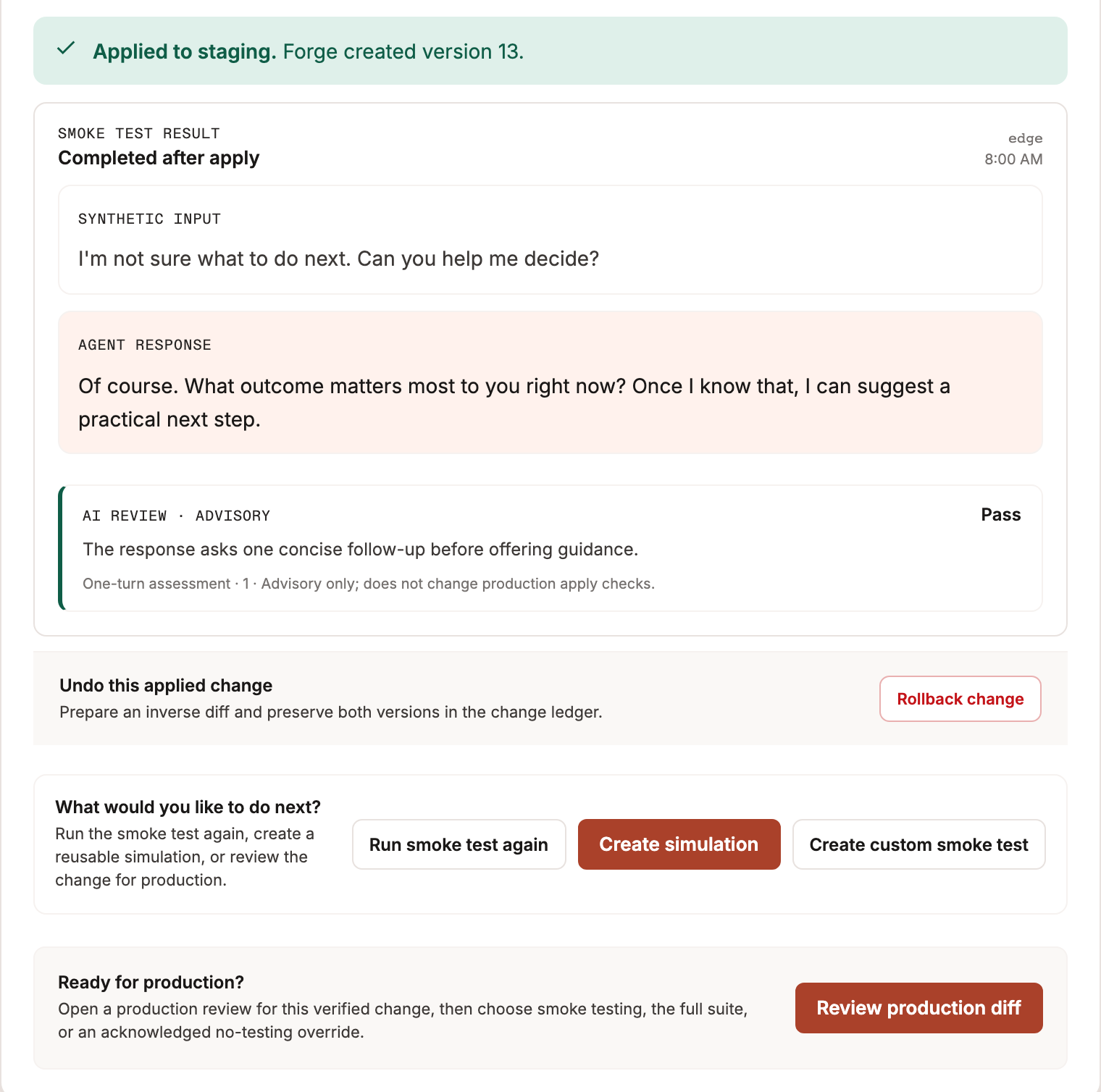
After a verified staging apply, Forge automatically sends one synthetic message to the staging service's `edge` version set. The applied change shows the input, agent response or runner error, and an outcome. `edge` is a version set, not a separate service.

A runner error or empty agent response fails the smoke gate. A nonempty response confirms that the turn executed, not that its content is correct. When available, an AI review adds an advisory `pass`, `fail`, or `uncertain` assessment with a reason; it does not determine the production apply gate. You can rerun the smoke test or create a custom one-turn test, edit its synthetic message, and confirm that it contains no patient data or protected health information (PHI) before running it. A one-turn test does not create reusable Forge test entities.

<figure><img src="https://3635224444-files.gitbook.io/~/files/v0/b/gitbook-x-prod.appspot.com/o/spaces%2FvcLyiHRcwv7g83p6vxAd%2Fuploads%2Fgit-blob-b3290ae1a1acdc021f883dcea19355806f98df58%2Fweb-forge-current-smoke.png?alt=media" alt="Web Forge post-apply smoke result with synthetic input, agent response, advisory review, rollback action, and testing options" width="660"><figcaption><p>After a staging apply, inspect the synthetic turn and choose whether to test again, create a simulation, review production, or prepare a rollback.</p></figcaption></figure>

### Reusable simulations

Ask Forge to create a simulation, then review its synthetic scenarios, objectives, user behavior, and metrics. **Create reusable simulation** saves linked Classic unit tests in one Classic test set. **Run simulation** starts that test set as a separate action. The saved artifact and available run results remain linked to the conversation. The [Platform Case Library and Classic simulations](/testing/testing/simulations.md) are different testing surfaces.

A failed test does not undo a configuration version. Inspect the evidence, prepare another reviewed change if needed, and test again. Synthetic tests do not reproduce every production dependency or certify future behavior.

## Review a production apply <a href="#review-a-release-to-production" id="review-a-release-to-production"></a>

For an eligible, verified staging change with a configured production counterpart, select **Review production diff**. Forge first shows the production diff in the staging conversation. Select **Promote to production** on that card to open the linked production conversation and its apply checks; opening it does not apply the change or retarget the staging chat. Forge compares each field's staging value before the edit, verified staging value after it, and latest production value. A divergent production value blocks apply for manual reconciliation.

<figure><img src="https://3635224444-files.gitbook.io/~/files/v0/b/gitbook-x-prod.appspot.com/o/spaces%2FvcLyiHRcwv7g83p6vxAd%2Fuploads%2Fgit-blob-4783f777b41e9493a47d6226ddb302d5bde7bb2c%2Fweb-forge-current-staging-promotion.png?alt=media" alt="Staging conversation production-diff card showing the current and proposed production values and the Promote to production button" width="680"><figcaption><p>Review the production diff in staging, then continue to the linked production chat for apply checks.</p></figcaption></figure>

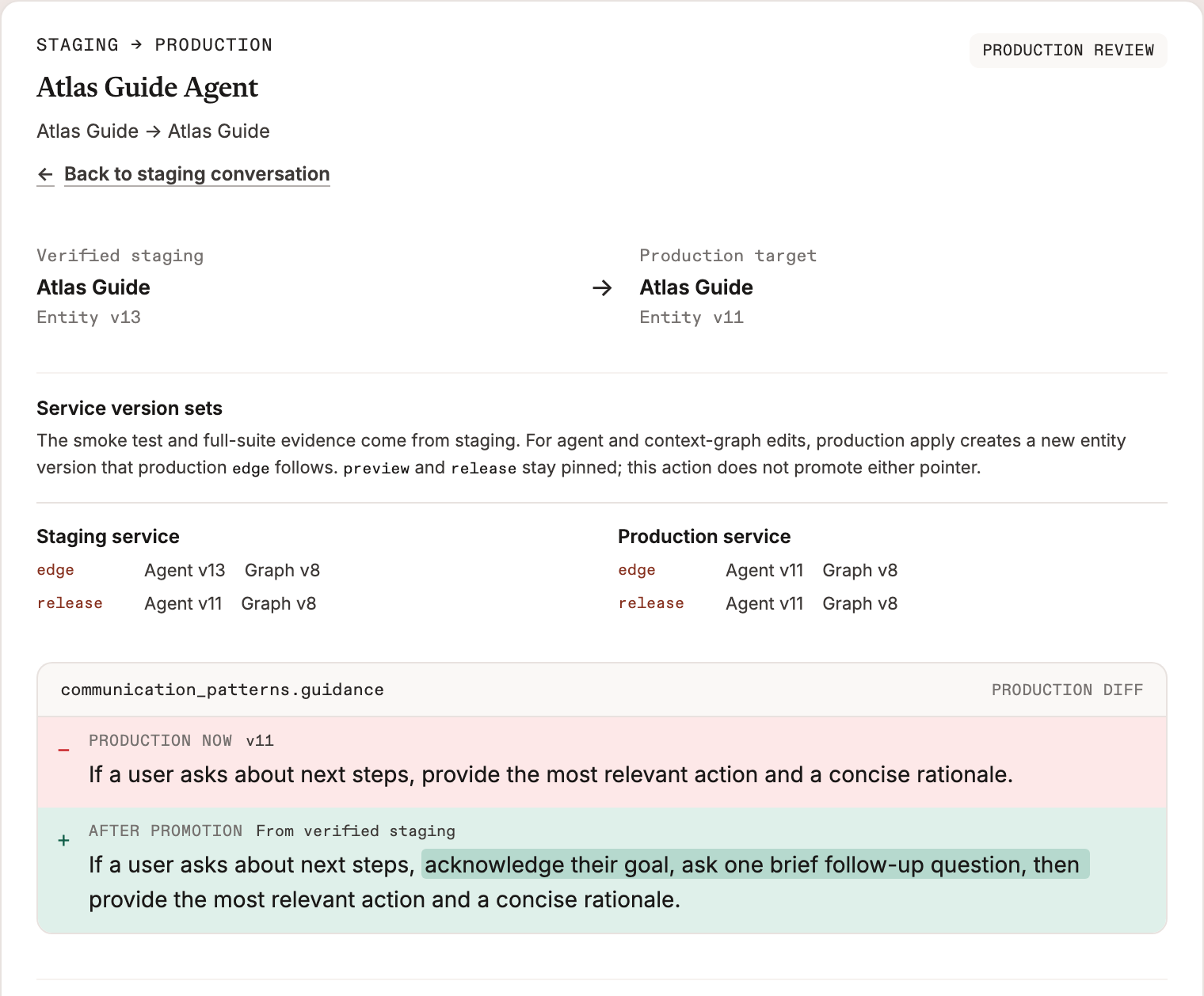
The production review shows source and target versions, service version sets, the exact production diff, and the available staging evidence.

<figure><img src="https://3635224444-files.gitbook.io/~/files/v0/b/gitbook-x-prod.appspot.com/o/spaces%2FvcLyiHRcwv7g83p6vxAd%2Fuploads%2Fgit-blob-3fbacee36128daf58bbf1d6cae3791f9406f7b11%2Fweb-forge-current-production-review.png?alt=media" alt="Web Forge production review comparing verified staging and production entity versions, version sets, and the field-level production diff" width="680"><figcaption><p>Compare the verified staging value with the current production value.</p></figcaption></figure>

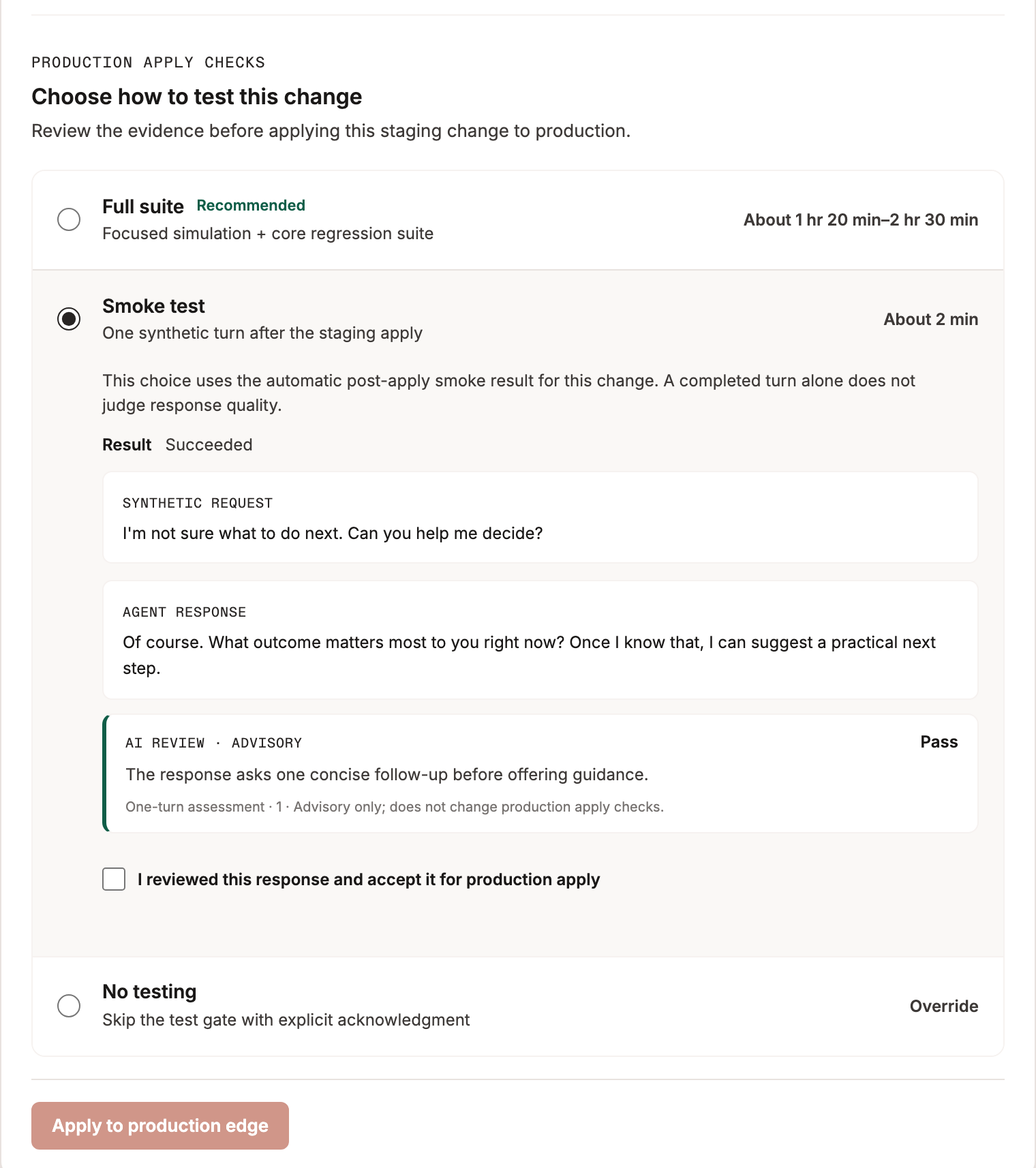
Choose one production apply check:

| Choice         | Required evidence                                                                                                                                                                                                                                                                                    |
| -------------- | ---------------------------------------------------------------------------------------------------------------------------------------------------------------------------------------------------------------------------------------------------------------------------------------------------- |
| **Full suite** | A focused simulation for this change and the configured core regression suite must both finish without runner errors or failed metrics. The review can start or refresh runs and link to their detailed results.                                                                                     |
| **Smoke test** | The automatic post-apply staging smoke result must be tied to this exact change, have no runner error and a nonempty response. The reviewer must read the response and select **I reviewed this response and accept it for production apply**. The advisory AI assessment does not decide this gate. |
| **No testing** | The reviewer must select **I accept responsibility**. This bypasses the test requirement only; freshness, conflict, scope, authorization, and readback checks still apply.                                                                                                                           |

The UI's time estimates are estimates, not guarantees. Stale staging versions, unresolved production conflicts, or incomplete evidence for the selected choice block apply.

<figure><img src="https://3635224444-files.gitbook.io/~/files/v0/b/gitbook-x-prod.appspot.com/o/spaces%2FvcLyiHRcwv7g83p6vxAd%2Fuploads%2Fgit-blob-d77158b8b15d768317a028a79dddd0b2cca595ba%2Fweb-forge-current-production-checks.png?alt=media" alt="Web Forge production apply checks showing full suite, smoke test with response acknowledgment, no-testing override, and the apply action" width="640"><figcaption><p>Select a check, review its evidence, and explicitly acknowledge the chosen path before applying.</p></figcaption></figure>

### What production apply changes

For an agent or context-graph edit that is not already present in production, **Apply to production edge** creates and verifies a new production entity version. If the verified staging value is already present, Forge reconciles the review without another write. Classic V1's immutable `edge` version set follows the latest agent and context-graph versions. Before a write, Forge checks that other visible production version sets pin the changed component; it then confirms their configurations did not change. The apply does not move the `preview`, `release`, or `release-previous` pointers. See [Version sets](/platform-overview/deployment-model.md#version-sets) for the broader release model.

For a dynamic behavior, the action is **Apply behavior to production**. Classic V1 does not isolate behavior versions with the agent and context-graph version-set pins. A behavior apply can therefore affect conversations using both `edge` and `release`; the review calls out that scope before applying.

The production writer is separate from the read-only production chat. If it is not configured, you can review the diff and staging evidence but cannot apply from Web Forge. After an authorized apply, Forge reads back the entity and version-set state; an unconfirmed result is reported as uncertain, not successful. This workflow gathers test evidence in staging before the write. Production-edge testing and a later `edge`-to-`release` promotion remain separate release steps.

## Roll back a staging change

Select **Rollback change** on an applied change, or use **Changes in this chat** to prepare a rollback of eligible changes in that conversation. Review the inverse field-level diff and explicitly apply it. Forge checks for newer edits first, creates a new entity version, and retains the original change in history. This differs from an [Agent Forge](/reference/agent-forge.md) whole-version restore.

A staging rollback does not automatically reverse a production apply. A rollback can enter the linked production review only when its original change has a confirmed production apply in Web Forge; the same production comparison and apply checks still apply.

## Safety and failure behavior <a href="#safety-and-failure-behavior" id="safety-and-failure-behavior"></a>

Forge enforces organization and service scope on reads, proposals, writes, and tests. Configuration writes require an explicit reviewed action; test inputs must be synthetic. Shared-entity impact and changed baselines are surfaced before apply, while ambiguous write outcomes are not reported as success. Human review, regression coverage, and normal release controls remain necessary for consequential changes.

Use Web Forge for guided service inspection and bounded edits. Use [Agent Forge](/reference/agent-forge.md) for repository-managed configuration and broader automation.


---

# Agent Instructions
This documentation is published with GitBook. GitBook is the documentation platform designed so that both humans and AI agents can read, navigate, and reason over technical content effectively. Learn more at gitbook.com.

## Querying This Documentation
If you need additional information that is not directly available in this page, you can query the documentation by asking a question.

Perform an HTTP GET request on the following URL with the `ask` and `goal` query parameters:

```
GET https://docs.concurrence.com/self-serve/web-forge.md?ask=<question>&goal=<user_goal>
```

`ask` is the immediate question: it should be specific, self-contained, and written in natural language.
`goal` is what the user is ultimately trying to achieve, the reason they need the answer. Sharing it helps GitBook give you a better, more relevant answer. A goal is most helpful when it describes the outcome the user wants rather than restating the question. For example, with `ask=how do I create an API token`, a goal like `automate deployments from our CI pipeline` lets GitBook tailor the answer to that use case.

The response will contain a direct answer to the question and relevant excerpts and sources from the documentation.

Use this mechanism when the answer is not explicitly present in the current page, you need clarification or additional context, or you want to retrieve related documentation sections.