> For the complete documentation index, see [llms.txt](https://docs.concurrence.com/llms.txt). Markdown versions of documentation pages are available by appending `.md` to page URLs; this page is available as [Markdown](https://docs.concurrence.com/use-cases/use-cases/population-health.md).
# Population Health
A configuration pattern for population outreach that combines ingestion, customer-defined risk logic, explicit outreach workflows, and agent conversations.
This guide describes how teams can compose ingestion, customer-defined risk logic, explicit outreach workflows, and agent conversations for population-health use cases.
{% hint style="warning" %}
Risk scores, forecasts, intervention effects, and policy recommendations require customer validation and appropriate clinical governance. The Platform API does not turn a model output into a validated clinical decision or automatically enroll a population in outreach.
{% endhint %}
## The Challenge
Health systems sitting on large volumes of clinical and sociodemographic data face a common problem: the data exists, but it does not drive action. Risk models run in analytics platforms that are disconnected from patient communication. Stratification scores sit in dashboards that care coordinators check manually. Evidence-based guidelines live in PDFs and clinical protocols that staff apply inconsistently.
The gap is not data or knowledge. It is execution: turning a risk score into a patient conversation, turning a guideline into a recommendation delivered at the right moment, doing this across thousands of patients without scaling staff linearly.
Concurrence provides data, function, trigger, outbound, and conversation primitives that a team can connect into this workflow. Eligibility, risk computation, consent, intervention policy, and outcome validation remain explicit configuration or customer-owned logic.
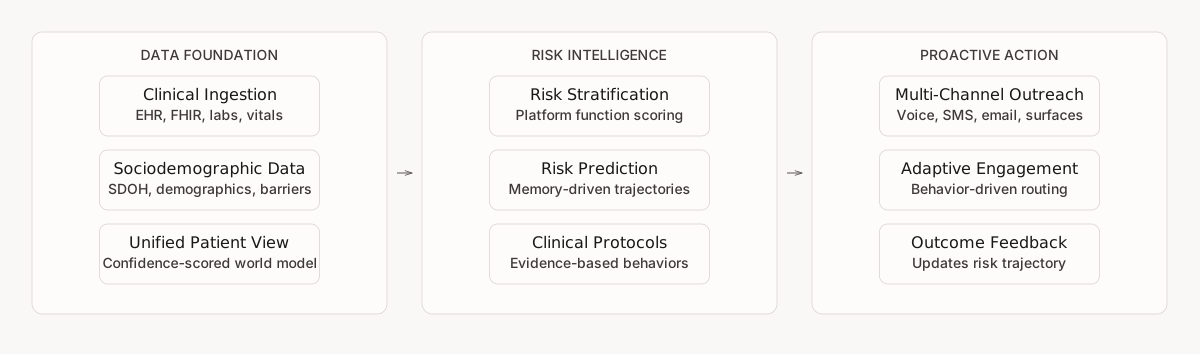
## Data Foundation
Population health starts with data. The platform needs a unified view of each patient that spans clinical records, sociodemographic context, and interaction history.
### Clinical Data Ingestion
Clinical data from EHR systems, FHIR stores, and other source systems reaches the world model through FHIR import or dataset intake. For population health, the relevant data includes:
* **Diagnoses and problem lists**: active conditions, comorbidities, historical diagnoses
* **Lab results and vitals**: HbA1c trends, blood pressure readings, lipid panels, BMI
* **Medications**: current prescriptions, adherence patterns, refill history
* **Encounter history**: visit frequency, no-show patterns, ED utilization, hospitalizations
* **Care plans and orders**: open referrals, pending follow-ups, screening gaps
FHIR import and authenticated dataset intake are separate ingestion paths. Supported ingestion produces attributed events for the [world model](/data/world-model.md). Source-class confidence depends on the producer and observation path, not simply on whether a record came from an EHR. Supported projections apply their defined precedence and recency rules; the selected value is not independently verified truth.
### Sociodemographic Data
Clinical data alone misses critical risk factors. The same ingestion paths that load clinical data can carry sociodemographic indicators:
* **Demographics**: age, sex, race/ethnicity, preferred language
* **Social determinants**: housing stability, food security, transportation access, employment status
* **Geographic context**: ZIP code, urban/rural classification, distance to care facilities
* **Insurance and financial**: coverage type, plan limitations, prior authorization patterns
* **Behavioral factors**: smoking status, substance use, physical activity levels
Social-determinant data often arrives from multiple sources with different provenance. Supported projections can prefer a higher-ranked source class and use recency within a class without deleting conflicting history. The confidence value is a projection input associated with the source path, not a universal assessment that one record or provider is reliable.
### Unified Patient View
The [world model](/data/world-model.md) retains source events and asynchronously projects supported entity state. Clinical, sociodemographic, and interaction evidence can contribute to the same entity when it has a stable association. Projection coverage can be partial, and the active pipeline does not create new cross-source `same_as` merges. Agents may still need authoritative tools for current or detailed records.
## Risk Stratification
Once data is unified, teams can register functions and queries that compute risk scores or rule-based cohorts for the population.
### Platform Functions for Risk Scoring
[Platform functions](/agent/platform-functions.md) can host read-only queries or computations used by a customer-defined risk workflow. The four function types map to different implementation needs:
| Function Type | Risk Stratification Use |
| ---------------- | ---------------------------------------------------------------------------------------------------------------------------------------------- |
| **SQL** | Cohort queries that identify patients meeting clinical criteria (e.g., all diabetics with HbA1c > 9 and no visit in 90 days) |
| **Python** | Custom scoring algorithms that combine clinical indicators, sociodemographic risk factors, and utilization patterns into composite risk scores |
| **AI** | Classification functions that categorize patients by acuity or urgency from unstructured clinical notes |
| **Table-valued** | Functions that expand one input into multiple rows, useful for per-encounter or per-line-item cohort breakdowns |
A Python user-defined function (UDF) might transform supplied features into a composite score. Python UDFs are pure compute and cannot query workspace data from inside the function body; shape the required data at the SQL level or supply it as parameters. Registration and execution do not validate the clinical model.
### Condition-Specific Stratification
Teams can register separate named functions for different indications. A diabetes function might use HbA1c trends and screening gaps, while a cardiovascular function uses different inputs. Keep model version, feature definition, validation population, and decision threshold outside the function output so reviewers can reproduce the policy that consumed the score.
Platform functions are registered at workspace scope, while their exposure to an agent depends on the service and runtime. Runtimes that enforce per-state tool bindings require the relevant context-graph state to reference the function in `tool_call_specs`; other runtimes can expose a broader workspace tool set. Validate the deployed service's resolved tools before relying on a function in a patient workflow.
### Population-Level Queries
[Workspace data queries](/agent/platform-functions.md#workspace-data-queries) (registered parameterized SQL templates that run against the workspace's own custom tables) answer population-level questions such as "How many patients in this panel have uncontrolled diabetes and a transportation barrier?" or "Which patients scored high-risk but have not been contacted in the last 30 days?" Teams register these queries up front so agents call them by name during operational workflows.
### Population Analytics Boundary
The public Platform API does not expose a general production epidemiology-table catalog with built-in prevalence, standardized prevalence ratio, comorbidity-association, or incident-trend endpoints. Teams can compute governed cohort measures with registered queries and their own analytical models.
## Risk Prediction
Stratification summarizes a defined evidence set. Prediction estimates a future outcome under a separately validated model and population.
### Memory-Derived Signals
The platform's [memory system](/agent/memory.md) provides three kinds of inputs that population-health teams can analyze:
| Signal | What It Captures |
| ----------------------------- | --------------------------------------------------------------------------------- |
| **Episodic observations** | Source-linked changes or context extracted from completed conversations |
| **Semantic user model** | A bounded narrative of patterns, trajectories, goals, and interaction preferences |
| **Structured clinical state** | Connector-derived active conditions, medications, and allergies |
Workspaces can define additional string-valued extraction targets through validated enrichment keys. Generated observations and user-model text remain model-derived and may be incomplete; structured clinical state retains its separate connector provenance and producer-assigned source-class confidence. Neither is a calibrated probability of clinical correctness.
These signals can support cohort analysis when combined with explicit outcomes and appropriate statistical methods. They do not automatically establish causality or produce a validated clinical risk score. Teams should define the target outcome, inspect source coverage, validate performance across cohorts, and keep the underlying lineage available for review.
### Continuous Monitoring
Configured recurring triggers and queries can evaluate patient state on a schedule. When a defined criterion changes, the workflow can start outreach under its channel, consent, timing, and authorization rules.
## Evidence-Based Recommendations
Risk scores and predictions are useful only when an authorized workflow maps them to an appropriate action. The platform can deliver authored guidance through agent conversations; it does not certify that the guidance or model is evidence-based.
### Knowledge System for Clinical Protocols
Context Graphs can place clinical protocols and evidence-based guidance directly in the states where the agent needs them. Rather than relying on a separate Platform dynamic-behavior layer, the graph makes the relevant framework and its boundaries explicit.
For each clinical indication, authored states and guidance can encode:
* **Screening protocols**: when and how to assess the patient against evidence-based criteria
* **Intervention pathways**: which recommendations to deliver based on risk level and patient context
* **Escalation boundaries**: when the agent must defer to a clinician rather than deliver a recommendation
* **Communication boundaries**: authored instructions for what the agent should not say, paired with server-side controls and human fallback where enforcement is required
High-stakes protocol framing gives the agent explicit instructions for applying the relevant framework when the authored context graph reaches that part of the conversation.
### Personalized Delivery
Teams can author different delivery guidance based on explicit, available context:
* **Health literacy**: Explicit communication preferences or tested workflow guidance can adjust language complexity without inferring ability from demographic proxies.
* **Barriers and preferences**: Current, verified transportation or access context can select among options the organization has approved.
* **Prior interactions**: When memory processing succeeds, the [memory system](/agent/memory.md) can surface source-linked observations and user-model context about prior preferences or attempts. Verify consequential facts against current records before changing recommendations.
* **Language and communication context**: Explicit language and communication preferences can shape framing when the selected channel and model support them.
### Progressive Data Collection
When the agent identifies gaps during a risk-assessment conversation and surface tools are eligible, it can generate a [surface](/channels/surfaces.md) for delivery by email or web handoff. The platform stores submitted structured data and attempts asynchronous event publication; a customer-defined scoring workflow can consume the resulting evidence when it becomes available.
Data collection can be progressive rather than all at once. Workspace templates can prefill supported fields from available entity state, and eligible fields auto-save as the patient progresses. A later surface does not automatically inherit every earlier answer; configure the template and verify the stored submission or projected value. Saved values and the surface itself remain subject to submission, event-publication, projection, and expiration boundaries.
## Proactive Outreach at Scale
An explicit application, trigger, or customer workflow can use a governed cohort or risk result to invoke one of the platform's [outbound paths](/channels/outbound.md).
### Multi-Channel Engagement
Supported outreach capabilities include voice calls, SMS, managed WhatsApp and iMessage, email, and surface email or web links. Availability and provisioning differ by channel. Teams configure channel selection using consent, patient preferences, use-case bindings, and the needs of each interaction rather than assuming automatic cross-channel optimization.
### Adaptive Outreach
Configured workflows can use supported delivery and surface events to distinguish behaviors such as opening a message, submitting a form, or leaving a form incomplete. Teams can map those events to different follow-up rules, for example:
* A patient who opens emails but does not click gets a different message framing on the next touch, not a repeat
* A patient who starts a form but abandons gets a resume prompt ("you are almost done") through a different channel
* A patient with no digital engagement is routed to an approved non-digital process outside the platform
* A patient who answers a call but says "not now" gets a callback scheduled at their preferred time
This branching is authored workflow behavior, not an automatic guarantee. Consent, channel availability, cooldown rules, and explicit campaign logic still govern each follow-up.
### Campaign-Driven Outreach
An external campaign workflow can place calls through the [Outbound Calls API](/channels/outbound.md) after it applies eligibility, consent, pacing, and clinical-selection rules. Example customer-owned selection criteria include:
* Contact all high-risk diabetic patients due for HbA1c testing
* Reach patients with cardiovascular risk factors who missed statin follow-up
* Schedule screening calls for patients flagged by a behavioral health risk model
* Follow up with post-discharge patients whose readmission risk score exceeds a threshold
A campaign needs an explicit source of eligibility, pacing, consent, suppression, and cross-channel policy; the platform does not provide one universal campaign engine.
### Compliance Gates
Outbound controls differ by channel and workflow. Configure and verify the applicable consent, timing, cooldown, fatigue, and authorization checks before production use.
* **Consent and opt-out**: verify the applicable channel record and preserve provider or customer-system outcomes; an agent statement alone is not proof that every downstream list changed
* **Quiet hours**: apply business-hours and timezone rules in the workflow that starts outreach; each channel also follows its own provider controls
* **Cooldown periods**: implement the required interval in the trigger, campaign, or external selection workflow
* **Configured authorization**: destination and channel policies determine whether an action can proceed
### Outreach Optimization
Teams can combine surface status, delivery events, conversation outcomes, and explicit patient preferences into an engagement view such as:
* **Channel effectiveness**: which channels produce the best response for each patient
* **Timing patterns**: when the patient is most likely to engage
* **Completion behavior**: how far through forms the patient typically gets
Use these signals in registered queries or campaign rules when you want them to affect prioritization. The platform does not infer an authoritative preferred channel from behavior alone.
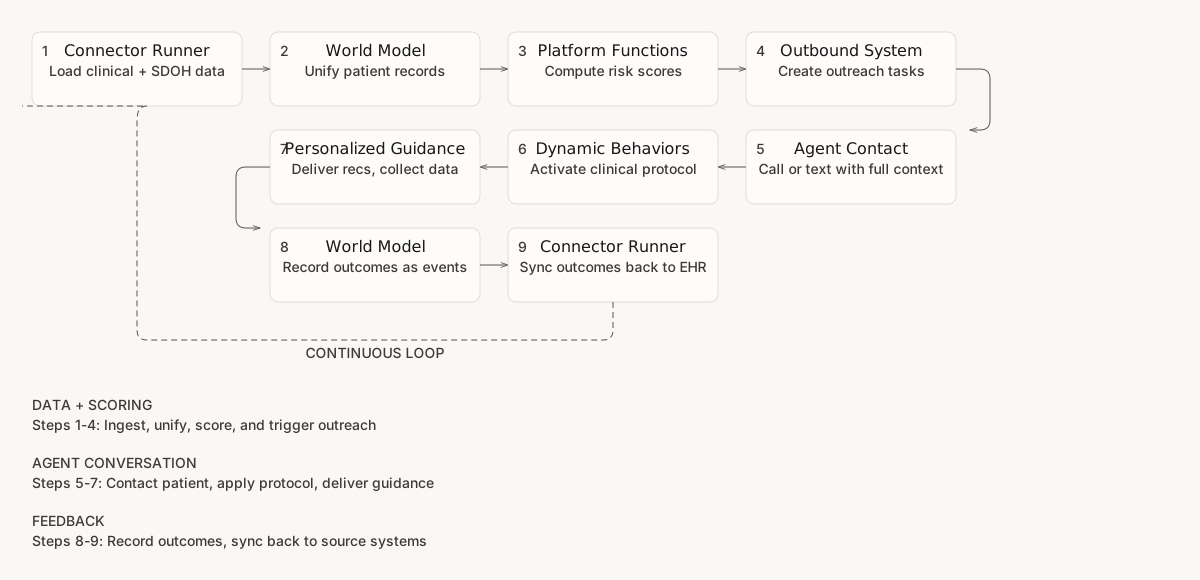
### Full-Loop Workflow
An illustrative, explicitly configured flow for a clinical indication:
1. **Data ingestion** loads clinical and sociodemographic data from EHR exports and other sources
2. **World model** asynchronously projects supported entity state with source and confidence
3. **Registered query or function** computes a customer-defined cohort or score from eligible inputs
4. **Trigger or external workflow** applies consent and policy, then creates an outbound request or task
5. **Agent** calls or texts the patient with the authorized context available to that runtime
6. **Context Graph guidance** supplies the organization's reviewed protocol and boundaries
7. **Agent** attempts the permitted conversation and tools, with human fallback where authored
8. **Supported observations** can be submitted as source-attributed events and project asynchronously when publication succeeds
9. **Integration tools** write any required updates to destination systems during the conversation, and each result is the evidence of what the destination accepted
The workflow exposes evidence at several boundaries: source events retain provenance, outbound attempts report delivery outcomes, and conversation records can retain available patient and agent turns. Teams that require end-to-end audit correlation should define stable identifiers across their risk calculation, campaign, conversation, and destination records rather than assume every intermediate computation is automatically stored as a world-model event.
## Verification Across Clinical Indications
Each clinical indication requires its own verification before reaching patients. The platform's [testing framework](/testing/testing.md) supports this through:
* **Condition-specific simulation personas**: synthetic patients representing the clinical and sociodemographic diversity of each indication's target population
* **Clinical scenarios** that test risk-appropriate responses, where the agent must handle a low-risk patient differently than a high-risk one
* **Required checks**: organization-defined criteria for escalation accuracy, scope-of-practice adherence, and medical information accuracy, followed by an explicit release decision
* **Trend review** that helps teams investigate whether measured agent performance changes as the patient population evolves
For detailed guidance on building clinical verification suites, see [Clinical Verification](/use-cases/use-cases/clinical-verification.md).
## Multiple Clinical Indications
Teams can configure multiple clinical indications in one workspace when their data access, tools, services, and policies are compatible:
* **Separate context graphs** per indication define the conversation flow and clinical boundaries for each condition
* **Indication-specific platform functions** encode the risk model and scoring criteria for each condition
* **Dedicated state guidance and retrieval** carry the organization's reviewed protocols for each indication
* **Shared data infrastructure**: world-model projections, ingestion paths, and outbound primitives can support more than one indication without implying that every score or workflow shares the same evidence
Adding an indication generally means defining and validating its data inputs, risk or eligibility logic, clinical policy, conversation flow, external actions, and verification suite. Reuse shared infrastructure only where authorization, provenance, and operating requirements remain compatible.
{% hint style="info" %}
**See also**
* [World Model](/data/world-model.md) for how supported source events become projected entity state
* [Platform Functions](/agent/platform-functions.md) for risk scoring and population queries
* [Functional Memory](/agent/memory.md) for conversation-derived observations, semantic user context, and structured clinical state
* [Context Graphs](/agent/context-graphs.md) for authoring protocol guidance and workflow boundaries
* [Outbound System](/channels/outbound.md) for proactive patient outreach
* [Clinical Verification](/use-cases/use-cases/clinical-verification.md) for testing clinical safety per indication
{% endhint %}
---
# Agent Instructions
This documentation is published with GitBook. GitBook is the documentation platform designed so that both humans and AI agents can read, navigate, and reason over technical content effectively. Learn more at gitbook.com.
## Querying This Documentation
If you need additional information that is not directly available in this page, you can query the documentation by asking a question.
Perform an HTTP GET request on the following URL with the `ask` and `goal` query parameters:
```
GET https://docs.concurrence.com/use-cases/use-cases/population-health.md?ask=&goal=
```
`ask` is the immediate question: it should be specific, self-contained, and written in natural language.
`goal` is what the user is ultimately trying to achieve, the reason they need the answer. Sharing it helps GitBook give you a better, more relevant answer. A goal is most helpful when it describes the outcome the user wants rather than restating the question. For example, with `ask=how do I create an API token`, a goal like `automate deployments from our CI pipeline` lets GitBook tailor the answer to that use case.
The response will contain a direct answer to the question and relevant excerpts and sources from the documentation.
Use this mechanism when the answer is not explicitly present in the current page, you need clarification or additional context, or you want to retrieve related documentation sections.